Revisions Pro
Transform your Grav CMS into a professional content management powerhouse with Revisions Pro, offering comprehensive version control for pages and configurations with a modern, unified interface. Track every change, compare versions visually, and restore content with confidence using this revision system that integrates seamlessly into your admin workflow.
Everything you need. Nothing you don’t.
Over 7 distinct features and integrations, out of the box.
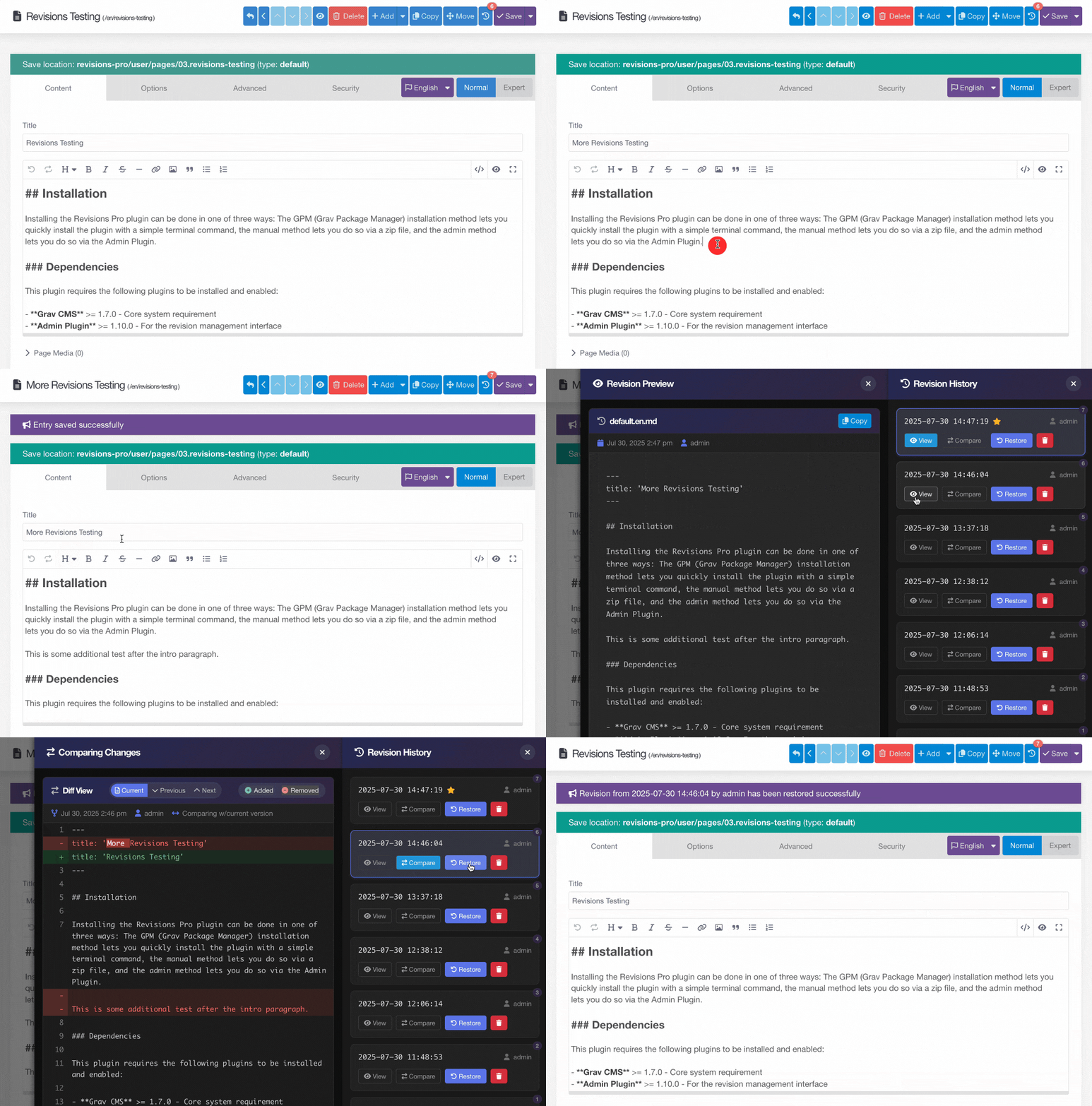
Modern Revision Interface
Access your revision history through a sleek sliding panel that appears consistently across all content types. The dark-themed UI provides comfortable viewing with responsive design for all devices. View timestamps, authors, file sizes, and perform actions like compare, restore, or delete with custom-styled dialogs.
See exactly what changed between any two versions with our advanced diff viewer. Syntax highlighting for YAML, Markdown, and other formats makes changes crystal clear. Green highlights show additions, red shows deletions, and the side-by-side view makes reviewing changes effortless.
Frequently Asked Questions
The most commonly asked questions about the Revisions Pro plugin
What types of content can be tracked?
Revisions Pro tracks changes to pages (content and frontmatter), system/site configurations, plugin configurations, and theme configurations. Each type can be individually enabled or disabled based on your needs.
How are revisions stored?
Revisions are stored as timestamped files alongside your original content (e.g., page.md.20240130-143022.rev). This approach ensures revisions travel with your content and respect environment-specific paths for configurations.
Can I limit the number of revisions kept?
Yes! Set max_revisions_per_page to automatically limit revisions per resource. When the limit is reached, the oldest revisions are automatically deleted. You can also set age-based cleanup to remove revisions older than a specified number of days.
Does this work with Grav's caching system?
Yes, Revisions Pro is fully compatible with Grav's caching system. The revision tracking happens during the save process and doesn't interfere with page caching or performance.
How do I set up automatic cleanup?
Enable auto_cleanup in the configuration and ensure Grav's scheduler is running via cron. The plugin will automatically clean up old revisions daily at 3 AM. You can also run cleanup manually using the CLI command: bin/plugin revisions-pro cleanup.
Can I restore a revision from months ago?
Yes, as long as the revision hasn't been cleaned up based on your retention policies. When you restore a revision, the current version is automatically backed up first, so you can always undo the restoration if needed.
Does it track who made changes?
Yes! Each revision records the user who made the change, along with the timestamp and file size. This information is displayed in the revision history panel for complete audit trails.
How do I access revisions for different languages?
The plugin automatically detects and properly handles multi-language content. When viewing a page in a specific language through the admin, you'll see only the revisions for that language version. The system correctly handles both default language files (with or without language extension) and language-specific files.