Skip to content
● Grav 2.2 is out: 2x faster cold starts and 96% less memory on big sites. Read the announcement →
Premium / YetiSearch Pro
Premium Plugin · v2.1.2

YetiSearch Pro

YetiSearch Pro provides Grav with the fastest search engine via a powerful local search, without requiring any external services or fees. Built on the new YetiSearch PHP library, it provides lightning-fast file-backed search with fuzzy matching, chunked indexing, geospatial queries, and smart change detection.

Grav 1.7+
Live Demo Documentation

Everything you need. Nothing you don’t.

Over 28 distinct features and integrations, out of the box.
01
100% local file-backed search - no external services required
02
Optional semantic search finds pages by meaning as well as keywords, using OpenAI, OpenRouter, Ollama or any OpenAI-compatible embedding API
03
Two modal designs - Simple (lightweight typeahead) or Full (two-panel with preview)
04
Smart Indexing with fingerprint-based change detection for efficient updates
05
Built with vanilla JavaScript - no framework dependencies
06
Easy theming with CSS variables for quick customization
07
Fuzzy search with configurable typo tolerance
08
Chunked indexing for precise search results within long content
09
Multi-language support with per-language or single-index strategies
10
Real-time updates - index updates automatically on page save/delete
11
Orphan cleanup automatically removes stale documents from deleted pages
12
Keyboard shortcuts - Cmd+K / Ctrl+K to open, arrow keys to navigate, Enter to select
13
Beautiful search result highlighting with contextual snippets
14
Configurable field boosting for title, headers, content, and more
15
Faceted search support for filtering by taxonomy
16
Geospatial search for location-based queries with radius and bounding box filters
17
Analytics tracking for searches, clicks, and popular terms
18
Powerful CLI commands for indexing and querying
19
Scheduled indexing via Grav Scheduler for automated updates
20
Granular permissions - view, modify, and admin roles for team access control
21
Environment-aware configuration for dev/staging/production workflows
22
Page-level controls - exclude pages or content blocks via frontmatter or shortcode
23
Cache management CLI for monitoring, warming, and purging search cache
24
Suggestions endpoint for lightweight typeahead autocomplete
25
Extensible events for custom document shaping and non-page content indexing
26
Works with any theme - includes ready-to-use Twig partials
27
Light/Dark/System appearance modes
28
Preview panel option showing breadcrumbs, content summary, and on-page sections
Smart Indexing

Smart Indexing

YetiSearch Pro features Smart Indexing with fingerprint-based change detection. When you update content, only the changed portions are re-indexed - not the entire site. Combined with chunked indexing that splits pages into smaller segments, you get precise search results that link directly to the relevant section. This makes indexing fast and keeps your search results highly relevant.

Two Beautiful Modal Designs

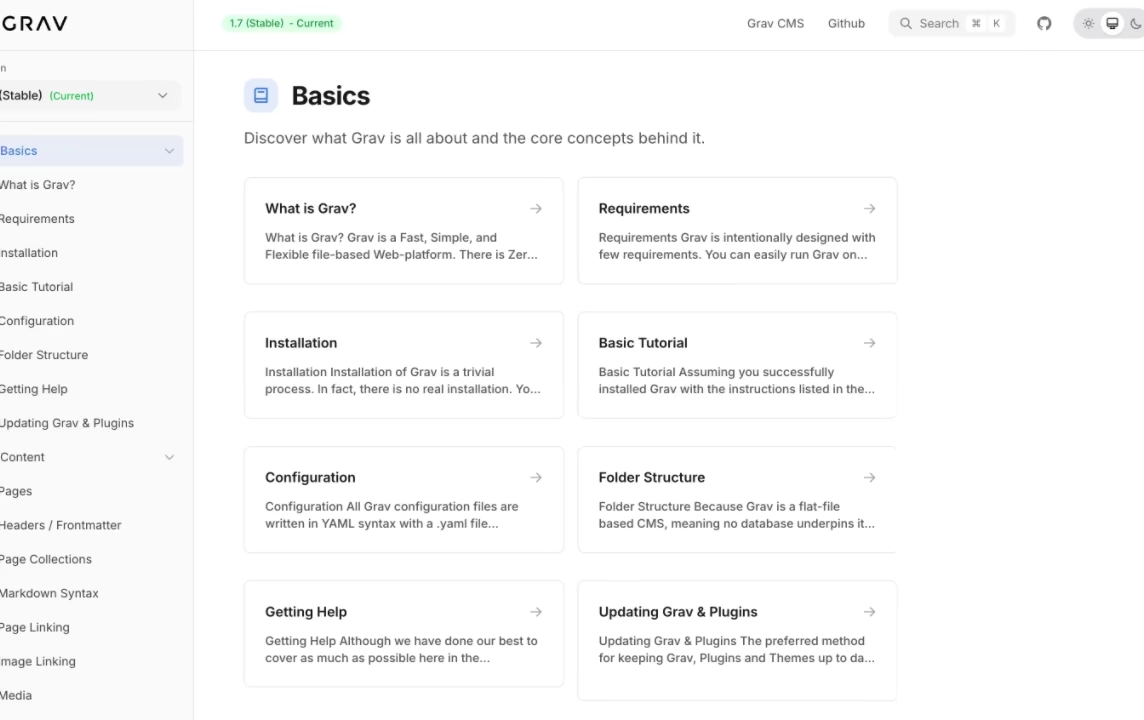
Choose between two search modal designs based on your needs. Full Modal provides a two-panel design with results on the left and a live preview on the right, including pagination, filter controls, breadcrumbs, and On This Page sections - perfect for documentation sites. Simple Modal offers a lightweight typeahead design with grouped results, clean and fast, ideal for blogs and general websites.
Two Beautiful Modal Designs
Powerful CLI

Powerful CLI

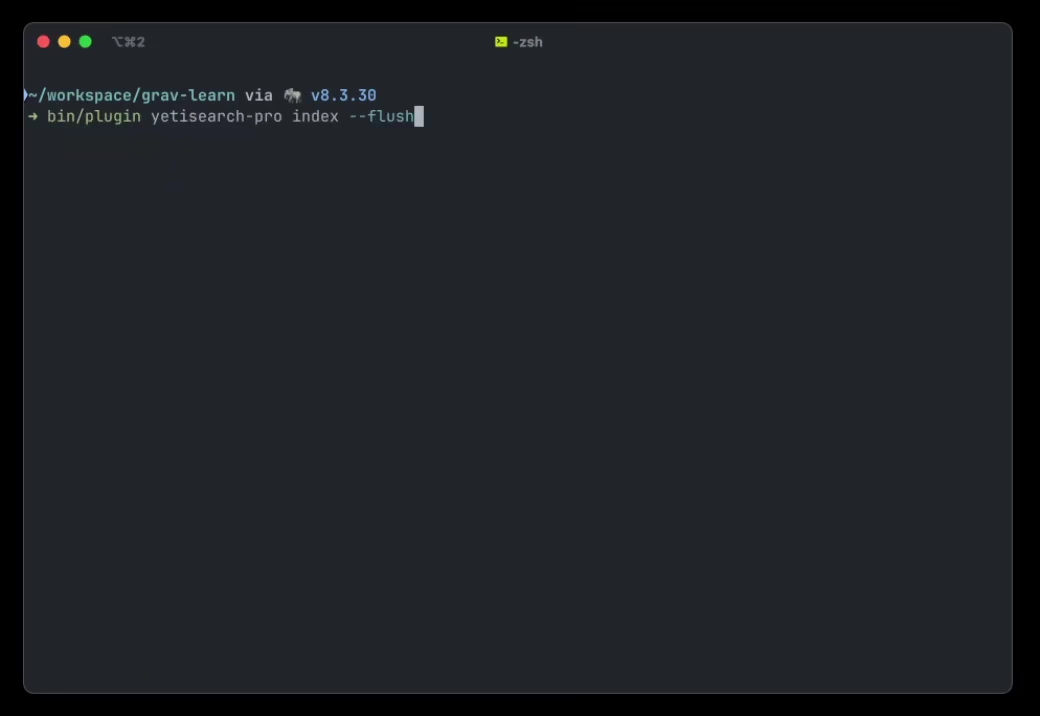
Full command-line interface for development, testing, and automation. Index your entire site or specific languages with progress bars. Query with filters, sorting, fuzzy search, and pagination. Manage cache with stats, monitoring, warming, and purging. Run scheduled tasks for automated maintenance. Supports JSON output for scripting and CI/CD integration.

Powerful Admin Interface

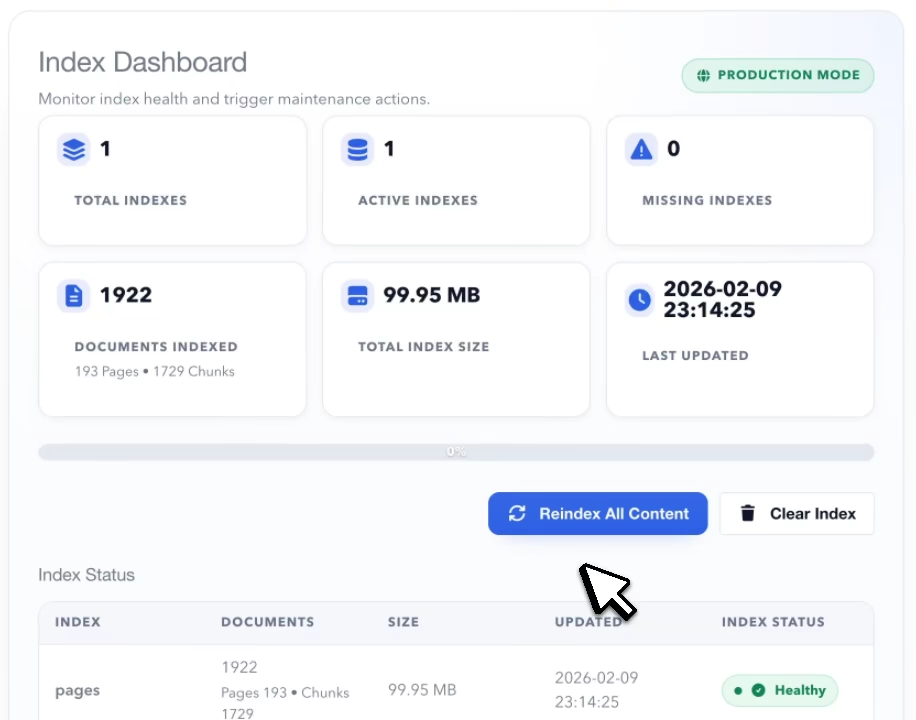
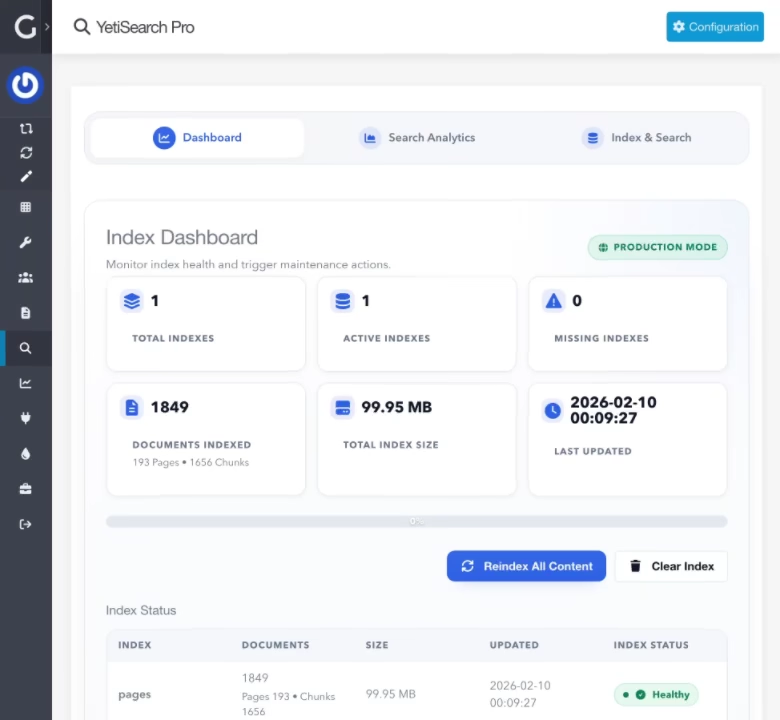
YetiSearch Pro includes a comprehensive Admin Dashboard for managing every aspect of your search. Monitor index health with document counts, index sizes, and timestamps, then trigger a full reindex with real-time progress tracking. The built-in Search Analytics panel tracks popular queries, top clicks, zero-result searches, and average response times - helping you identify content gaps. An Index Browser lets you inspect, search, and even edit individual documents, view debug statistics, and optimize indexes directly from the admin.
Powerful Admin Interface
Smart Fuzzy Queries

Smart Fuzzy Queries

YetiSearch Pro delivers highly relevant results through a multi-layered ranking system. Configurable field boosting lets you weight titles, headers, tags, and content independently, while a re-ranking engine applies bonuses for exact matches, prefix matches, and word matches in key fields. Enable fuzzy search with tunable typo tolerance so users find what they need even with misspellings, and "Did you mean" suggestions automatically guide users toward better queries when results come up empty.

Frequently Asked Questions

The most commonly asked questions about YetiSearch Pro

How does YetiSearch Pro compare to Algolia Pro?

Both are excellent search solutions with different approaches:

  • Algolia Pro uses Algolia's cloud infrastructure - Fast, AI-powered, but requires an Algolia account and has usage-based pricing
  • YetiSearch Pro runs entirely locally on your server - Incredible fast due to network latency, no external services, no API costs, no usage limits, and your data never leaves your infrastructure

Choose Algolia Pro for massive scale and AI features. Choose YetiSearch Pro for privacy, simplicity, and zero recurring costs.

Do I need any external services?

No! YetiSearch Pro is completely self-contained. The search index is stored as files in your user/data/yetisearch-pro directory. There are no API keys to configure, no external services to maintain, and no usage limits to worry about. The one exception is optional semantic search, which needs an embedding API if you choose to turn it on.

What are the server requirements?

YetiSearch Pro has minimal server requirements:

  • PHP 7.4 or higher (PHP 8.0+ recommended)
  • SQLite 3.24.0 or higher (3.35.0+ recommended for best performance)
  • SQLite FTS5 extension enabled
  • PHP extensions: pdo, sqlite3, mbstring, json
  • Standard Grav 1.7+ hosting environment

Check your SQLite version with: php -r "echo SQLite3::version()['versionString'];"

Can I use YetiSearch Pro on multiple sites?

Per the Grav Premium License, you need to have a license for each use.

How do I trigger search updates?

YetiSearch Pro offers multiple ways to keep your index current:

  • Real-time - Automatically re-indexes pages when saved or deleted in the Admin
  • CLI - Run bin/plugin yetisearch index manually or in scripts
  • Scheduler - Configure automated indexing via Grav's built-in scheduler
What content can YetiSearch Pro index?

By default, YetiSearch Pro indexes Grav pages including title, content, excerpt, URL, taxonomy tags, and categories. Using the plugin's events, you can:

  • Add custom page header fields
  • Index FlexObjects data
  • Include any custom content sources
How does geospatial search work?

YetiSearch Pro supports location-based searching for content with geographic data. Configure geo_fields in your index to enable:

  • Radius search - Find content within a specified distance from a point
  • Bounding box - Search within rectangular geographic regions
  • Distance sorting - Order results by proximity to a location

Perfect for store locators, event listings, real estate sites, and any content with location data.

Can I extend YetiSearch Pro for custom content?

Absolutely! YetiSearch Pro fires several events for extensibility:

  • onYetisearchCollectObjects - Add non-page documents (FlexObjects, custom data) to the index
  • onYetisearchBuildDocument - Shape fields per document (add custom frontmatter, facets, geo data)
  • onYetisearchProBeforeSearch - Modify filters or options before queries execute
Does it work with the Helios theme?

Yes! YetiSearch Pro and the Helios documentation theme are designed to work together beautifully. Helios includes built-in YetiSearch Pro integration with the Cmd+K keyboard shortcut pre-configured.

YetiSearch Pro Changelog

v2.1.2

5 days ago

    • Plugins that change documents through onYetisearchBuildDocument now see pages saved in the admin too. Before, the event fired only during a full reindex, so a page saved in the admin was stored as built until the next reindex

v2.1.1

2 weeks ago

    • Noise calibration. Semantic search now works out for itself where nonsense stops and real searches start on your content. After each full embedding run it embeds a set of meaningless test phrases, measures how closely they match your pages, and sets the cutoff just above that. A small site and a large one need very different cutoffs, and one fixed number either let nonsense through on the large site or turned real searches away on the small one. Set Noise Calibration to Off to keep the 2.1.0 behavior
    • Calibration Strictness setting (default 2.0) moves the cutoff up or down without re-embedding. Lower it if good matches are missing, raise it if nonsense gets through
    • The YetiSearch Pro page in Admin Next shows each index's noise cutoff, whether it was measured or is the default, and any test phrases that were skipped because they match your own content. bin/plugin yetisearch-pro embed --status shows the cutoff too
    • Requires yetidevworks/yetisearch 2.5.1
    • bin/plugin yetisearch-pro embed measures the cutoff even when every page is already embedded, so an upgraded site gets calibrated without re-embedding anything

v2.1.0

2 weeks ago

    • Semantic search. Search can now find pages by meaning as well as keywords: "can't log in" finds the password reset page, "hire an advisor" finds the consulting page. Turn it on under Semantic Search in the plugin settings and point it at an embedding API: OpenAI, OpenRouter, a self-hosted Ollama server, or anything else that speaks the OpenAI embeddings API. Keyword and meaning rankings are merged, so pages that match on both rank first. Without it enabled nothing changes
    • Pages are embedded after each save once the response has been sent, after a reindex, by a new Semantic Search Embedding scheduler job (every 15 minutes, on by default, runs only while semantic search is enabled), or with the new bin/plugin yetisearch-pro embed command (--status, --test, --reset). Only new or changed pages are sent to the provider, so reindexing unchanged content costs nothing. bin/plugin yetisearch-pro index embeds afterwards unless given --no-embed, and bin/plugin yetisearch-pro schedule --task embed runs the job by hand
    • The YetiSearch Pro page in Admin Next shows embedding coverage with a progress bar, and has Embed, Test connection and Re-embed all buttons
    • The search modals show keyword results while the visitor types and replace them with results ranked by meaning once typing pauses, so no keystroke waits on the embedding provider. The /ys endpoint accepts semantic=0 for keyword ranking only and reports semantic in its response
    • Settings for provider, API base URL, API key (or env:NAME to read it from the environment), model, dimensions, the balance between meaning and keywords, minimum similarity, minimum query length, search timeout and query/document prefixes, plus a Semantic Search toggle per index. If the provider is slow or unreachable, searches fall back to keywords
    • Requires yetidevworks/yetisearch 2.4, under its correct package name (the plugin asked for yetisearch/yetisearch, a name that does not exist on Packagist)
    • Pages saved in Admin Next are indexed again right away. Admin Next saves pages through the API plugin, which fires onAdminAfterSave rather than onFlexAfterSave, so realtime indexing never ran for those saves
    • On a multi-language site, a page saved with realtime indexing on no longer ends up in the index twice. The realtime update built the document id without the page's language, so it added a second copy next to the one a full index had written instead of replacing it

v2.0.3

3 weeks ago

    • A page reached through version fallback no longer has its Twig processed twice, which could abort the whole index run. A page that documents Twig inside {% verbatim %} threw "Unexpected end of template" on the second pass, and because that happened outside the guard around normal rendering, one such page stopped the run instead of falling back to raw markdown

v2.0.2

4 weeks ago

    • An API key limited to specific permissions can no longer use YetiSearch Pro's tools beyond what it was given, even when the account that created it is a super admin. A key limited to YetiSearch Pro keeps working at the level it was given

v2.0.1

5 months ago

    • Custom environment names are now supported when set explicitly via the Environment Mode field, which is now a free-form text input. Names like localhost, staging-eu, or abc.wydn.com are accepted and used as-is in the index database prefix. Auto mode keeps the original production / staging / development behavior so existing index databases on default installs are not renamed by the upgrade.
    • Fixed --env switch being ignored by the indexer CLI when a GRAV_ENVIRONMENT shell variable was already exported (common on MAMP and similar local setups). The plugin now prefers Grav's resolved system.environment over the raw shell variable, so bin/plugin yetisearch-pro index --env=<name> correctly picks up the per-environment config and writes to the right database.

v2.0.0

5 months ago

    • Added Grav 2.0, API, and Admin 2.0 support

v1.1.2

7 months ago

    • SQLite backward compatibility: The RETURNING clause (requires SQLite 3.35.0+) is now optional. On older SQLite versions (3.24.0+), a fallback SELECT query is used to retrieve doc_id after upsert operations. This lowers the minimum SQLite requirement from 3.35.0 to 3.24.0 while preserving optimal performance on newer versions.

v1.1.1

7 months ago

    • Fixed admin reindex failing when other plugins access $grav['admin']: The admin reindex handler removed the admin service from the DI container to avoid interference, but this caused plugins like revisions-pro to crash with "Identifier 'admin' is not defined" when Pages::enablePages() fired onPageProcessed events during page tree rebuilds, resulting in 0 documents indexed.

v1.1.0

7 months ago

    • Added "Flush & Reindex" button to admin dashboard: New action button between "Reindex All" and "Clear Index" that deletes all existing indexes and rebuilds them from scratch, with a confirmation dialog to prevent accidental use.
    • Fixed single-strategy index flushing in multilang sites: When using strategy: single with multiple languages, each language iteration was dropping and recreating the same physical index, causing only the last language's content to survive a --flush reindex. Flush now runs only once per physical index.
    • Fixed orphan detection deleting cross-language documents: With strategy: single, orphan detection ran per-language iteration, incorrectly treating documents from other languages as orphans and deleting them. Orphan detection now accumulates across all language iterations and runs once at the end.
    • Fixed smart indexing snapshot for single-strategy multilang: The snapshot used for fingerprint comparison was being overwritten by each language iteration, breaking skip-unchanged detection for all but the last language. The snapshot is now loaded once and shared across iterations.
    • Fixed admin dashboard showing inflated index count: With strategy: single and 12 languages, the dashboard reported "12 TOTAL INDEXES" and "12 ACTIVE INDEXES" even though there was only 1 physical index. Index counting now deduplicates by resolved index name.
    • Fixed language filter not working in admin Index & Search: The language dropdown in the admin browser/search had no effect for strategy: single indexes because the selected language was discarded during index resolution. The language is now preserved and passed as a query filter.
    • Fixed admin browser catalog fetching duplicate data: The getBrowserCatalog endpoint fetched index info, breakdown, and stats 12 times for the same physical index in a multilang single-strategy setup. It now fetches once per physical index.
    • Fixed hyphenated language codes breaking per_language strategy: Language codes containing hyphens (e.g. ca-valencia, zh-cn, pt-br) failed SQLite table name validation when used in index names. Hyphens are now sanitized to underscores in resolved index names.
    • Fixed Index & Search table layout: Columns were squished to the right when document IDs or routes were long. Table now uses fixed column widths so all columns remain visible.