Hi everyone. I am using grav cms for a long time but recently I have found out that I am missing some fundamental concepts /details of grav. So I am sorry in advance to ask for stupid questions.
In quark there are many admin blueprint settings like when it is published and so on but I have not find out (in documentation and in Quark blueprints) what is correct way to add them to my custom blueprints when i dont want to create inherited theme to Quark.
Hi
In general, if you see a blueprint in quark you should be able to copy/paste that file directly into your theme and it should work. You will need to clear your broswer / grav cache too.
Thank You for your reply.
I know how to create custom blueprints (https://learn.getgrav.org/16/forms/blueprints/example-page-blueprint) that is not a problem at all. I want to add tabs "advanced" and "options" from default blueprint right away. Right now, I am using blueprints without them or I copy these lines from file /system/blueprints/pages/default... When Grav change I need to always check if something changed under the hood and it is not up to best practice, but I have not found out how to import only these two tabs without other default blueprints data/lines.
@tunkila, I fail to understand your question and replies, but...
If you want to
extend the default blueprint from '/system/blueprints/pages/default.yaml',
which is overridden by Quark's 'user/themes/quark/blueprints/default.yaml'
and you want to add an extra field to the 'Settings' section in the Advanced tab...
Then, you should create file 'user/blueprints/pages/default.yaml' and add:
YAML
extends@:defaultform:fields:tabs:fields:advanced:fields:columns:fields:column1:fields:header.an_example_text_field:type:textlabel:Add a numberdefault:5validate:required:truetype:int
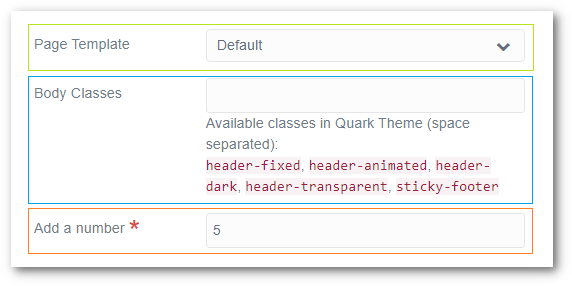
That will give you the following page fields in the Advanced tab in Admin:
The green box is added by the original 'system/blueprints/pages/default.yaml',
The blue box is an override of 'header.body_classes' by Quark's 'user/themes/quark/blueprints/default/yaml'
The red box is added by your 'user/blueprints/pages/default.yaml'
You can now safely upgrade Quark and Grav without impact on your extension.