Skip to content
Grav 2.0 is officially stable. Read the announcement →

Community guidelines

Please keep discussions civil and on-topic. Repeated violations may lead to a temporary ban.

General

Can't make AJAX call execute in a simple contact form

Solved by pamtbaau View solution

Started by 01K 7 years ago · 17 replies · 2502 views
7 years ago

Hi there!
Having difficulties to run form with an AJAX.
I'm missing something...
I've Modular Page, called contact
In Frontmatter I've this code:

YAML
title: 'Contact Us'
body_classes: 'modular header-lite fullwidth'
menu: Contacts
onpage_menu: false
cache_enable: false
form:
    name: my-nice-form
    action: /contact
    template: form-messages
    refresh_prevention: true
    fields:
        -
            name: name
            id: name
            label: Name
            classes: 'form-control form-control-lg'
            placeholder: 'Enter your name'
            autocomplete: 'on'
            type: text
            validate:
                required: true
        -
            name: email
            id: email
            classes: 'form-control form-control-lg'
            label: Email
            placeholder: 'Enter your email address'
            type: email
            validate:
                rule: email
                required: true
        -
            name: message
            label: Message
            classes: 'form-control form-control-lg'
            size: long
            placeholder: 'Enter your message'
            type: textarea
            validate:
                required: true
    buttons:
        -
            type: submit
            value: Submit
            classes: 'btn btn-primary btn-block'
    process:
        -
            email:
                from: '{{ config.plugins.email.from }}'
                to:
                    - '{{ config.plugins.email.from }}'
                    - '{{ form.value.email }}'
                subject: '[Feedback] {{ form.value.name|e }}'
                body: '{% include ''forms/data.html.twig'' %}'
        -
            save:
                fileprefix: feedback-
                dateformat: Ymd-His-u
                extension: txt
                body: '{% include ''forms/data.txt.twig'' %}'
        -
            message: 'Thank you for your feedback!'
        -
            display: thankyou
content:
    items: '@self.modular'
    order:
        by: default
        dir: asc

And in the editor:

<div id="form-result"></div>

JS
<script>
$(document).ready(function(){

    var form = $('#my-nice-form');
    form.submit(function(e) {
        // prevent form submission
        e.preventDefault();

        // submit the form via Ajax
        $.ajax({
            url: form.attr('action'),
            type: form.attr('method'),
            dataType: 'html',
            data: form.serialize(),
            success: function(result) {
                // Inject the result in the HTML
                $('#form-result').html(result);
            }
        });
    });
});
</script>

So, the whole modular.md have mentioned code from above.

Once I submit form without AJAX - the thank you message appears, but with AJAX - I see empty HTML markup with plain email link.

Thanks in advance!
7 years ago Solution

@01K, I'm not a form user, but did some digging for you...

A few chapters in the documentation are of interest:

After a bit of reading and sorting out some confusion from the docs, I created the following in a One-Page skeleton:

  1. Created a new Contact page as a child page of the modular

  2. Created an empty file '/user/pages/forms/ajax-test/form.md'.
    See the documentation on Ajax Submission for an explanation.

    The filestructure is now:

    TXT
    /user/pages/
     01.home/
       01._hero/
       02._highlights/
       03._callout/
       04._features/
       05._contact/     <-- new folder
          form.md       <-- new page with form definition
       modular.md
     forms/             <-- new folder
        ajax-test/      <-- new folder
           form.md      <-- new empty page
    
    
  3. I copied your code into '05._contact/form.md' and made some changes to reflect the documentation. See the inline comments.

    MARKDOWN
    ---
    title: 'Contact Us'
    body_classes: 'modular header-lite fullwidth'
    menu: Contacts
    # onpage_menu: false       # <-- this belongs to main modular page
    cache_enable: false
    form:
      name: my-nice-form
      # action: /contact            # <-- see docs about Ajax
      action: /forms/ajax-test      # <-- see docs about Ajax
      template: form-messages
      refresh_prevention: true
      fields:
         -
            name: name
            id: name
            label: Name
            classes: 'form-control form-control-lg'
            placeholder: 'Enter your name'
            autocomplete: 'on'
            type: text
            validate:
               required: true
         -
            name: email
            id: email
            classes: 'form-control form-control-lg'
            label: Email
            placeholder: 'Enter your email address'
            type: email
            validate:
               rule: email
               required: true
         -
            name: message
            label: Message
            classes: 'form-control form-control-lg'
            size: long
            placeholder: 'Enter your message'
            type: textarea
            validate:
               required: true
      buttons:
         -
            type: submit
            value: Submit
            classes: 'btn btn-primary btn-block'
      process:
         -
            email:
               from: '{{ config.plugins.email.from }}'
               to:
                  - '{{ config.plugins.email.from }}'
                  - '{{ form.value.email }}'
               subject: '[Feedback] {{ form.value.name|e }}'
               body: '{% include ''forms/data.html.twig'' %}'
         -
            save:
               fileprefix: feedback-
               dateformat: Ymd-His-u
               extension: txt
               body: '{% include ''forms/data.txt.twig'' %}'
         -
            message: 'Thank you for your feedback!'
         # -                     <-- This action will route the user to a 'thankyou' page
         #    display: thankyou  <-- You don't want that when using Ajax
    # content:       <-- content definition belongs to main modular page
    #    items: '@self.modular'
    #    order:
    #       by: default
    #       dir: asc
    ---
    <div id="form-result"></div>       <!-- required to display result of submit -->
    
    <script>
    $(document).ready(function(){
    
      var form = $('#my-nice-form');
      form.submit(function(e) {
         // prevent form submission
         e.preventDefault();
    
         // submit the form via Ajax
         $.ajax({
               url: form.attr('action'),
               type: form.attr('method'),
               dataType: 'html',
               data: form.serialize(),
               success: function(result) {
                  // Inject the result in the HTML
                  $('#form-result').html(result);
               },
               // The following is added for debugging purposes.
               error: function(result) {
                  // Inject the result in the HTML
                  $('#form-result').html(result.responseText);
               }
         });
      });
    });
    </script>
    

You should now have a contact form in a modular child page, that submits the form using Ajax...

👍 1
7 years ago

Thank you very much @pamtbaau!
I hope I will finish it.
The display template should be Form?

7 years ago

@01K, Not sure what you mean with your display template remark...

As you can see in the folder structure, the names of the files are 'form.md'. This already tells Grav that the template to be used is the 'form' template. No need to set that again in the frontmatter of a page.

Or do you perhaps using the Admin plugin to create a page? I that case, I have no idea since I don't use it... Took a look at it a minute ago, but wasn't able to create a child modular page. Nor did I find a how-to in the documentation...

Maybe someone else know how to do this using the Admin plugin?

7 years ago

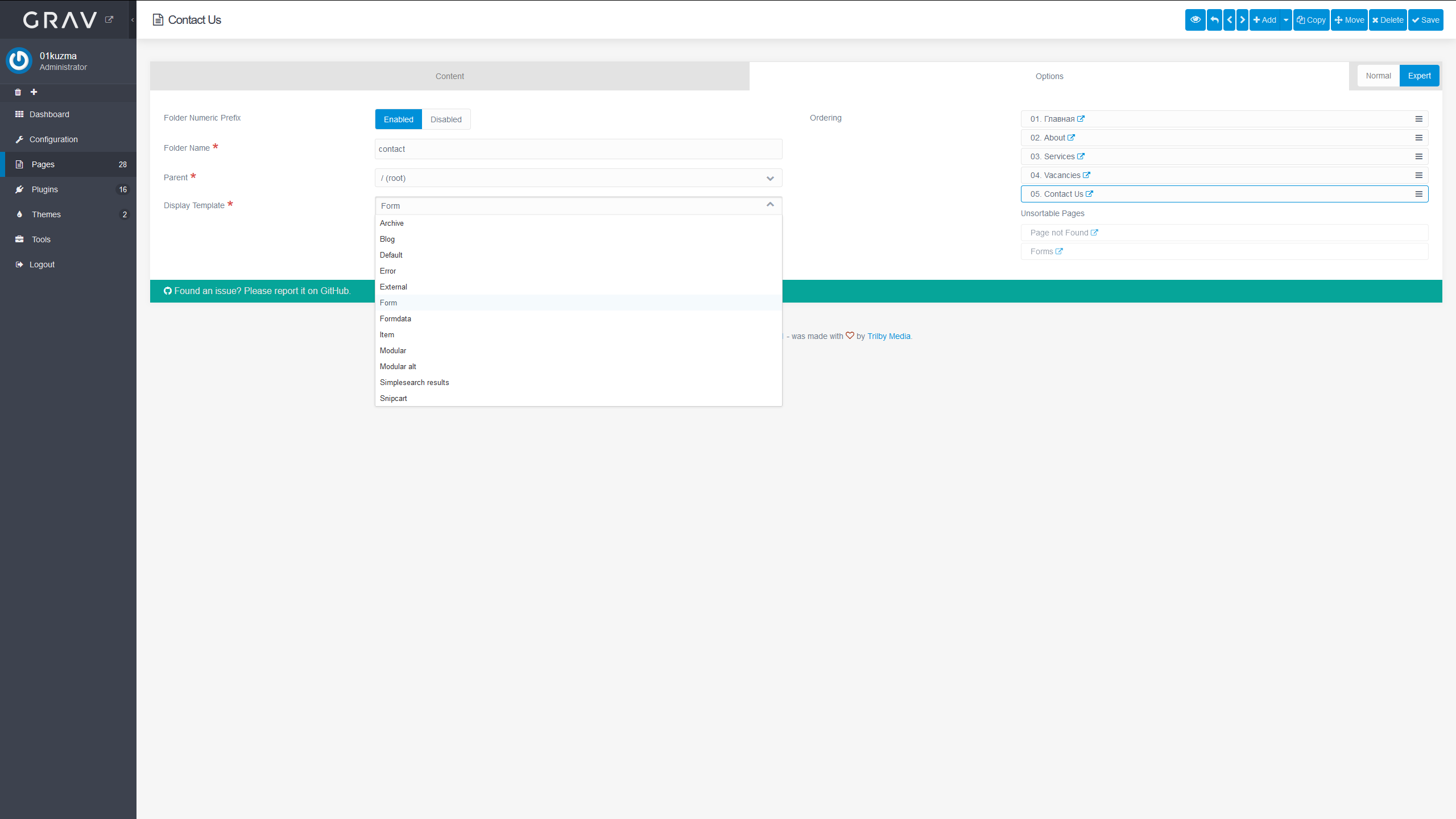
Yeah, I'm using the admin panel.
That's how does it look like:
image|690x388

7 years ago

@01K, It seems to me, according the screenshot you are showing, you are not creating a child page of a modular page, but instead a root page with template 'Form'.

TXT
user/pages/
   05.contact/
      form.md

When you use '+Add v / Add Modular', to add a new child page to a modular page, you will get a different dialog. In that dialog, you won't see template 'Form' but only a list of templates available in: /user/themes/quark/templates/modular which are 'Features', 'Hero', 'Text' (for Quark that is)

last edited 11/27/19 by pamtbaau
7 years ago

ah, the deeper I go, the less I understand 😦
Please, could you attach it as a archive, in such way I could undestand the structure and logic from admin panel, how it does look like

7 years ago

@01K That holds for just about everything in life...

ah, the deeper I go, the less I understand

If you allow me to give some unsolicited advise:

  • Start reading the documentation page-by-page, starting with Basic. And try the samples...
  • Also, to get a better feel of the basics of Grav, use an editor instead of Admin to create folders and pages, edit frontmatter, Twig templates etc.
    I personally use the popular and free Visual Studio Code, which understands Markdown, PHP, Twig etc.
7 years ago

I'm getting towrds the result, I'm think so... but now the browser stops responding, once I run this page.
It seems it goes to infinite loop.

The structure, which I've now:

TXT
-pages
    01.home
    02.about
    xxx

    05.contacts
        _form
        _main
        thankyou
    modular.md

    error
    forms
        ajax-form
        form.md <-empty file

modular.md from 05.contacts folder features this code:

YAML
---
title: Contacts
content:
    items: '@self.modular'
    order:
        by: default
        dir: asc
body_classes: 'modular header-image fullwidth contacts'
menu: Contacts
onpage_menu: false
process:
    markdown: true
    twig: true
---

form.md from 05.contacts-> _form have this code:

YAML
---
body_classes: 'modular header-lite fullwidth'
cache_enable: false
form:
    name: my-nice-form
    action: /forms/ajax-form
    template: form-messages
    refresh_prevention: true
    fields:
        -
            name: name
            id: name
            label: Name
            classes: 'form-control form-control-lg'
            placeholder: 'Enter your name'
            autocomplete: 'on'
            type: text
            validate:
                required: true
        -
            name: email
            id: email
            classes: 'form-control form-control-lg'
            label: Email
            placeholder: 'Enter your email address'
            type: email
            validate:
                rule: email
                required: true
        -
            name: message
            label: Message
            classes: 'form-control form-control-lg'
            size: long
            placeholder: 'Enter your message'
            type: textarea
            validate:
                required: true
    buttons:
        -
            type: submit
            value: Submit
            classes: 'btn btn-primary btn-block'
    process:
        -
            email:
                from: '{{ config.plugins.email.from }}'
                to:
                    - '{{ config.plugins.email.from }}'
                    - '{{ form.value.email }}'
                subject: '[Feedback] {{ form.value.name|e }}'
                body: '{% include ''forms/data.html.twig'' %}'
        -
            save:
                fileprefix: feedback-
                dateformat: Ymd-His-u
                extension: txt
                body: '{% include ''forms/data.txt.twig'' %}'
        -
            message: 'Thank you for your feedback!'
---

<div id="form-result"></div>

<script>
$(document).ready(function(){

   var form = $('#my-nice-form');
   form.submit(function(e) {

      e.preventDefault();

      $.ajax({
            url: form.attr('action'),
            type: form.attr('method'),
            dataType: 'html',
            data: form.serialize(),
            success: function(result) {

               $('#form-result').html(result);
            },
            // The following is added for debugging purposes.
            error: function(result) {

               $('#form-result').html(result.responseText);
            }
      });
   });
});
</script>       

I've got blank screen with no output. It should work, but...

7 years ago

@01K The contents you have given for the modular.md and form.md, are working fine.

Your folder structure looks wrong though. This is mine:

TXT
/pages/
  01.home/
  02.typography/
  03.contacts
     _main/
        text.md
     _form/
        form.md
     modular.md
  forms/
     ajax-form/
        form.md

Few questions/remarks:

  • The following setting in modular.md doesn't seem useful, because the modular itself usually doesn't contain any text apart from the frontmatter.
    YAML
    process:
    markdown: true
    twig: true
    
  • What is your rationale for using a modular page instead of a regular page for a contact form? The following is a simple contact form using a regular page:
    Folder structure:

    TXT
    /pages/
     ...
     04.simple-contact
        form.md
     forms/
        ajax-form/
           form.md
    

    Content of '/pages/04.simple-contact/form.md':

    MARKDOWN
    ---
    body_classes: 'modular header-lite fullwidth'
    cache_enable: false
    form:
      name: my-nice-form
      ... etc.
    ---
    # Contact Us
    
    If you want to contact us, please use our contactform
    
    <div id="form-result"></div>
    
    <script>
    $(document).ready(function(){
    
     var form = $('#my-nice-form');
     form.submit(function(e) {
    
        e.preventDefault();
    
        $.ajax({
              url: form.attr('action'),
              type: form.attr('method'),
              dataType: 'html',
              data: form.serialize(),
              success: function(result) {
    
                 $('#form-result').html(result);
              },
              / / The following is added for debugging purposes.
              error: function(result) {
    
                 $('#form-result').html(result.responseText);
              }
        });
     });
    });
    </script>
    
7 years ago

Hi!
Hm, very strange.
I've tried already numerous times, and all possible combinations, but I got an infinite loop on my server, just a blank screen. No any output or error messages.
Could you please check the file with form from my website?
https://kuzma.lt/js/05.contact.zip
I put it in pages/folder
And in pages/ I've got
forms/ajax-form/form.md empty file
I don't have any ideas about why it doesn't work...

7 years ago

@01K, It works fine...

Suggestions:

  • Did you play with routes anywhere?
  • Did you alter .htaccess?
  • Whatever the answer above... Create a fresh installation and delete the new /pages/ folder and copy your pages folder from your current site.
  • NB. Drop the `/thankyou' folder, because the form is using Ajax and doesn't route to the thankyou page.
👍 1
7 years ago

I think, you gave the right suggestion, the .htaccess
It is standard, only featuring RewriteEngine On

last edited 11/29/19 by 01K
7 years ago

@01K, I'm afraid I don't understand you reply...

If .htaccess is untouched, there should be a lot more going on than RewriteEngine On...

Please download Grav, create a fresh installation and copy the /pages/ folder from your current site. See what happens...

👍 1
7 years ago

Brilliant,
from previous tutorial I'had left the tmpl override in templates/modular folder, so this caused the infinite loop 🙂

7 years ago

@01K

Brilliant

Is that meant to be sarcastic towards your own 'mishap', or a compliment about my help? Or maybe both...

Last suggestion: Use Git in your project! That way you can see the changes you've made in a heartbeat and undo when finished 'playing' around...

👍 1
7 years ago

Thank you! Your suggestions helped me a lot!

6 years ago

Just commenting for future readers: creating a /pages/forms/ajax-test folder with a blank form.md file in it may not be necessary. See the discussion in this thread.

Suggested topics

Topic Participants Replies Views Activity
General · by Jerry Hunt, 4 days ago
2 80 10 hours ago
General · by pamtbaau, 15 hours ago
1 51 15 hours ago
General · by Andy Miller, 1 day ago
0 45 1 day ago
General · by Marcel, 12 months ago
6 346 5 days ago
General · by Duc , 5 days ago
3 40 5 days ago