Skip to content
Grav 2.0 is officially stable. Read the announcement →

Community guidelines

Please keep discussions civil and on-topic. Repeated violations may lead to a temporary ban.

General

Can't output plain html with raw filter

Solved by 01K View solution

Started by 01K 4 years ago · 12 replies · 1299 views
4 years ago

HI!
Currently, I'm implementing a third-party slider.
To make things a little bit easier I manager to insert a plain html code into markdown.
As for output I've set a custom template which is pretty simple, it's consists of a three parts:

  1. assets combination
  2. data output
  3. custom JS init
TWIG
{% block stylesheets %}
    {% do 
        assets.addCss('theme://css/some.css') %}    

{% endblock %}
{{ assets.css()|raw }}

{% block javascripts %}
    {% do 
        assets.addJs('theme://js/some.js') %}   
{% endblock %}
{{ assets.js()|raw }}       

<div id="slider" style="width:1000px;height:100vh;margin:0 auto;margin-bottom: 0px;">
    {% block content %}
        {{ page.content|raw }}
    {% endblock %}
</div>

<script type="text/javascript">

    $(document).ready(function() {

    var url = '{{ theme_url }}';

        $('#slider').slider({           
           ..init code
        });
    });

</script>

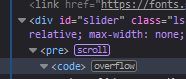
The problem is that the code from markdown is wrapped into two tags:
<pre> and <code>

If I set html filter I get only two divs rendered.
4 years ago

@01K, Curious about the page which contains plain HTML. The Markdown should be parsed into HTML and the embedded HTML should be left alone.

I've never seen HTML embedded in markdown being wrapped inside <pre><code> tags.

4 years ago

It's just a harcoded html code pasted into a markdown:

HTML
<!-- Slide 1..N-->
<div class="slide" data-l="bgsize:cover; bgposition:50% 50%; duration:4000; >
    <img width="1920" height="1080" src="images/bg.jpg" class="bg" alt="" />
    <img width="1280" height="768" src="images/slide-1.jpg" alt="" />
and so on
</div>

Just using it as a UI for editing the image paths and making other edits.

But as a output it gets:
image|186x79

4 years ago

@01K, Adding closing quotes might do miracles...

After adding a closing quoted all displays fine in page Typography of fresh Grav install.

4 years ago

Sorry, if I understood right, you mean <div>'s ?
They are all closed (<div>content</div>) in my markdown instance...

4 years ago

No, I mean quotes, like "

4 years ago

Understood 🙂
oh, I've got several hundreds of that quotes in that particular code...
So, it seems that there is only one solution - to move all the code from markdown into html.twig template

4 years ago

@01K,

So, it seems that there is only one solution - to move all the code from markdown into html.twig template

That shouldn't be necessary...

Here is a hint:

TXT
data-l="bgsize:cover; bgposition:50% 50%; duration:4000; >               
                                   -------------------- ^
4 years ago

ah, it was my typo in this thread, I've just reduced the data attributes for the sake of example. The code itself in the .md doesn't have those spaces 😕

But I also have tested the output with a simple <div> blocks, and in it still renders as a text, not a code...

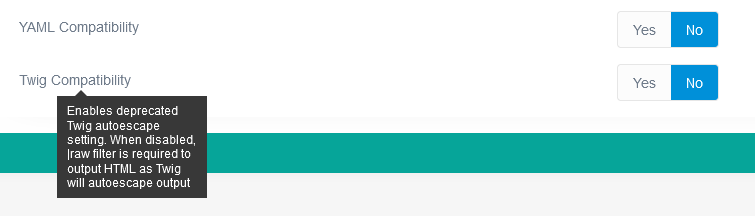
I've set those advanced settings to off to meet Grav 1.7 requirements
image|690x105

I've got a running website, which was upgraded from Grav 1.7 and have compatibility modes set to "yes". There I've post a similar page with html and it does work...

4 years ago

@01K,

The code itself in the .md doesn’t have those spaces

Spaces? I was hinting at a missing quote "...

4 years ago Solution

sorry, I wasn't watchful enough.
In the code quotes were in place, but I think I found a clue, correct me if I am wrong.
I've pasted the code once more in markdown eliminating so spaces, and voila, everything is rendered in place. So, does the compatibility mode strictly check the formatting issues?

4 years ago

@01K, I'm using a fresh Grav 1.7 installation and have not altered any compatibility settings.

I would not alter the Grav 1.7 default compatibility Twig settings because auto-escape has been added to Grav 1.7 to prevent XSS (cross-site scripting) attacks.

When altering the compatibility modes as shown in the upgrade manual, your site is again vulnerable to the XSS attacks as was the case for Grav 1.6.

Use filter |raw in Twig if fields (like page.content) contain HTML code that needs to be preserved and not escaped.

By the way, the compatibility settings have nothing to do with the <pre><code> issue you experienced. I believe that was caused by a syntax error in the code.

👍 1
4 years ago

Because my project was updated from 1.6 to 1.7.x by default the compatibility feature was enabled. So, now I've set them (set to No) as they are in fresh Grav 1.7 installation

image|690x197

Suggested topics

Topic Participants Replies Views Activity
General · by Jerry Hunt, 4 days ago
2 95 15 hours ago
General · by pamtbaau, 20 hours ago
1 61 19 hours ago
General · by Andy Miller, 1 day ago
0 47 1 day ago
General · by Marcel, 12 months ago
6 356 5 days ago
General · by Duc , 6 days ago
3 44 6 days ago