Hi, I am trying to figure out how to extend the site configuration panel in Admin with options that I see are there in site.yaml, but are not shown in the Admin. I know stuff like that is done with a blueprint.yaml file, but I cannot find this for the standard site configuartion. Hope someone can help me.
Hi @TonHaarmans
To extend the administration
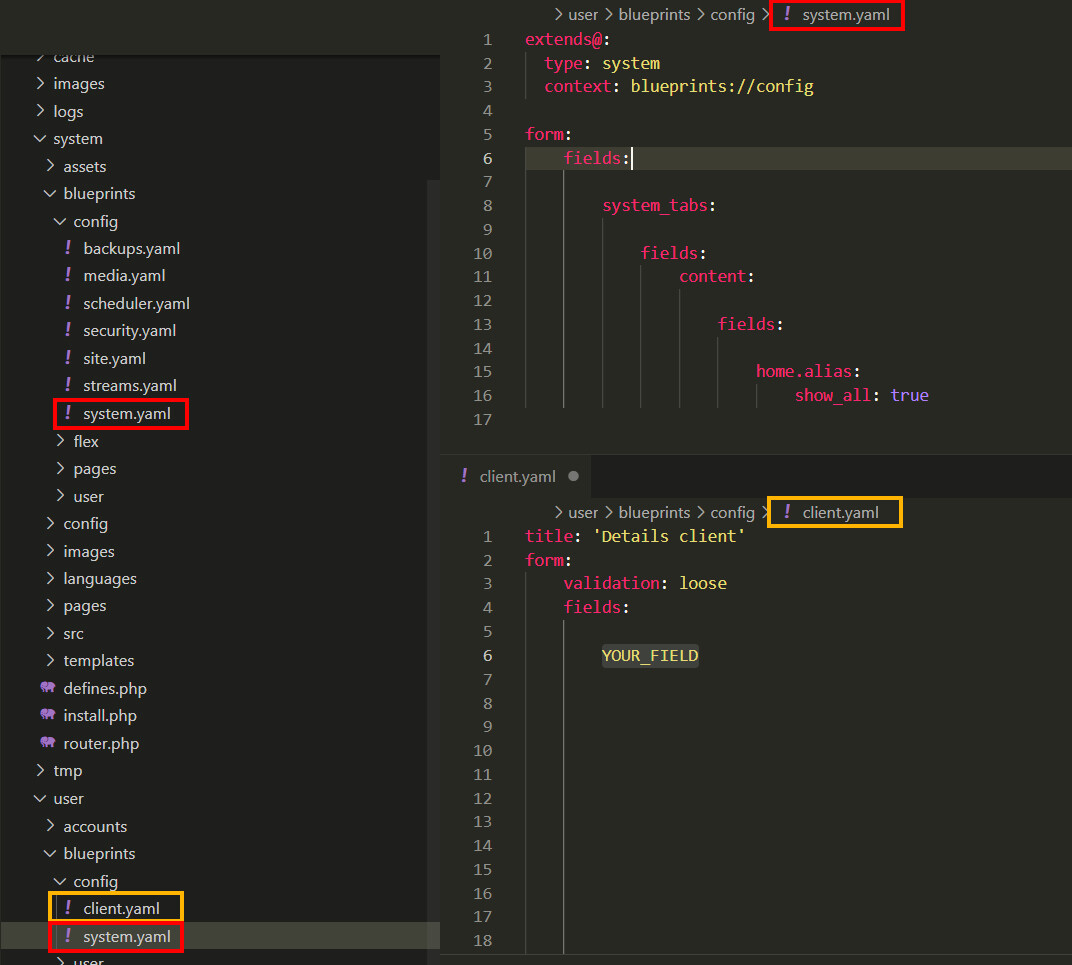
Add the new files here: "user > blueprints > HERE
Use the same hierarchy as: "system > blueprints > HERE".
Sincerely
Kit
Thanks Kit. I am still a newbe with this stuff. What do you mean with new files?
If you are a novice, start by trying to create a new file "client.yaml" (in orange on the image) and add the fields you like
Check out the documentation for all the fields available
Be careful if you modify an existing behaviour, if you update this part it will be impacted.
Example : system.yaml and more
Sincerely
Kit
Sorry for the late reply. I've been ill for a while. Anyway, I am not sure if I understand you. Is this the procedure to add items in the Admin, that are already present in system.yaml, but do not show up in the Admin (that's what I need). Or is this a procedure to add items that are not present in existing yaml files?
Thank you for answering!
Log in to reply.
Suggested topics
| Topic | Participants | Replies | Views | Activity |
|---|---|---|---|---|
| 4 | 178 | 2 days ago | ||
| 2 | 119 | 3 days ago | ||
| 1 | 100 | 1 week ago | ||
| 1 | 124 | 1 week ago | ||
| 0 | 246 | 3 weeks ago |