Skip to content
Grav 2.0 is officially stable. Read the announcement →

Community guidelines

Please keep discussions civil and on-topic. Repeated violations may lead to a temporary ban.

General

Grav 1.7 add weird number to folder numeric prefix

Started by Pedro M 5 years ago · 10 replies · 1104 views
5 years ago

Hi there,

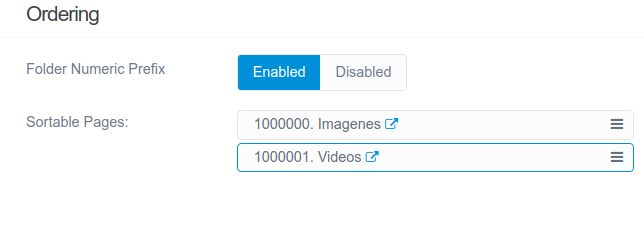
Since I changed to Grav 1.7, this one randomly adds a long number (like 000001) to folder numeric prefix, instead 1,2,3, etc. Then, I need to change it in files explorer to usual number (1,2,3...). It can be seen in the following screenshot:

Selection_062|644x249

Anybody knows what's happening?.

Thanks a lot in advance.

5 years ago

Hi @pmoreno
Bit of a strange one ! Lol.

If you have updated the site , the first thing might be worth clearing all the cache on the site

https://learn.getgrav.org/17/cli-console/grav-cli

bin/grav cache or if on windows php bin/grav cache or use the admin plugin on the site.

II was wondering if it may be a plugin causing the issue ? Can you grab a screenshot of what plugins you have active.

I have been setting up lots of test examples of grav for support and done upgrades to them and not see your particular issue.

Is it just existing pages which had this number scheme, so if you add a new page now that you have done the upgrade, it is happening every time when you create a new page now.

Is it purely when NEW pages are created from the root of the site, or where pages are creating in pre existing folders / pages.

There was a issue reported for an early version of 1.7 on github but has been fixed https://github.com/getgrav/grav/issues/2837

Is this a production server or a development server ? What OS is using ? Do you have admin running on the site ?

Was wondering if you have got the bugged versions so might be worth checking this page

https://learn.getgrav.org/17/basics/updates
and follow through the update procedure.

I presume if grav see the prefix format of 0000001 it will then folder that pattern on adding additional pages. So its a kind of kill or cure thing, where you copy your grav install, rename the pages so no page is prefixed, then try and a page and see if it tries to prefix it.

I think it might be a rare issue, but happy to help you figure it out.

:)

last edited 05/19/21 by Spam Hater
5 years ago

Just before I went to sleep, thought I would just test the increment theory out.
I manually created a directory and called 100001.test, in that folder I made a default.md file, I then went to the admin gui and created another page through the GUI and guess what it created a 100002.test2 folder, so grav can detect automatically an increment based on what the previousfolder is (when using a number prefix based page)

I thought I would take it a step further. I created another folder manually 200011.anothertest and added a default.md

Then went to the admin gui and created another page and it indeed automatically continued 200012.thistest

So to resolve your issue even thought its not the end of the world, it will be do with autodetect of previous folder through ordering and continues with the highest folder element + 1

Was good to know as was speaking about the maxmum number of items you could have in a folder and we thought it was going to be only 99, but using a prefix method, it could be a lot lot more !

How it got to be that way in your example, I am not sure, maybe a folder was accidentally renamed and it has just carried on in sequence !

Hope that answer the question :)

5 years ago

HI @spamhater

Thanks for your time and your help. Just now I've add a new page as a child to another with numeric prefix. When the numeric prefix is already established, there is not problem.

But if I create a new page into root or another father page, if this is the first the issue come back to happen.

In this link, https://drive.google.com/file/d/1ew3JKd4soHXpohFG2EkBtZlwBXBGJ1G5/view?usp=sharing, I've shared a short video (in gif format) to you can see the problem.

Thanks so much.

5 years ago

Hi @pmoreno , thanks for the vid

Could I ask you to do the following steps,
since your working locally on your desktop

It looked like a ubuntu / linux desktop that you are using

BASH
sudo apt-get install tree

https://snapcraft.io/install/tree/ubuntu#:~:text=Tree%20is%20a%20recursive%20directory,and%20output%20is%20to%20tty.

install a small application called tree

then open a terminal editor and change to your grav install directory and then to the users folder

then run the tree at the command line

TXT
tree -H ./ > result.html

this will will output your page and folder structure to a file called results.html

you can view it in your browser and if you then could upload or post a link to this file

Grav is very parent > child based so it might be something weird at a higher level.

Might be able to find a potential reason why it is happening and how to correct it. 🙂

I will try and follow your exact steps on a clean install and see if I can recreate the problem as well, it is a very interesting one :)

5 years ago

@pmoreno

I have just download the latest version of grav and installed it, added gantry and hydrogen and followed your pattern of adding pages to a clean site.

I also got the same result, the 9999999, so I then created another fresh install and followed the pattern on a clean site , and the fauly occurs.

So we can eliminate that is anything to do with your site, it is a "issue" with grav and it is replicatable. I will log it on github and someone will need to check why the issue is happening.

In the mean time, a quick fix is when you are creating your new page and allow it create the 999999.foldername , go in to your filemanager and change it to 01.foldername

anything further pages in the parent will be numbered from the previous page (ie. change 999999 or 100000 to 01 and the sort order will be correct)

If you create another sub page the first folder will be labeled incorrectly, so you would have to rename it back to 01 and then any subsequent pages in that folder will be correct again.

It think this is due to two issues,

1) if you create a new page / folder from the root of the pages admn panel, everything works (parent = root). If then try and create a sub page or folder, you allowed to select the parent, but it still says root, rather than the sub folder.

2) if you create a page which has the long prefix and create a subpage under that folder, if it is the first child in that directory, everytime you hit save of the a new page, the folder number is incremented.

So \root\01.newfolder\100000.subfolder changes number, everytime you hit the save button when in the edit, so it changes 100000,100001,100002 etc.

But if you then create another child in that directory it will number from the existing foldername
5 years ago

Thanks a lot @spamhater

I'm afraid we have to wait the Grav team launch a new version, with corrections for this issue.

Nevertheless, I'll try to find more causes involved in this issue.

Thanks so much for your time.

👍 1
5 years ago

Just to let you know this has been sorted today and is available in the devlop build on github

You could grab the devlope build, download the package and copy the fix file from the archive and overwrite your existing one

https://github.com/getgrav/grav/tree/develop

system/src/Grav/Common/Flex/Types/Pages/PageObject.php

That should stop your frustration but make sure your current pages dont have any high page numbering

or just wait a couple of weeks and hopefully these update will be available automatically through grav itself :)

5 years ago

Thanks so much, @spamhater

I appreciate your work a lot. I'm a beginner programmer and there are many issues I don't know how to solve.

Thanks again. Good job!

👍 1

Suggested topics

Topic Participants Replies Views Activity
General · by Jerry Hunt, 4 days ago
2 80 9 hours ago
General · by pamtbaau, 15 hours ago
1 51 14 hours ago
General · by Andy Miller, 1 day ago
0 45 1 day ago
General · by Marcel, 12 months ago
6 346 5 days ago
General · by Duc , 5 days ago
3 40 5 days ago