Skip to content
Grav 2.0 is officially stable. Read the announcement →

Community guidelines

Please keep discussions civil and on-topic. Repeated violations may lead to a temporary ban.

General

HELP ! theme testing kill our site!

Solved by Paul Hibbitts View solution

Started by leduf 5 years ago · 22 replies · 945 views
5 years ago

i try to install "quark publishing" theme (initially Quark), then refresh ... then site crash !
how to recover ?

now i have an empty page (cache clear , for webbrowser )

nothing appear in the log . so what it's the mean of having log option ?

last edited 01/10/21 by leduf
5 years ago

Hi @ledufakademy , installing a theme won't activate it - did you activate it after install? Perhaps something happened during the install process?

I just did a test installation of Quark Open Publishing with the Grav Blog Skeleton and no issues there.

You could manually set the active theme back to Quark (if you activated Quark Open Publishing) here:
https://learn.getgrav.org/16/basics/grav-configuration#themes-configuration (theme:quark).

Please let me know how you make out.
Paul

5 years ago

hello paul, have an happy new years (first!)
since october 2019 we have :

Server Error
Sorry, something went terribly wrong!

0 - An exception has been thrown during the rendering of a template ("Template "modular/hero.html.twig" is not defined.").
For further details please review your logs/ folder, or enable displaying of errors in your system configuration.

i have no time to debug this ... since october.

So ...
When saving modular pages . (we only have one page with modular sections ...)
So i have decide to update, but nothing change.
So i have tried to change theme ... then patatra !
Empty page ...
No customization in code : just pure Quak theme.

last edited 01/10/21 by leduf
5 years ago

Our nginx option :

TXT
location / {
    try_files $uri $uri/ /index.php?$query_string;
}

location ~* /(\.git|cache|bin|logs|backup|tests)/.*$ { return 403; }

location ~* /(system|vendor)/.*\.(txt|xml|md|html|yaml|yml|php|pl|py|cgi|twig|sh|bat)$ { return 403; }

location ~* /user/.*\.(txt|md|yaml|yml|php|pl|py|cgi|twig|sh|bat)$ { return 403; }

location ~ /(LICENSE\.txt|composer\.lock|composer\.json|nginx\.conf|web\.config|htaccess\.txt|\.htaccess) { return 403; }

location ~ \.php$ {
    # Choose either a socket or TCP/IP address
    fastcgi_pass unix:/var/run/php/php7.3-fpm.sock;
    fastcgi_split_path_info ^(.+\.php)(/.+)$;
    fastcgi_index index.php;
    include fastcgi_params;
    fastcgi_param SCRIPT_FILENAME $document_root/$fastcgi_script_name;
}
5 years ago

From the error message it looks like a required twig template is missing, but Quark is supposed to have the template so something else might be going on.

I'd suggest you restore the active theme to Quark, and the perhaps try to update your Grav install to see if that might be a related issue?

ps - I am not overly technical, so I can't give any feedback re: nginx options

5 years ago

... empty page !
so i can't to anything with webgui.

Do you have an idea for CLI option in order to do that ?

5 years ago

You can edit the config file at /user/config/system.yaml (and refer to the info I shared earlier)

If you having issues with the Admin Panel it makes me think even more that this issue is beyond just the active theme setting... let me know if you can change the active theme.

5 years ago

pages:
theme: quark
order:
by: default
dir: asc
list:

Quak is already activated ... but not working now ;-)

5 years ago

Might you know what version of Grav you have going? Perhaps you can use the CLI to try to update everything? https://learn.getgrav.org/16/cli-console/command-line-intro#grav-specific-commands (esp. bin/gpm self-upgrade)

The good thing with Grav of course is that site content is separate from your Grav install. I would at least make a backup of your current user folder as you could use that and a fresh Grav install to get back going etc.
5 years ago

Progressing ....

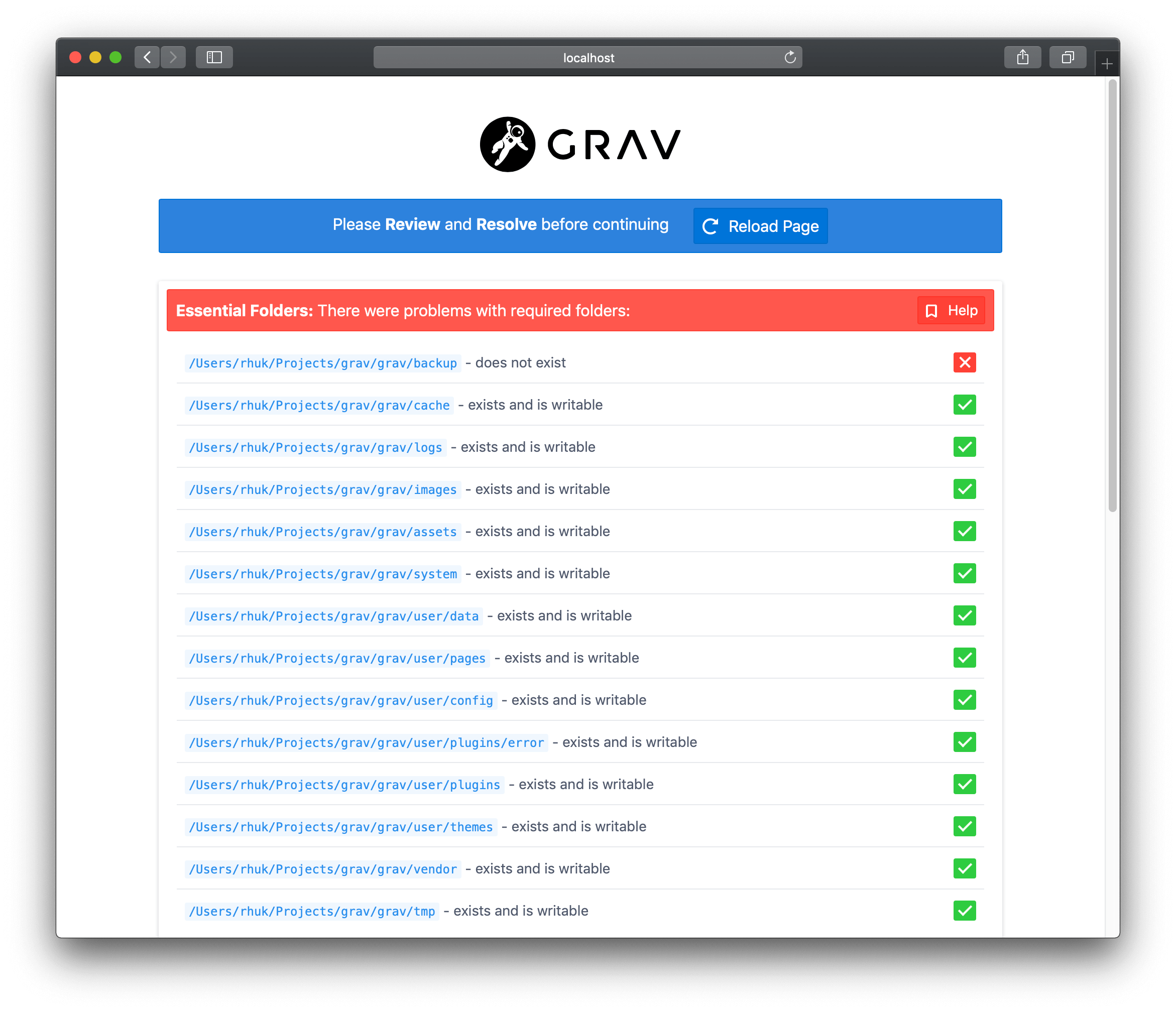
there was permissions error : why ? big mystery ! (we never change file permission ...)

But now i came back to inital error :
user/plugins/error - dose not exist

5 years ago

An :

bin/gpm install error
solve my issue ;-)

Thank you Paul !

5 years ago

i let a student (i don't hate student ;-)), working with GItea and our GRAV source ...
he has probaly broken something

5 years ago

do you remember what is the plugin which allow :

!!!!
!!!
!!
!

... in order to colorize text background ?
i also lost button .... ????

classes=btn,btn-primary,btn-lg&target=_blank

5 years ago

MarkDown ... notice !!!
yesss. Good shot .

👍 1
5 years ago

For button ... not working , i got the button but some classes are not working ...

Suggested topics

Topic Participants Replies Views Activity
General · by Jerry Hunt, 4 days ago
2 76 7 hours ago
General · by pamtbaau, 13 hours ago
1 47 12 hours ago
General · by Andy Miller, 1 day ago
0 44 1 day ago
General · by Marcel, 12 months ago
6 346 5 days ago
General · by Duc , 5 days ago
3 40 5 days ago