Did you mean to write "when I press save"? This implies to me you check the checkbox but it's unset when you go to save the page.
If you mean you want it to default to checked for new pages, use the default field value property. You probably want to set it to 'checked' or true, not sure which one works.
I copied the first page blueprint example from the docs Example: Page Blueprints into above file
Copied the code from OP (and correctly indented it) below the existing field from the example resulting in the following (partial) blueprint:
YAML
[stuff deleted]fields:header.an_example_text_field:type:textlabel:Add a numberdefault:5validate:required:truetype:intheader.box:type:checkboxlabel:to be tested
The page editor on tab 'Advanced' and below section 'Overrides' will look like:
I checked the box and saved. The saved and refeshed page looks like:
@seb3000, would you mind sharing a reproducible case showing the issue?
By the way, the following definition will yield a value of false/true in frontmatter:
YAML
header.box:type:checkboxlabel:to be testedvalidate:type:bool
@AmauryH, I don't think the indentation used by OP is actually in the code, because that indentation makes the yaml invalid and causes Grav to throw an Exception 'Unable to parse at line ...'
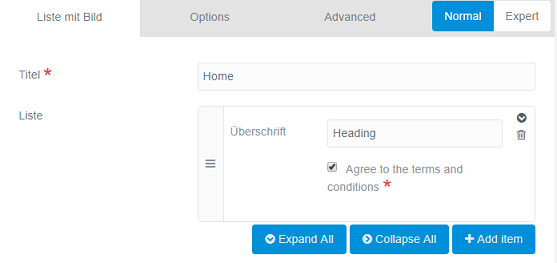
Thanks for your answer. It seems like checkboxes are working fine when using standalone, but not if used inside a list.
Have a look at my blueprint snippet
YAML
fields:content:unset@:truetype:tabtitle:Liste mit Bildfields:header.title:type:textlabel:Titelvalidate:required:trueheader.list:type:listlabel:Listefields:.title:type:textlabel:Überschrift.agree_to_terms:type:checkboxlabel:"Agree to the terms and conditions"validate:required:true
My workaround was using the toggle field, which is working inside nested lists.