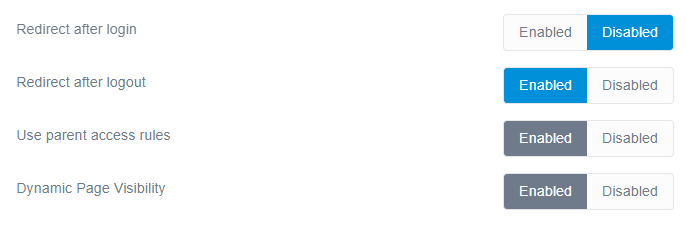
I found that I can hide the contetnts of a page from unauthenticated users by setting:
YAML
access:site.login:true
in the Advanced page properties.
But I cannot find a way to also hide the menu. When user login form is shown, unfortunately all sections and menu is still browsable, which allows for at least deducing what is written about, what techs are used, etc.
Is it possible to hide menu when user is unauthenticated and display it as usual after log in?
Using a fresh Grav v1.7.31 install, try the following:
Add the following to page header of 02.typography/default.md
YAML
login:# The following will mark page as invisible for users without access rightsvisibility_requires_access:trueaccess:# Page is only visible to logged-in userssite.login:true
Note:
Above settings can be set using Admin in the Security tab of a Page
Create file /user/config/plugins/login.yaml and add:
TXT
dynamic_page_visibility: true
Note:
This can be set using Admin in the config of plugin Login
If not logged in, page Typography will not be visible in menu.
Note:
Above behaviour for page Typography will work for any collection using filter visible e.g. {% for p in page.children.visible %}.
@jbd,
It’s misleading that the Grav admin GUI states “Set to Yes if page should be shown in menus only if user can access them.” which is not true.
The help statement in Admin is correct, but I admit a reference to the Login setting might be helpful.
NB.
The first item of a quick search for visibility_requires_access using Google led to the answer... Tip: Add Search as standard tool to your toolbelt. ;-)
@pamtbaau:
The first item of a quick search for visibility_requires_access using Google led to the answer… Tip: Add Search as standard tool to your toolbelt. 😉
Excellent solution and advice but in defence of the other two, there is nothing to indicate they knew they were searching for "visibility_requires_access" 🙂
Great, thanks! I was missing visibility on dynamic_page_visibility 😄
Unfortunately my Google skills sometimes lead me to the same issue and not the answer :upside_down_face:
And incidentally, that led me to another confused moment, "why are some toggles blue and others greyed out?", and thought that some GUI toggles were overridden elsewhere.
@hughbris, Yes you are right, it wasn't exactly that easy. But a bit of marketing for Search wouldn't hurt. It has already led @jbd to find the answer to another "burning" question ;-)
The following steps wouldn't have been that convincing, I'm afraid: