Skip to content
Grav 2.0 is officially stable. Read the announcement →

Community guidelines

Please keep discussions civil and on-topic. Repeated violations may lead to a temporary ban.

General

Horizontal rules omitted every other child

Solved by Thomas Green View solution

Started by Thomas Green 7 years ago · 4 replies · 426 views
7 years ago

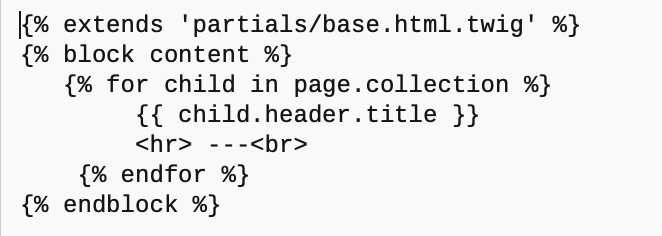
I have a collection page with children; when displayed, I want a horizontal rule between each child, so my template is this:
11|662x236
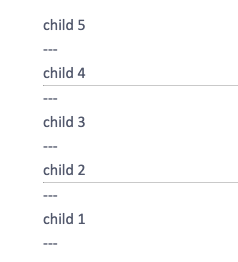
But I'm only seeing a rule after every second child:
53|238x262

I inserted the 3 dashes to make sure that the for-loop was indeed visiting the line containing the hr tag for every child.

Anyone know why that might be happening?

last edited 09/21/19 by Thomas Green
7 years ago

Hi @ThosGreen, I have run your code using Quark and the blog skeleton. I have replaced template '/user/themes/quark/templates/blog.html.twig' with the following code:

TWIG
{% extends 'partials/base.html.twig' %}
{% set collection = page.collection() %}

{% block body %}
   {% for child in collection %}
       {{ child.header.title }}  {# NB. child.title might be a better choice #}
       <hr>
   {% endfor %}
{% endblock %}

The horizontal lines are shown perfectly...

You said "But I’m only seeing a rule after every second child". Not sure where you were looking: The formatted page in the browser, or the HTML code?

  • Would you mind sharing the generated HTML code?
  • Which template are you using?
  • Did you make any changes to either css or scss?
7 years ago Solution

It's the browser!!

MacBook:
Safari works perfectly
Chrome leaves out every 2nd rule
Opera leaves out ALL the rules

Samsung phone:
Opera leaves out every 2nd rule
Chrome works perfectly

Well, what a lot of time I wasted. Thank you very much for looking into this, Pamtbaau.

7 years ago

PS I switched to using a div for each child-instance, with the bottom border set to a line, and it works fine. Should really have done that first.

7 years ago

@ThosGreen Looking at your research (which is very informative) there is probably more to it then just the browser...

According to Modzilla Developer Netword on <hr>:

Historically, this has been presented as a horizontal rule or line. While it may still be displayed as a horizontal rule in visual browsers, this element is now defined in semantic terms, rather than presentational terms, so if you wish to draw a horizontal line, you should do so using appropriate CSS (Note: Emphasis is mine.).

Or according the HTML5 standards at w3.org:

The hr element represents a paragraph-level thematic break, e.g. a scene change in a story, or a transition to another topic within a section of a reference book.

The above means that <hr> is not strictly a horizontal line anymore, but now indicates a semantic break, e.g. a new section in a text. This is helpful for visually impaired users using non-visual readers.

This also means we should use <hr> wisely nowadays to not confuse visually impaired users.

If your use of the 'horizontal line' is purely aesthetic your choice to use a <div> is probably the right one.

Btw: I'm glad you "wasted" some time, because I learned something from it...
Suggested topics

Topic Participants Replies Views Activity
General · by Jerry Hunt, 4 days ago
2 80 9 hours ago
General · by pamtbaau, 14 hours ago
1 51 13 hours ago
General · by Andy Miller, 1 day ago
0 44 1 day ago
General · by Marcel, 12 months ago
6 346 5 days ago
General · by Duc , 5 days ago
3 40 5 days ago