Skip to content
Grav 2.0 is officially stable. Read the announcement →

Community guidelines

Please keep discussions civil and on-topic. Repeated violations may lead to a temporary ban.

General

How to implement Last-Modified for a site under management GRAV

Solved by dydaevskiy View solution

Started by dydaevskiy 8 years ago · 1 replies · 430 views
8 years ago

Friends explain me please how can I set up Last-Modified. Thank you for any answer.

One of the stages of optimization of the Internet resource for the successful promotion and support of the site is server-side optimization. Among other things - setting up the correct server response to the request Last-Modified. Correct setting of this parameter will help in increasing the download speed of the site and will positively affect its indexing by search robots. This is what I need to configure.

last edited 08/20/18 by dydaevskiy
8 years ago Solution

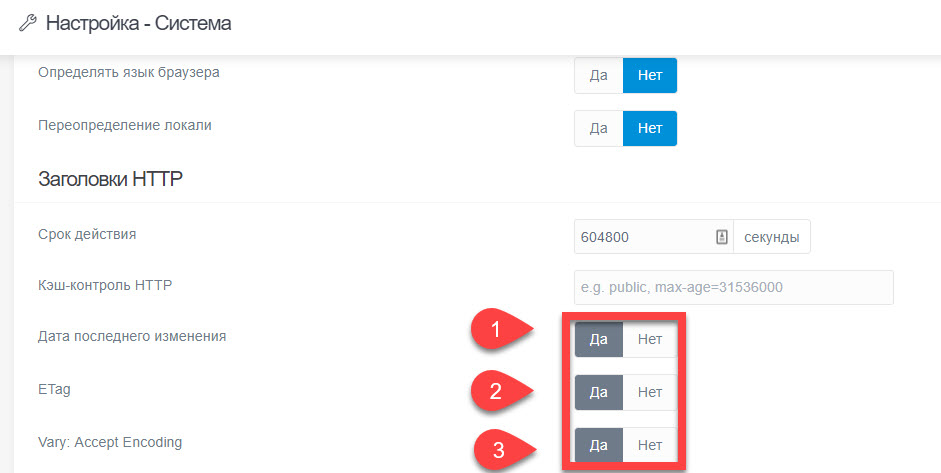
Everything was simple enough, you need to go to the site settings, then on the "System" tab, scroll to the "HTTP Headers" section and set the settings as shown in the screenshot below:
2018-08-28_11-12-03|690x346

👍 1
last edited 08/28/18 by dydaevskiy

Suggested topics

Topic Participants Replies Views Activity
General · by Jerry Hunt, 4 days ago
2 85 13 hours ago
General · by pamtbaau, 18 hours ago
1 60 18 hours ago
General · by Andy Miller, 1 day ago
0 47 1 day ago
General · by Marcel, 12 months ago
6 350 5 days ago
General · by Duc , 6 days ago
3 44 5 days ago