Skip to content
Grav 2.0 is officially stable. Read the announcement →

Community guidelines

Please keep discussions civil and on-topic. Repeated violations may lead to a temporary ban.

General

How to select just gif from pages media

Started by Roberto Vázquez González 9 years ago · 6 replies · 1601 views
9 years ago

Hi,
I'm iterating through pages in a collection and I want to select from each post, one image and one gif we can find on each folder.

TWIG
     {% for p in page.collection %}
    {% set first_image = p.media.images|first %}
    {% set first_gif = p.media['avatar.gif'] %}

    <h2>{{ p.title }}</h2>
    <h3>{{ p.header.headline }}</h3>

    {{ first_image }}
    {{ first_gif }}
    {{ p.summary }}
    {% endfor %}

It works with the previous example, but I want to somehow be able to select just one gif image, doesn't matter what's the name of it, like I do with images.

I tried with p.media['*.gif'], p.media['*.gif']|first and p.media.animatedImage|first, but nothing, the only way I found yet to select the gifs per page, is by calling it with the exact name of the file, but this is very restrictive for me.

Could you somehow explain a way to have an array with all the "Animated Image" on each page as we do with the images?

Thanks in advance.
9 years ago

Hello there,

give it try with... (replace page with your p variable)

TWIG
{# get all the images from the page media #}
{% set images = page.media.images %}

{# create an empty array to hold your bg images #}
{% set bg_images = [] %}

{# loop over all the images and put only 'gif' images into the new array #}
{% for filename, image in images %}
  {% if filename ends with 'gif' %]
  {% set bg_images = bg_images|merge(image) %}
  {% endif %}
{% endfor %}

The example comes from this post. There is some more explanation. ;)
/forum/archive/get-the-image-with-name-starting-with-t7926

Regards,
Michael

8 years ago

Hello mgoll, would you have advice on targeting (for eg.) the second image in the pages media? I see there is "first" and "last", but I can't find any examples on knabbing other images in the sequence!

8 years ago

You should be able to simply reference by its index in this case, e.g. bg_images[1].

8 years ago

thank you -I've tried

04%20PM|535x112

but just getting unknown (first and last works, 3 images total)! The images are coming up with-.meta.yaml doesn't exist could this be the issue?

last edited 11/22/18 by Jono Ross
8 years ago

Please be advised that gifs are not 'images' but instead 'animated images'. See Supported Media Files and class AbstractMedia which is returned by page.media in Twig.

This means that the array returned by page.media.images does not contain gif files.

One could get access to all media types included the gifs by using:

  • page.media['my-animated.gif']
  • page.media.files, or page.media.all and filter the resulting array on gif extension

The rationale of gifs being excluded from page.media.images is that the image manipulation functions do not work properly on gifs. See this issue at Github.

Just for completeness, a similar discussion on gifs can be found in thread Animated GIFs not showing at Quark blog list page

Hope this clarifies the issue of gifs a bit...

last edited 11/21/18 by pamtbaau
8 years ago

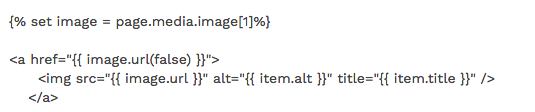
@deflux:
{{ item.alt }}

What @pamtbaau said, plus shouldn't you be outputting {{ image.alt }} in the above Twig?

Suggested topics

Topic Participants Replies Views Activity
General · by Jerry Hunt, 4 days ago
2 76 8 hours ago
General · by pamtbaau, 13 hours ago
1 47 12 hours ago
General · by Andy Miller, 1 day ago
0 44 1 day ago
General · by Marcel, 12 months ago
6 346 5 days ago
General · by Duc , 5 days ago
3 40 5 days ago