Skip to content
Grav 2.0 is officially stable. Read the announcement →

Community guidelines

Please keep discussions civil and on-topic. Repeated violations may lead to a temporary ban.

General

Installing Grav | general what do I do now problem

Started by Derek Chirnside 6 years ago · 8 replies · 1223 views
6 years ago

I have installed grav by unzipping into a folder in a bluehost server.
The grav-admin version.

Not sure what to do now.
Can someone point me to a link in the docs?

I expected something like a link to open which would run something like an install - but I must be missing something in the docs.
6 years ago

OK.
Progress.
Installed in wrong folder.
Now unzipped into in public_html/grav-admin

running . . ./grav-admin/index.php gets a different error.

Blockquote
Internal Server Error
The server encountered an internal error or misconfiguration and was unable to complete your request.
Please contact the server administrator at xxx to inform them of the time this error occurred, and the actions you performed just before this error.
More information about this error may be available in the server error log.
Additionally, a 500 Internal Server Error error was encountered while trying to use an ErrorDocument to handle the request.

6 years ago

If you unzipped it into /public.html shouldn't you just access it as index.php? If the account has a domain try just going to domain.com/index.php where domain is your domain..

6 years ago

Yes, I agree with @dan-james. Just copy the complete contents of grav-admin (including hidden files) into the root folder (public_html) and then visit the site in the browser. This should automatically load a page which will create you a user, which you then use to log in.

last edited 09/21/20 by Col
6 years ago

Hi @derekcx, @col makes a good point: "Remember the hidden files"!

If you drag and drop the Grav folder the .htaccess file will be left behind, and that will stop Grav from working. Make sure it's in there : )

6 years ago

@dan-james, @col
Thanks.
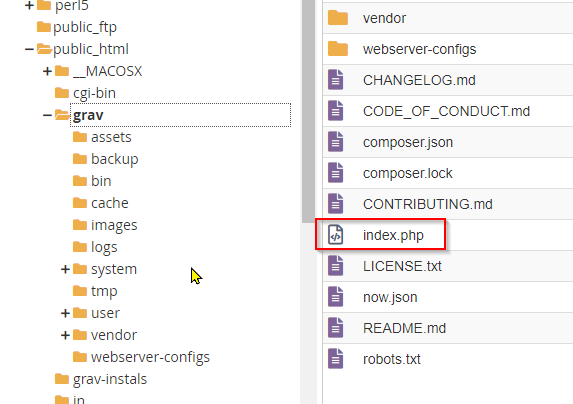
Problem|573x404

This is what I have done. Close to what you have said.
Files and flders are in a folder grav.
<website>/grav/index.php fails.

I have checked version of PHP
In Grav, folders have 0775, files have 0664 permissions.

To put me in context: I have installed Moodle and Wordpress several times.
I am not really experienced or knowledgeable in the detail. :-)

-Derek

6 years ago

Just checking.
Does Grav work on a folder like this?

As opposed to being unzipped in the root.

Derek

6 years ago

I have always installed into the root directory rather than a sub folder, but I'd be surprised if that wasn't possible. Does this help?

/forum/archive/grav-in-subfolder-without-site-visitors-ever-knowing-t7931

6 years ago

You do not run index.php, you run a server. For Grav 1.6 navigate to the folder on the command line and run php -S localhost:8000 system/router.php, for Grav 1.7 run php bin/grav server. .htaccess, which is a dotfile that you need to check exists in the root folder of Grav, contains instructions for Apache and Lightspeed.

Since Grav is flat-file you can run it in any folder, and you can tell your server what folder or domain to serve it from. It's not uncommon to run it as localhost:8000/grav, domain.tld/grav, or directly on the domain. It doesn't have to be in the root folder of the server though. https://github.com/getgrav/grav/blob/develop/webserver-configs/htaccess.txt can be renamed to .htaccess and moved up a level; this folder with server-configurations ships with all installations of Grav.

Since you installed on Bluehost with the Admin-plugin, navigate to yourdomain.extension/grav-admin and you should be asked to create an Administrator account.

Suggested topics

Topic Participants Replies Views Activity
General · by Jerry Hunt, 4 days ago
2 74 6 hours ago
General · by pamtbaau, 11 hours ago
1 47 11 hours ago
General · by Andy Miller, 23 hours ago
0 43 23 hours ago
General · by Marcel, 12 months ago
6 346 5 days ago
General · by Duc , 5 days ago
3 39 5 days ago