Skip to content
Grav 2.0 is officially stable. Read the announcement →

Community guidelines

Please keep discussions civil and on-topic. Repeated violations may lead to a temporary ban.

General

Navigation question - add image in menu items

Started by Byrge 9 years ago · 2 replies · 965 views
9 years ago

I have the following code:

TWIG
<nav>
    {% set show_onpage_menu = header.onpage_menu == true or header.onpage_menu is null %}
    {% macro pageLinkName(text) %}{{ text|lower|replace({' ':'_'}) }}{% endmacro %}
    {% for row in page.collection()|batch(4) %}
     <ul class="nav_overlay nav-{{ loop.index }}">
      {% for module in row %}
        {% if not module.header.hidemenu %}
        {% set current_module = (module.active or module.activeChild) ? 'active' : '' %}
            <li class="{{ current_module }}">
                <a href="#{{ _self.pageLinkName(module.menu) }}"><i class="fa fa-link"></i>{{ module.menu }}</a>
            </li>
        {% endif %}
    {% endfor %}
</ul>
    {% endfor %}
</nav>

The output is the links to the pages which do have the page.header : menu: <<menu name here>>. This is the expected result.

Now I like to add an image here. I do have in the page.header an image: <<image name here>>.

YAML
---
title: Collectie
menu: Collectie
hidemenu: false
image: raambekleding.jpg

How can I get the image url and the image displayed in the navigation?

Thanks in advance,
Byrge
9 years ago

Take a look into this: https://learn.getgrav.org/content/media#url

If you have uploaded the image to the page, it should be possible to use something like this:

TWIG
{{ page.media[page.header.image].url }}

if you want the image being displayed, use something like this:

TWIG
{{ page.media[page.header.image].html('My title', 'Some ALT text', 'myclass') }}
9 years ago

Hi, thanks for your answer. Unfornately you solutions don't work. Probably because the .twig template file is a partial and loops through the modular pages to find the titles of the 'pages'.

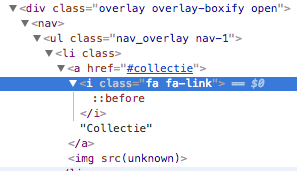
The code output is:
51|297x171

See the image src = unknown.

The macro ... {% macro pageLinkName with the "<a href="#{{ _self.pageLinkName(module.menu) }}">" works for the page titles, but how can I have the images (in the same page.header) of the modular pages in my navigation?

Thanks in advance,
Byrge

Suggested topics

Topic Participants Replies Views Activity
General · by Jerry Hunt, 4 days ago
2 76 8 hours ago
General · by pamtbaau, 13 hours ago
1 47 12 hours ago
General · by Andy Miller, 1 day ago
0 44 1 day ago
General · by Marcel, 12 months ago
6 346 5 days ago
General · by Duc , 5 days ago
3 40 5 days ago