Hi,
I would like to change the background-color of the one-page theme skeleton. I made a div class in the features.md and also in features.html.twig and tried to put a background-color to that class but it did not work. I have put in red(in the attached img) the part which i want to change background-color of.
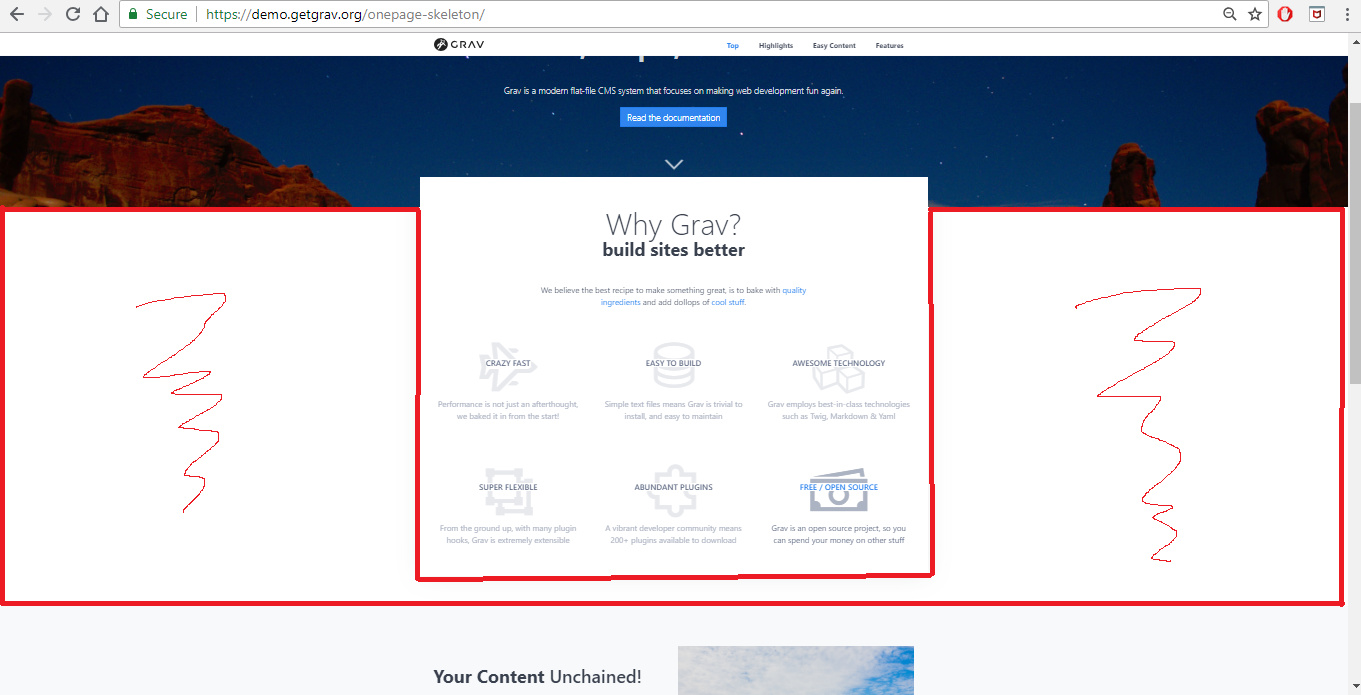
That is just the body tag of the page. You'll have to change either the body css or the #page-wrapper css to whatever color you want and change the section below (#modular-features) that also shows the body back to white.
yeah .. i tried that .. but the problem is that the color overlaps little bit of the header image also, till the part of that container where it is written 'Why grav .. build sites better etc.' ..
last edited 06/15/18 by rohan sharma
and if i want to add a 'my team' div ... how do u suggest i go about it ? i tried copying team.md and team.html.twig from other skeletons but their layout gets mismatch a lot creating weird looking content.
Log in to reply.
Suggested topics
| Topic | Participants | Replies | Views | Activity |
|---|---|---|---|---|
| 4 | 180 | 2 days ago | ||
| 2 | 119 | 3 days ago | ||
| 1 | 100 | 1 week ago | ||
| 1 | 124 | 1 week ago | ||
| 0 | 248 | 3 weeks ago |