Skip to content
Grav 2.0 is officially stable. Read the announcement →

Community guidelines

Please keep discussions civil and on-topic. Repeated violations may lead to a temporary ban.

General

Plain Grav + Admin 1.4 rc2 - enabling FontAwesome

Started by Vince42 8 years ago · 5 replies · 622 views
8 years ago

Hi,

I am trying to set up a simple site. I downloaded 1.4 rc2 of Grav + Admin, created a modular page and am currently trying to setup a feature page.

The first thing that made me wonder: is there an alternative to specifying the features in the expert view frontmatter? Would it be possible to rebuild the same structure in the markdown text?

The next thing that got me stuck: I am trying to use FontAwesome icons in the features, but although I copied and pasted the frontmatter of another theme, no icon is shown.

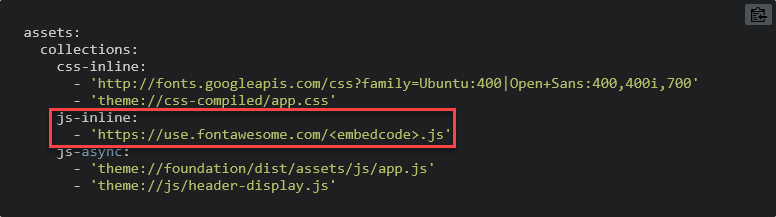
I read in the documentation about the Asset Manager and it seems that I am missing js-inline: - 'https://use.fontawesome.com/<embedcode>.js' in my system.yaml.

Here more questions arose: Can I safely edit system.yaml? Is there a place in the admin panel, where I could edit this part of system.yaml? Is this single change sufficient to get the FontAwesome icons working? Is there a better way to achieve my goal?

Lots of newbie questions - please bare with me. ;)

Cheers
Vince
8 years ago

Hello there,

maybe i cannot answer all of your questions, but let me try it with this one:

@Vince42:
The first thing that made me wonder: is there an alternative to specifying the features in the expert view frontmatter? Would it be possible to rebuild the same structure in the markdown text?

You can use HTML in your markdown. So if you wish to remake the "Features"-view in plain markdown you're able to. Just copy the necessary html of an existing page and edit it as you like. I really don't know why you wish to do it like that, but you re able to. ;)

@Vince42:
I read in the documentation about the Asset Manager and it seems that I am missing js-inline: - 'https://use.fontawesome.com/&lt;embedcode&gt;.js' in my system.yaml.

Here more questions arose: Can I safely edit system.yaml? Is there a place in the admin panel, where I could edit this part of system.yaml? Is this single change sufficient to get the FontAwesome icons working? Is there a better way to achieve my goal?

You can safely edit the "system.yaml". But you should always do it in the the "user/config"-folder. You can just copy your system.yaml to this directory and change it. You can read all about it here.

Regards
Michael

8 years ago

I personally prefer editing markdown in the main content field than editing the frontmatter - that's why I wondered, whether there is a way to have a feature section while avoiding frontmatter editing.

I will try getting FontAwesome to work by editing user/config/system.yaml - thank you for pointing out the right place to do that!

8 years ago

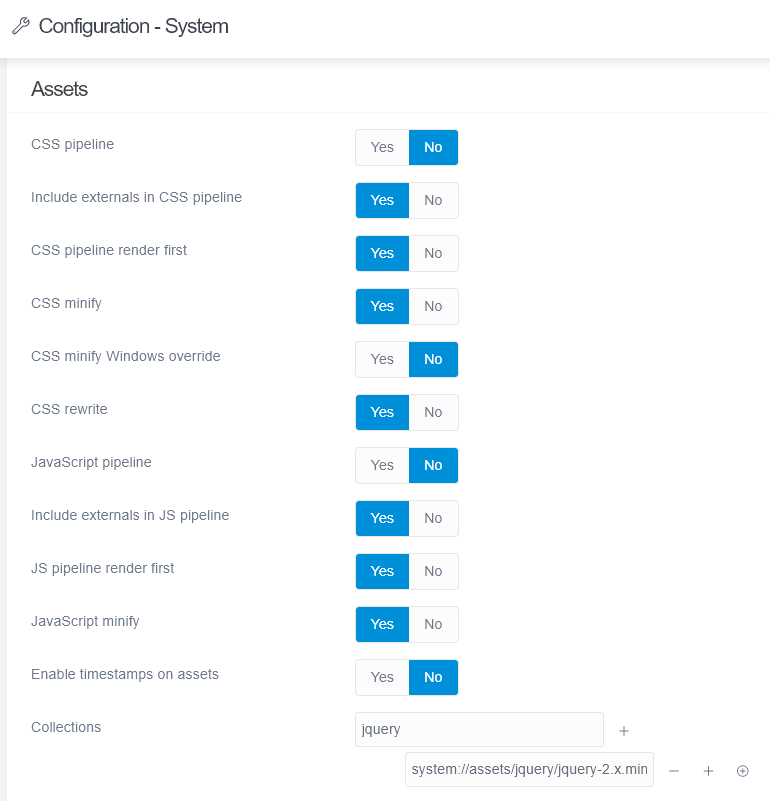
So I thought I should edit in the admin backend this section:
image|480x500

I added the strings that I found in the Asset Manager documentation for FontAwesome
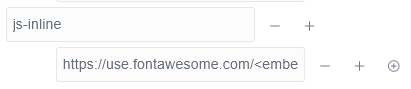
image|690x192

at the end of the configuration
image|411x89

And it does not work. What did I misunderstand?

8 years ago

can't wait to upgrade :)
I will stop my effort to get FontAwesome running in this release then. ;)

👍 1

Suggested topics

Topic Participants Replies Views Activity
General · by Jerry Hunt, 4 days ago
2 74 6 hours ago
General · by pamtbaau, 11 hours ago
1 47 11 hours ago
General · by Andy Miller, 23 hours ago
0 43 23 hours ago
General · by Marcel, 12 months ago
6 346 5 days ago
General · by Duc , 5 days ago
3 39 5 days ago