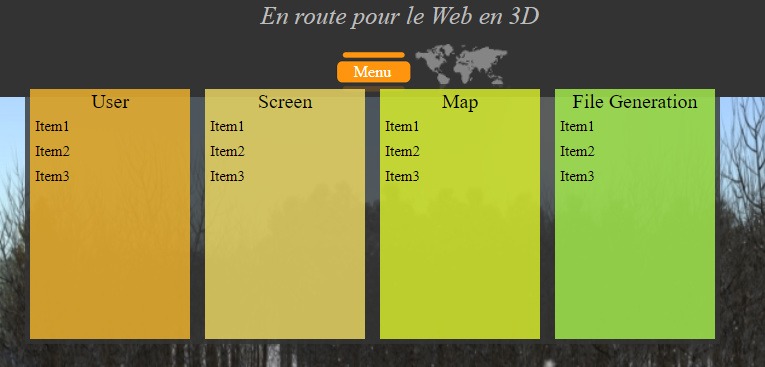
I was hoping to find if there is a "menu builder" from a plugin or theme that allow to modify your menu as you wish ?
Actually I did this menu : https://codepen.io/BirdOne/pen/rPydKy (thanks to some help from Grav's users), and I was actually hoping if there is some plugin/theme that can help me to change it and to build another menu "easily" with just somes clicks like Taxonomy list or like in Wordpress.
My goal is to create a 3D environment and give Grav as a tool to common users of the web. This way my environnement (and btw Grav too) will have more users even if they don't know how to code one simple line in html/css/php/twig.
Sorry if my english is broken and thanks all for your help.
Hi @paulhibbitts, thanks you for your reply. I'm trying to get how your code is working. Shall I replace the file blueprints.yaml by your code ?
I already read Grav tutorial about blueprints but since I'm French I can't get 100% what they're explaining (even if my english is still ok). Before using your code I'd like to understand it. Do you have a video that explain or show how we can use it ? Or even screens after the installation ? 🙂
No, more is needed than just replacing the existing blueprint file. Depending on what theme you are using you would add the relevant YAML code to that blueprint. In addition, if you are wanting these changes to be kept after any theme updates you should create an inherited theme.
You could post the existing theme's blueprints.yaml file and I can try to add the needed menu building YAML as a first step. Next step would be to modify the template in your theme to display the menu items.
It's the basical theme when you create it with dev tools ... I didn't do a lot of modifcation since I don't know what I shall change 😢 . I'd like to be able to create any menu I want from just somes clicks like this one :
Like creating items with sub-items, change orders items, the color background but with buttons to helps "casual" people that don't know how to code.
Thanks a lot for your help Paul !
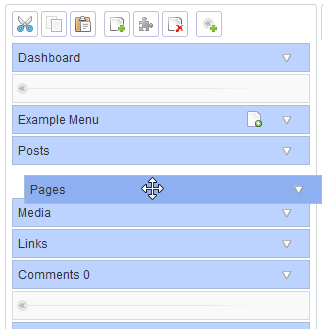
Edit : I was looking for something made in wordpress and here it is : https://fr.wordpress.org/plugins/admin-menu-editor/ this plugin can grant you lot of things about editing your menu ! I'd like to create something like that for Grav, If we can create such a plugin I'd like to upload it as a plugin for Grav for everyone.
Edit 2 : I don't things I've such competence to create it alone, if someone would like to help me on this (you're concerned Paul !), I'll take it. It will help Grav to become a better CMS !
I can help you with creating the menu items themselves via a Blueprint, but not the presentation of the menu as you shared above. Grav does not have a visual menu builder, but as I mentioned you can use Blueprints to create Grav theme menus. Someone else here more experience in CSS/HTML might be able to help though...
Here is what a modified theme blueprint would look like to support creating a simple list of custom menu items (I am using the same Blueprint YAML as I use for my Bootstrap4 Open Matter Theme):
YAML
name:Mezaversion:0.1.0description:Theme Mezaicon:rebelauthor:name:Rayhanemail:<your email>homepage:<your repo>demo:<you demo>keywords:grav, theme, etcbugs:<your repo>/issuesreadme:<your repo>/README.mdlicense:MITform:validation:loosefields:dropdown.enabled:type:togglelabel:Dropdown in Menuhighlight:1default:1options:1:PLUGIN_ADMIN.ENABLED0:PLUGIN_ADMIN.DISABLEDvalidate:type:boolmenubar:type:sectiontitle:'Menubar'underline:truedisplaycustommenus.enabled:type:togglelabel:'Display Custom Menu Items'help:'Determines if any defined custom menu entries are displayed in the menubar.'default:0highlight:1options:1:'Yes'0:'No'validate:type:boolcustommenu:name:menutype:listlabel:'Custom Menubar Items'fields:.text:type:textlabel:Textdescription:'Text label for menu item.'.icon:type:textlabel:Icondescription:'Font Awesome icon for menu item.'.url:type:textlabel:URLdescription:'URL for menu item.'.target:type:selectlabel:Targetdefault:_selfsize:mediumoptions:_blank:'Open in a new window'_parent:'Open in the parent frame'_top:'Open in the full body of the window'_self:'Open in the same frame as clicked'
The above will allow you to create a simple list of custom menubar items in your Theme settings, and the results are saved to user/config/themes/THEMENAME.yaml
I might still be not understanding what you are asking for - the above is to create custom menu items that are not Grav pages within a site. With the term 'Menu Builder' what exactly are you looking for? Depending on your needs etc you might also want to check out Gantry (http://gantry.org/) for Grav and RocketTheme Gantry themes (https://rockettheme.com/grav/themes).
I'd like to create a plugin. This plugin have to show an interface that will help you to create your menu like in this photo :
For this you have to be able to chose the position (center, right, left) choose how the menu will show, the menu order page(1.Menu 2.Dashboard 3.User ...), sub-menus, how the menu is build (in line ? in block ?). This way you can create menu with simple actions.
Thanks for grant, in first view it seem to be helpful ! Thanks too for the Blueprint YALM !