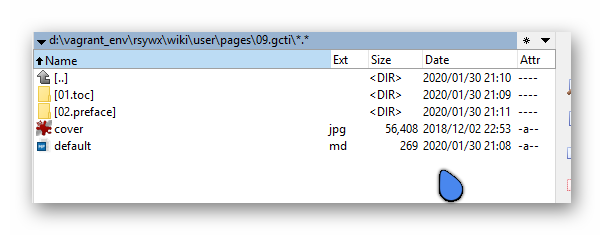
I am now starting to migrate my previous wiki sites to Grav (trying hard).
In one of the "topics", I may have over 20 "pages" (see above for a quick illustration, with 01/02...). I wish to place a link in each page (default.md in each folder) to link to "prev page" and "next page".
@taylorren, If you are still using an inherited theme based on Quark, the functionality is already available.
To implement 'Next' and 'Previous' on your pages, you need to do the following:
In page '09.gcti/default.md', define a collection of pages.
YAML
---content:items:'@self.children'---
Every child-page can now use functions like page.nextSibling and page.isLast in templates. Template '/quark/templates/partials/blog-item.html.twig' is an example using it.
Change the template for all the subpages, eg. '01.toc/default.md', from 'default.md' to 'item.md'.
This will turn each page into a blog item page.
Bonus suggestion:
What you are trying to achieve very much looks likes a blog functionality. You might want to have a look at the 'Blog Site' skeleton which gives you an idea of how a blog using the Quark theme looks like.
NB. The above steps uses the build-in blog functionality of Quark. If you want 'gcti' to show a list of 'items', you should rename '09.gcti/default.md' into '09.gcti/blog.md'
And thanks for the bonus tip. Actually I am not writing a blog in this sense. I have a dedicated WordPress site solely for blog purpose.
I use wiki-type of framework to have a better navigation between pages with tight connections. For example, all pages in gcti will belong to, in this case, a book.
Hi @taylorren, I do something similar in my Bootstrap4 Open Matter and Quark Open Publishing themes called "Sections" where based on a folder hierarchy next/prev page buttons are automatically generated. Support for a taxonomy tag called filter is also supported to dynamically generate different views of the pages.