Skip to content
Grav 2.0 is officially stable. Read the announcement →

Community guidelines

Please keep discussions civil and on-topic. Repeated violations may lead to a temporary ban.

General

Shortcodes not working in additional markdown editor

Started by jordan 5 years ago · 2 replies · 465 views
5 years ago

Hi everyone,

I've added a second markdown editor (form of type "markdown") so that I can distinguish some kind of introduction from the main text content.
My problem is that the shortcodes are not working in this additional markdown editor (but they work correctly in the main "content" form). For example, when using the shortcode to Underline a part of the text, the result is [u]my underlined text[/u] ... does anyone has an idea of how to make the shortcodes work?

Thanks!

5 years ago

So I see two issues here:

  1. Second editor has issues with parsing markdown
  2. You want your pages to have intro

  1. Not sure about that, but sounds like Javascript issue not getting the second editor element
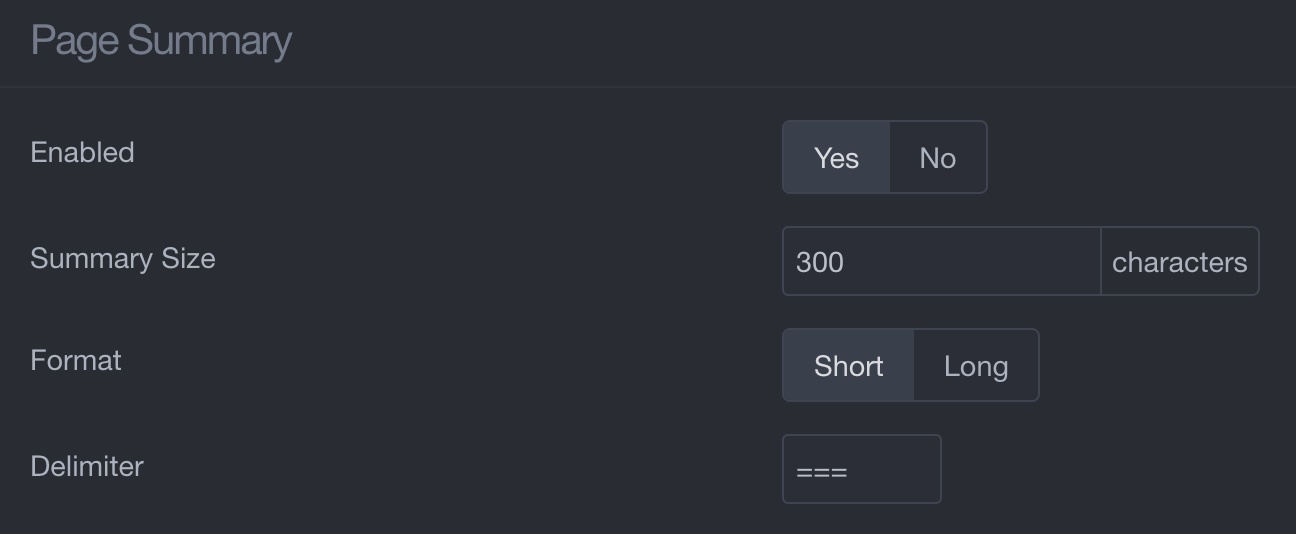
  2. There's a site config (in Admin located under Configuration > Site) which has Page Summary settings:
    Screenshot 2021-10-04 at 17.19.45|690x284
    And then in main content editor you can have something like
    TXT
    
    Some page intro
    

===

Other page content.
With lots of text.

TWIG


In Twig it's available as `{{ page.summary }}` IIRC
5 years ago

Thanks for your answer, and sorry that it took so long for me to reply.

Concerning the ways to add a summary to a page, I know them well and use them regularly. I used an additional editor because it's not really a summary that I need, but a text I can use independently from the main content. To make it more clear, I'm constructing a blog with multiple articles. On the blog page I want to show the summaries of the main contents, but on the articles' pages I want to add a "pre-text" before the main content (in french it's called a "chapô"). And for this chapô I want to have the possibility to use shortcodes, which are currently not functionning.

The markdown syntax is working fine in this chapô's editor : I can use bold, italic, make links, etc. Only the shortcodes are not working.
I've thought that it would may be due to the shortcode's plugin which only takes the main content into account, but I've not been able to find such a specification in the plugin's files...
Suggested topics

Topic Participants Replies Views Activity
General · by Jerry Hunt, 4 days ago
2 74 6 hours ago
General · by pamtbaau, 11 hours ago
1 47 11 hours ago
General · by Andy Miller, 23 hours ago
0 43 23 hours ago
General · by Marcel, 12 months ago
6 346 5 days ago
General · by Duc , 5 days ago
3 39 5 days ago