Skip to content
Grav 2.0 is officially stable. Read the announcement →

Community guidelines

Please keep discussions civil and on-topic. Repeated violations may lead to a temporary ban.

General

Template override for child theme only works when template in parent them is deleted

Started by pg@grav 2 years ago · 8 replies · 561 views
2 years ago

Hi,
i created a child theme for a bootstrap5-theme:
https://github.com/stom66/grav-theme-t2b5
but the template override is not working.
Only if i delete the template in the parent theme, all changes are accepted. Can somebody give me a hint, what might be wrong

steps I did

  1. Inheriting Manually
  2. copy template: from
    user\themes\t2b5\templates\default.html.twig -> user\themes\myb5\templates\default.html.twig
  3. changed
    <div class="container"> -> <div class="container-fluid">
  4. clear all cache
last edited 01/12/24 by pamtbaau
2 years ago

@pgrav,

Hint 1: You made a mistake in step 1.

But since you omitted the most important information, I have no idea what mistake...

Hint 2: Use $ bin/plugin devtools new-theme to prevent making mistakes.

2 years ago

@pgrav:
ustomization#inheriting-manually

Thanks pamtbaau for your quick answer!
I thought inheriting manually is still an option?
I will try the plugin now.
Thanks

2 years ago

@pgrav:
I thought inheriting manually is still an option?

It sure is. Editing all code files with ed and vi is also still an option... ;-)

NB. Please mark your post as solved if issue has been solved.

2 years ago

well i know used the dev-plugin and cli for inheriting, with the same result.
So if somebody knows where to look first, hints are welcome.

2 years ago

@pgrav, I'm sorry, but I cannot reproduce the issue,..

I did the following using a fresh install of Grav:

  • $ cd user/themes
  • $ mkdir t2b5; cd t2b5
  • $ git clone https://github.com/stom66/grav-theme-t2b5 .
  • $ cd ../../..
  • $ bin/plugin devtools new-theme
    • Enter Theme Name: myb5
    • Please choose an option: Inheritance
    • Please choose a theme to extend: t2b5
  • In user/config/system.yaml set the theme:
    YAML
    pages:
    theme: myb5
    
  • Copied /user/themes/t2b5/templates/default.html.twig into folder /user/themes/myb5/templates/
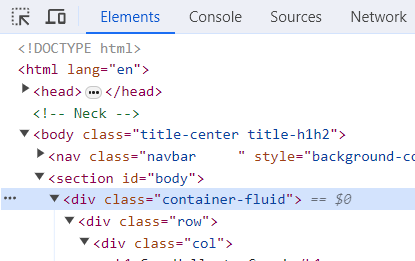
  • Edit template /user/themes/myb5/templates/default.html.twig and changed on line 10: <div class="container"> into <div class="container-fluid">
  • Opened the browser which shows the following in the console:
    image|415x261

Seems to me that template default.html.twig is overriding the original template...

2 years ago

Thank you very much pamtbaau for your time you spend once again!

The strange or funny thing i used toepfereifranke as the theme name (only to make it easier to others here in the forum i shortened the path/themename to myb5.
when i use like you myb5 or even tpfereifanke then i get container-fluid. When i use the "real" name toepfereifranke then i get these problems.

Is there any restriction to the number of letters or something like this in the themename convention

2 years ago

@pgrav, Also toepfereifranke is working fine. Even abcdefghijklmnopqrstuvwxyz is working fine...

Suggested topics

Topic Participants Replies Views Activity
General · by Jerry Hunt, 4 days ago
2 74 6 hours ago
General · by pamtbaau, 11 hours ago
1 47 11 hours ago
General · by Andy Miller, 23 hours ago
0 43 23 hours ago
General · by Marcel, 12 months ago
6 346 5 days ago
General · by Duc , 5 days ago
3 39 5 days ago