Skip to content
Grav 2.0 is officially stable. Read the announcement →

Community guidelines

Please keep discussions civil and on-topic. Repeated violations may lead to a temporary ban.

General

Theme blueprints not working

Started by Alexander Kim 8 years ago · 6 replies · 1145 views
8 years ago

Following this example: https://learn.getgrav.org/forms/blueprints/example-page-blueprint

I created my video.yaml file under "user/themes/MYTHEMENAME/blueprints", contents of its file:

YAML
title: Video
'@extends':
    type: default
    context: blueprints://pages

form:
  fields:
    tabs:
      type: tabs
      active: 1

      fields:
        gallery:
          type: tab
          title: Gallery

          fields:
            header.txf:
              type: text
              label: Add a number
              default: 5
              validate:
                required: true
                type: int

            header.sb:
              type: select
              label: Select one of the following
              default: one
              options:
                one: One
                two: Two
                three: Three

Cleared all caches, but i still don't see that tab under "/admin/pages" or "/admin/pages/home" advanced tab. What's wrong? Is it bug?

8 years ago

@heihachi88:
title: Video
'@extends':
type: default
context: blueprints://pages

form:
fields:
tabs:
type: tabs
active: 1

YAML
  fields:
    gallery:
      type: tab
      title: Gallery

      fields:
        header.txf:
          type: text
          label: Add a number
          default: 5
          validate:
            required: true
            type: int

        header.sb:
          type: select
          label: Select one of the following
          default: one
          options:
            one: One
            two: Two
            three: Three

Hello,

I have copy/paste your code in a new video.yaml on my configuration and i see the new tab.
image|690x113

So your yaml is correct.

Have you got some more information ?

8 years ago

Just strange, maybe issues with my theme's yaml?

Here's the contents of it (user/themes/MYTHEMENAME/MYTHEMENAME.yaml):

YAML
enabled: true
dropdown:
  enabled: true

Also is it possible to put my custom fields directly in "Content" tab?

last edited 03/26/18 by Alexander Kim
8 years ago

Why it's so complicated about blueprints in grav? I've tried a new installation of GRAV with default theme, IT JUST DOESN'T WORKS! Makes me mad.

8 years ago

could you describe the steps you did? I just tried clean installation of woo theme again, installed admin plugin, created "user/themes/mytheme/blueprints/page.yaml", added yaml code from example, went to admin and nothing!

8 years ago

I don't know woo theme.
What's the content of your page.yaml ? Why do you need to create a page.yaml ?

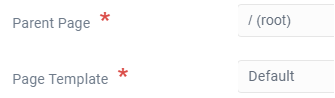
Try first to create a page which template is default :
image|335x98

8 years ago

page.yaml has content just like in the first post.

Already have default page.

Suggested topics

Topic Participants Replies Views Activity
General · by Jerry Hunt, 4 days ago
2 80 9 hours ago
General · by pamtbaau, 14 hours ago
1 51 14 hours ago
General · by Andy Miller, 1 day ago
0 44 1 day ago
General · by Marcel, 12 months ago
6 346 5 days ago
General · by Duc , 5 days ago
3 40 5 days ago