Skip to content
Grav 2.0 is officially stable. Read the announcement →

Community guidelines

Please keep discussions civil and on-topic. Repeated violations may lead to a temporary ban.

Installation & Hosting

How to debug using dump and xdebug?

Started by M 4 years ago · 14 replies · 1014 views
4 years ago

I was absent from Grav for some time and wanted to continue develoment. About two or three years ago I could simply place a dump() command inside a PHP file and saw the content in the browser. This is not the case any more. I see nothing. Any ideas?

I tried it on a hosted site where it worked in the past as well as on a fresh local installation on my laptop. It runs Arch with php7-apache, php7-fpm, php7-gd using built-in symfony.

👍 1
4 years ago

Thanks for providing all that environment info. ⭐ More posters should do this!

Pretty sure this PHP command is still supported. The only reasons I can imagine that it might not render are:

  • CSS or something else in the page layout is hiding the dump output
  • the PHP code is being skipped (for example, within an if block that is evaluated false)

Take a look at the chapter on other available debug techniques as well, sometimes there are better options than PHP dump().

Let us know how you go, please.

4 years ago

Thanks for your reply. I have a fresh install of grav-admin and added the events plugin. To the plugin I added the following code:

PHP
    public function onAdminSave(Event $event)
    {
        $this->grav['log']->info('Entering onAdminSave');

        $config = (array) $this->config->get('plugins.events');
        dump($config);
        $this->grav['log']->info('onAdminSave dump finished');
        ....

This is the only change I made after installation and it leads to

TXT
[2022-11-09 21:31:10] grav.INFO: Entering onAdminSave [] []
[2022-11-09 21:31:10] grav.INFO: onAdminSave dump finished [] []

in grav.log. But I see nothing from the dump.

last edited 11/09/22 by M
4 years ago

So it looks like that code block is being run. Since this is part of Admin and that has lots of tricky JS and CSS and AJAX, I think it might be the first option I suggested.

Sometimes I have added die(); after the dump() when I suspect my dump output is being obscured.

4 years ago

Thank you very much for that hint. When I add die(); I can see the dump. It's not very comfortable, but it will help.

What about logging variable contents to log file or debugbar? The documentation didn't help me much, as the PHP examples only output some textstrings. How do I use it for more complicated PHP types?

4 years ago

@myscha:
How do I use it for more complicated PHP types?

I don't know, but here are some suggestions:

  • remove die() and view the page source (it's obscured in rendering but should be in there somewhere); browser 'Inspect' might show something semi-readable too
  • enclose your ugly dumped output before die() with <pre>...</pre>
  • use the other debugger "clockwork" - I understand that it's much better (you'd need to use $this->grav['debugger']->addMessage($myvariable) from PHP)
  • try Xdebug if it's available - have only just started with this and have not got everything working yet.
4 years ago

The reason why dump() doesn't show during onAdminSave is because the Save action is performed by multiple task requests to the server.

When hitting Save on a page:

  • The first request: onAdminSave is being called, but there is no call to onOutputGenerated.
  • In subsequent requests, onAdminSave is not being called, and onOutputGenerated is being called in some of them.

Conclusions:

  • So I guess that any output generated using dump() during onAdminSave will never be sent to the client.
  • dump() does work in events like OnPluginInitialized, onPageInitialized, ...

Just curious, why would one use dump() when one can step through code using a debugger?

4 years ago

@hughbris:
use the other debugger “clockwork” - I understand that it’s much better (you’d need to use $this->grav['debugger']->addMessage($myvariable) from PHP)

PHP
    public function onAdminAfterSave(Event $event)
    {
        $this->grav['debugger']->addMessage("onAdminAfterSave");

        $icalendar = new \Events\iCalendarProcessor();
        $this->grav['debugger']->addMessage($icalendar);

doesn't show anything in the debugbar. What am I doing wrong?

@pamtbaau:
Just curious, why would one use dump() when one can step through code using a debugger?

Because one didn't know that it's possible :see_no_evil:
Are you talking about Xdebug, too?

last edited 11/11/22 by M
4 years ago

@myscha,

Because one didn’t know that it’s possible :see_no_evil:

Uh... wasn't that part of course Programming 101 ? ;-)

Are you talking about Xdebug, too?

Yes. See Xdebug docs.

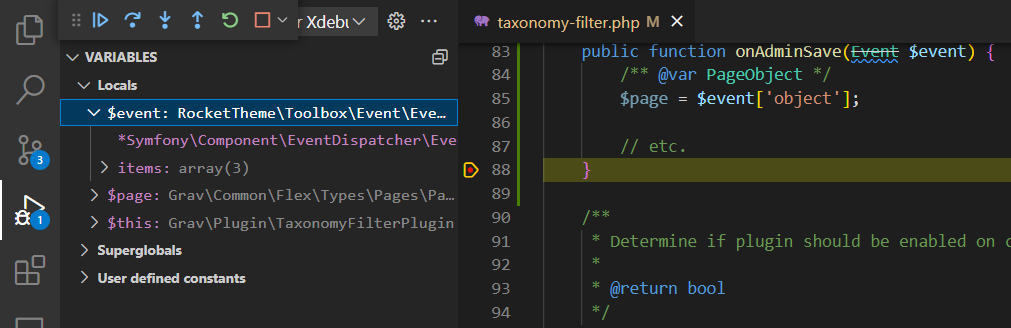
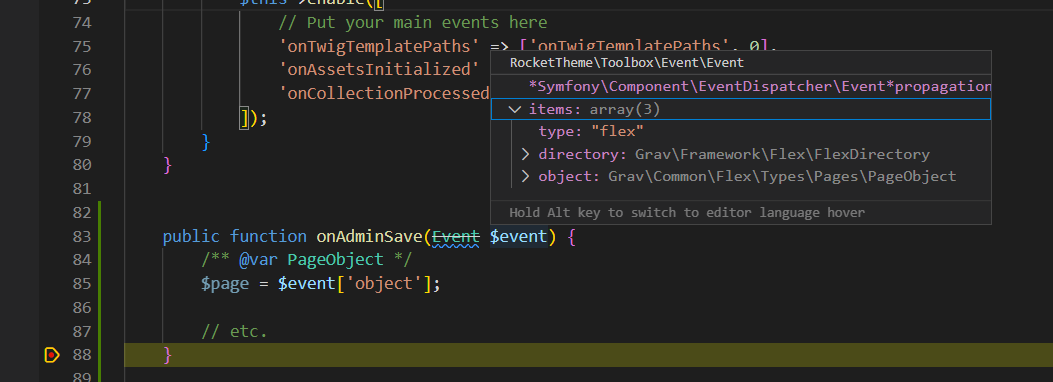
Here is a screenshot when using Xdebug in VScode while hovering over parameter $event after a breakpoint inside onAdminSave (line 88) has been hit.

image|690x250

And this is the list of variables shown in the left sidebar of VScode
image|690x223

last edited 11/11/22 by pamtbaau
4 years ago

I assume you use a/some VScode plugin/s, can you tell which one/s for PHP?

👍 1
4 years ago

I would also like to know this.

last edited 11/19/22
4 years ago

Plenty of tutorials can be found on the web...

  • What have you tried sofar? Which steps?
  • Where in the process of setting up Xdebug with VSCode did you get stuck?

In short:

  • Install Xdebug on your system and update Apaches PHP ini file.
  • Install Xdebug Helper for Chrome or Firefox.
    • Browse to the website you wish to debug, open extension and switch on "Debug".
  • In VSCode:
    • Install VSCode extension:
    • PHP Debug by Xdebug
    • While you're adding extensions, add as a bonus for PHP editing:
    • PHP Intelephense by Ben Mewburn
    • Twig Language 2 by mblode
    • From the left menu hit "Run and Debug" icon. Then, in the sidebar:
      • Click "Create a launch.json file"
      • Chose "PHP" from dropdown.
      • Start the debugger using the green arrow
4 years ago

Thanks. I doubt you can help in my situation, but here's why I think I'm having trouble in a nutshell:

  • I'm accessing PHP in docker containers from VSCode on the host. I have Xdebug info output and can dump but not step debug. The step debugger is enabled but unable to connect to the configured "client". Online guides tell me not to open a port on the docker container, so I am assuming VSCode is the "server" here.
  • I am probably wasting time because I am confused which is server and which is client.
  • I am probably wasting time because I don't understand whether I should set Xdebug up in the browser or VSCode or both. I'm trying both.
  • The VSCode config/launch UI is pretty confusing and the settings.json file is not exactly self documenting. I think my "path to PHP" setting might need a special value.

This is all a diversion from the original question and I don't expect that you can help. I wanted to explain what I am finding difficult. Some online resources have helped me progress but there still seem to be significant gaps in my understanding of how this should work.

4 years ago

@hughbris,

I doubt you can help in my situation

I've never used Docker (I'm using WSL on Windows 11), so indeed I might not be of much help in you situation.

This is all a diversion from the original question

I've changed the title to: How to debug using dump and xdebug?

Might it be an idea to start getting XDebug running on a environment without Docker? Just to get a feel of how things interop. Once you've got that working, you can add the complexity of Docker.

Could this blog be of any help: https://blog.devsense.com/2022/develop-php-in-docker. It also shows Xdebug.

last edited 11/30/22 by pamtbaau
4 years ago

Thanks, it's because I know your environment is nothing like mine that I doubted you could help.

@pamtbaau:
Might it be an idea to start getting XDebug running on a environment without Docker?

It would confirm that Docker is the problem. However I try to use Docker for server functions to keep my desktop clean and I'm reluctant to lose that. It's a double edged sword, I agree.

Thanks for your offers and the link but it's not quite what I'm looking for.
Suggested topics

Topic Participants Replies Views Activity
Installation & Hosting · by antoinep, 11 hours ago
5 59 5 hours ago
Installation & Hosting · by Jürgen Dietrich, 7 months ago
0 60 7 months ago
Installation & Hosting · by rappluk, 8 months ago
0 61 8 months ago
Installation & Hosting · by N, 12 months ago
3 71 12 months ago
Installation & Hosting · by Youle, 1 year ago
1 60 1 year ago