Skip to content
Grav 2.0 is officially stable. Read the announcement →

Community guidelines

Please keep discussions civil and on-topic. Repeated violations may lead to a temporary ban.

Installation & Hosting

How to properly duplicate website

Solved by pamtbaau View solution

Started by Cameron Limbrick 3 years ago · 6 replies · 723 views
3 years ago

I copied my website.com to staging.website.com in cpanel file manager. when I login to staging.website.com/admin my "login custom image" and "primary custom logo" is wrong, it actually points to an old image that i initially setup at the beginning. any idea what's going on?

what is the best practice for duplicating the website and admin so that it's a perfect clone?

last edited 09/24/23 by Cameron Limbrick
3 years ago Solution

@cameronl, Grav is a flat file CMS, so any way you can copy all files from one location to another is fine. Using zip, FTP, scp, etc., whatever fits best in your workflow.

When all of the site's config settings are located inside folder /user/config/, you're done.

However, just copying is not enough when using so called Environment configuration. This is automatically used by Admin, but can also be enabled manually.

Environment configuration allows you to use specific settings per domain. Think of dev, staging, production settings. For example, you might want to switch off asset pipelining in dev, but switch on in staging/production.

The domain related settings are kept in separate folders:

  1. /system/config/ contains all available settings with defaults.
    These should never be touched.
  2. /user/config/ contains user defined settings that override the settings found in location 1.
  3. Settings for specific domains which override settings defined in location 2. and 1.
    • /user/env/domain1/config/ for configuration settings specific for domain "domain1"
    • /user/env/domain2/config/ for configuration settings specific for domain "domain2"

Note: Grav 1.6 uses location /user/domain/config/ while Grav 1.7 uses /user/env/domain/config/.

That means, that when a site is being cloned from "old-domain" into "new-domain", the /user/env/old-domain/ folder should be copied (or renamed) into /user/env/new-domain/, and adapted as required for the new domain.

When using Admin, saved config files will automatically be stored into a folder using the current domain's name. Admin will not automatically copy the settings for the old-domain into the folder of the new-domain.

Getting back to your issue:
This might be caused by the Environment configuration. In the new domain, Grav will fallback to /user/config/, which might still contain your old settings.
👍 2
last edited 09/24/23 by pamtbaau
3 years ago

thank you for this helpful info. I successful renamed domain folder in /user/ to the new domain and everything looks ok. btw, I am using v1.7.42.3 and there is no env folder. Am I missing something? thanks!

@pamtbaau:
Note: Grav 1.6 uses location /user/domain/config/ while Grav 1.7 uses /user/env/domain/config/.

3 years ago

@cameronl, I'm not sure if it makes any difference, but this is a note at the very top of the docs:

Up to Grav 1.6 environments were stored in user/ folder. Grav 1.7 moves environments to user/env/ to make environments easier to maintain. It is highly recommended that you move all the environments into this new location on your existing sites.

And in the 1.6 to 1.7 upgrade notes it is said:

Important: Grav 1.7 moves environments into user://env folder. The old location still works, but it is better to move environments into a single location future features may rely on it.

Moving it to /user/env/ saves you from clutter in the /user root folder.

3 years ago

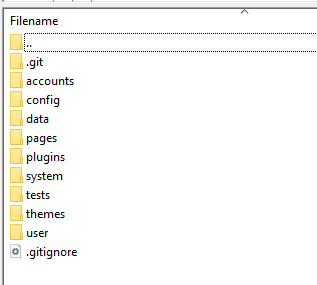
Hey, quick question - I'm trying to achieve the same thing as OP, but my user folder doesn't contain the /env/ or /domain.com/ folder.

Screenshot 2023-10-21 014103|317x285

What am I missing here?

3 years ago

@Zyklome, Nothing...

As said above:

When all of the site’s config settings are located inside folder /user/config/, you’re done.

Suggested topics

Topic Participants Replies Views Activity
Installation & Hosting · by antoinep, 11 hours ago
5 59 5 hours ago
Installation & Hosting · by Jürgen Dietrich, 7 months ago
0 60 7 months ago
Installation & Hosting · by rappluk, 8 months ago
0 61 8 months ago
Installation & Hosting · by N, 12 months ago
3 71 12 months ago
Installation & Hosting · by Youle, 1 year ago
1 60 1 year ago