Skip to content
Grav 2.0 is officially stable. Read the announcement →

Community guidelines

Please keep discussions civil and on-topic. Repeated violations may lead to a temporary ban.

Installation & Hosting

How to set language of UI of Admin Panel

Solved by pamtbaau View solution

Started by Iñigo 6 years ago · 3 replies · 2584 views
6 years ago

Hello people!

I really like Grav. Great discovery!

I've already set up a couple of sites 😊

I know this is an obvious question, but I've been trying for 1 hour to change the language from English to Spanish of the UI of Grav's Admin Panel...

With the latest Grav Update, I can't put my language in Spanish

And I can't change it, after cleaning cache, cookies, etc.

What do I do wrong with the image?
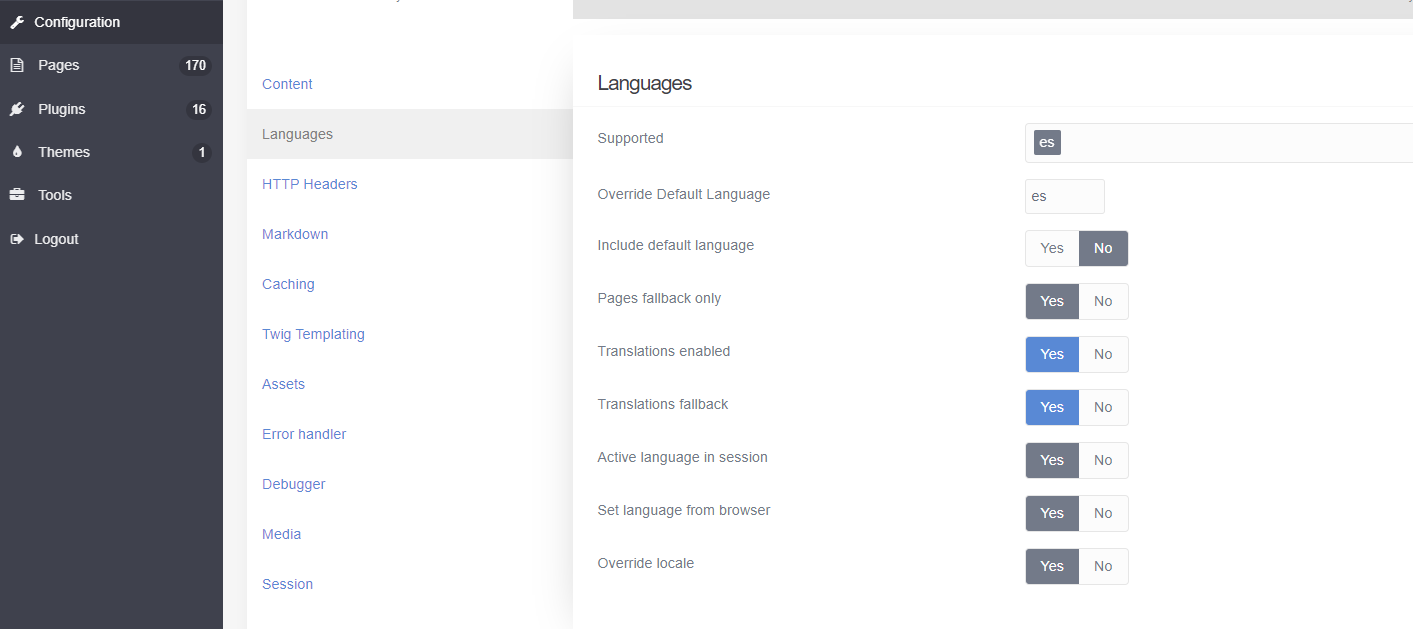
language|690x307

I appreciate your help! 😉

Thank you very much!

last edited 01/25/20 by pamtbaau
6 years ago Solution

@montty, There are 2 settings for language(s):

  • Language of the content of the site.
    You set these settings in section 'configuration/system/languages`. That's what your image displays.
  • The language of the UI of Admin Panel.
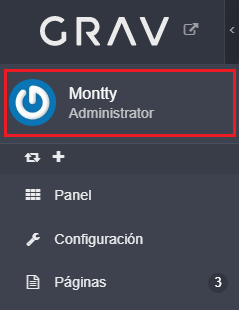
    This is set in the configuration section of the current user, which can be found at the top of the menu.
    image|239x310
👍 1
3 years ago

Note, you have to sign out and sign back in again for the user language change to take effect!

Suggested topics

Topic Participants Replies Views Activity
Installation & Hosting · by antoinep, 11 hours ago
5 59 5 hours ago
Installation & Hosting · by Jürgen Dietrich, 7 months ago
0 60 7 months ago
Installation & Hosting · by rappluk, 8 months ago
0 61 8 months ago
Installation & Hosting · by N, 12 months ago
3 71 12 months ago
Installation & Hosting · by Youle, 1 year ago
1 60 1 year ago