Skip to content
Grav 2.0 is officially stable. Read the announcement →

Community guidelines

Please keep discussions civil and on-topic. Repeated violations may lead to a temporary ban.

Plugins

Custom template for Archives plugin to sort by Year / Months

plugins

Started by Jovanie De La Cruz 2 years ago · 1 replies · 182 views
2 years ago

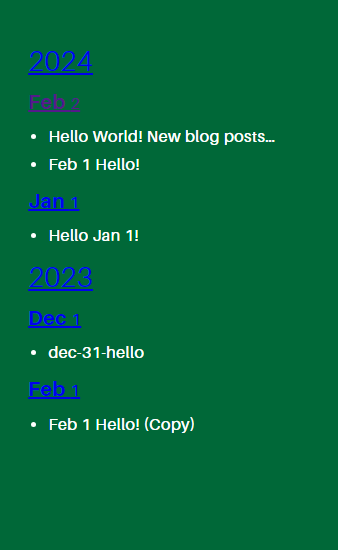
Was looking around to see if anyone else was able to achieve this and aside from another plugin that didn't quite accomplish what I wanted there wasn't really a clean solution. I made a custom template from the included archives.html.twig to add Year tags above the months. Give it a try!

TWIG
<!-- user/themes/custom_theme/templates/partials/year_month_archives.html.twig -->
{% set last_year = "" %}
{% for year,months in archives_data %}
    {% if last_year != year|date("Y") %}
    <a href="{{ archives_url ?? base_url }}/{{ config.plugins.archives.taxonomy_names.year }}{{ config.system.param_sep }}{{ year|date(config.plugins.archives.taxonomy_values.year)|lower|e('url') }}"><h2>{{ year|date("Y") }}</h2></a>
    {% endif %}
    {% set last_year = year|date("Y") %}
    <a href="{{ archives_url ?? base_url }}/{{ config.plugins.archives.taxonomy_names.month }}{{ config.system.param_sep }}{{ year|date(config.plugins.archives.taxonomy_values.month)|lower|e('url') }}">
    <h3>{{ year|date("M") }}{% if archives_show_count %}
        <span class="label">{{ months|length }}</span>
        {% endif %}</h3></a>

    <ul>

        {% for month, items in months if items|length > 0 %}
        <li>
            <a href="{{items.link}}">
            {{items.title|striptags|truncate(25, "...")|convert_encoding('UTF-8', 'HTML-ENTITIES')}}
            </a>
        </li>
        {% endfor %}
    </ul>
{% endfor %}
e0d9fb0ffbe47a326456a79c8246c289|307x500

I still need to clean it up and style it for my custom theme but this is what I was looking to achieve.

👍 1
last edited 02/23/24 by Jovanie De La Cruz
2 years ago

Thanks for sharing! It's a nice easy plugin to customise. I made something very similar in the Receptar theme from a timeline style I pinched from somewhere (the Timeline plugin I think). The page collection "events" is defined as the list of blog posts, not sure why I named it that way:

TWIG
<div class="years">
{% for year in 'now'|date('Y')..page.collection('events').last.date|date('Y') %}
{# https://css-tricks.com/snippets/css/unordered-list-as-a-timeline/ #}
    <h2>{{ year }}</h2>
    <ol class="timeline">
    {% for event in page.collection('events') if event.date|date('Y') == year %}
        <li><time datetime="{{ event.date|date('c') }}">{{ event.date|date('M j') }}</time> : <a class="event" href="{{ event.url }}">{{ event.title }}</a>
        {% if event.taxonomy.tag %}
        <div class="entry-category"> {# classnames and wrapper required to piggyback off theme styles #}
            <span class="tags-links entry-meta-element">
            {% for tag in event.taxonomy.tag %}
                <a href="/tag{{ config.system.param_sep }}{{ tag }}" rel="tag">{{ tag }}{% if not loop.last %}, {% endif %}</a>
            {% endfor %}
            </span>
        </div>
        {% endif %}
        </li>
    {% endfor %}
    </ol>
{% endfor %}
</div>

Live example.

Suggested topics

Topic Participants Replies Views Activity
Plugins · by Rene, 1 week ago
2 43 1 week ago
Plugins · by Xavier, 4 weeks ago
2 53 4 weeks ago
Plugins · by Luka Prinčič, 7 years ago
3 1179 1 month ago
Plugins · by Sebastian van de Meer, 1 month ago
1 47 1 month ago
Plugins · by PIERROT Alain, 2 months ago
3 72 2 months ago