Hi there Grav team!
Last week I began a project from scratch and I'm enjoying a lot working with Grav.
I have built my own plugin to insert custom shortcodes. I added this shortcodes to the editor thanks to "Editor Buttons" plugin. Everything is working fine but I miss a feature or at least I don't know how to do it.
Shortcodes accept attributes. The way Grav works, once you click the shortcode icon, the shortcode is added to the editor with the attributes filled with a default value.
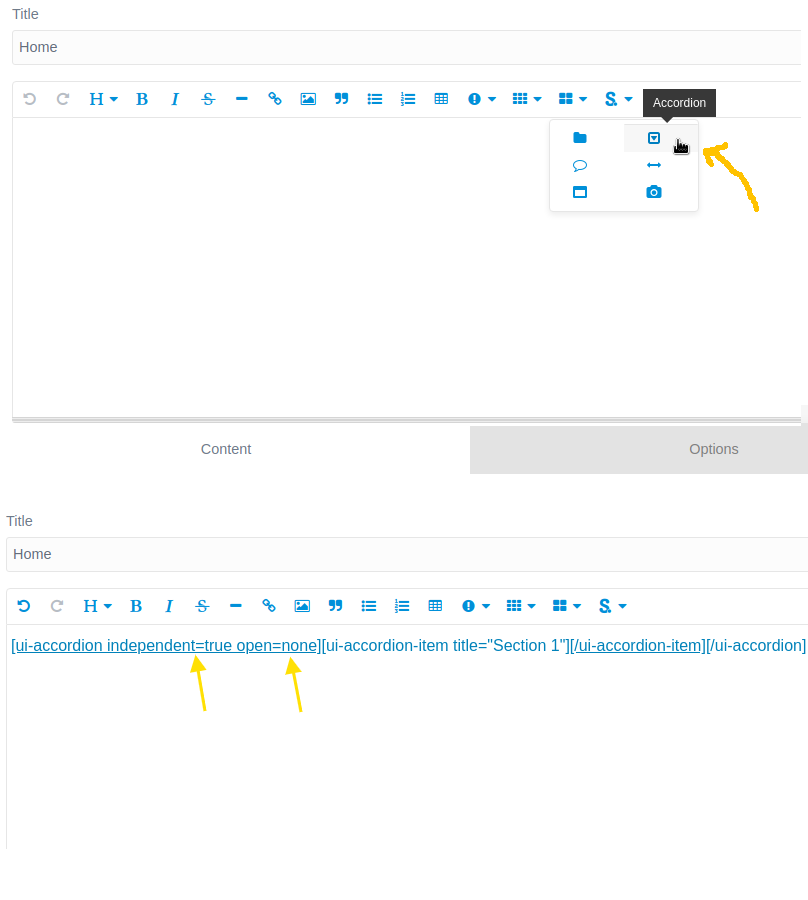
It would be possible to add an intermediate step and open a modal window with text inputs or even better with a <select> tag to choose the attributes from predefined options?
I have created a test shortcode, I called it [green]. The code that I use to insert this shortcode is the following. This code is added to the plugin "Editor Buttons" plugins->editor-buttons->admin->buttons->insert-shortcodes-js->my-file.js
...
children: [
            {
              'green': {
                identifier: 'green',
                title: 'Green',
                label: '<i class="fa fa-fw fa-paint-brush" style="color: green">[green]</i>',
                modes: ['gfm', 'markdown'],
                action: function (_ref) {
                  let codemirror = _ref.codemirror, button = _ref.button;
                  button.on('click.editor.green', function () {
                    Instance.buttonStrategies.replaceSelections({
                      token: '$1',
                      template: '[green attrib1=value1 attrib2=value2]$1[/green]',
                      codemirror: codemirror
                    });
                    codemirror.focus();
                  });
                }
              }
            },
...
The on click event directly inserts the shortcode defined here with the attributes defined by default. There is a way to insert the attributes in an intermediate step through a modal window?
So, the people in charge of adding content doesn't have to remember all different options for all shortcodes, they only will have to select the most appropriate one from a <select> list.
I hope the explanation is clear.
I think it will improve a lot the experience for editors.
Best!