Skip to content
Grav 2.0 is officially stable. Read the announcement →

Community guidelines

Please keep discussions civil and on-topic. Repeated violations may lead to a temporary ban.

Plugins

Newbie one: How to insert the google map code into the form template

Started by Pere Castanyer 8 years ago · 12 replies · 3203 views
8 years ago

Hello,

I've started using grav (with gantry5) and I'm trying to show a map in the contact form page.

I have a page folder "3.Contact" with the form file form.md in it as shown in the documentation: https://learn.getgrav.org/forms/forms/example-form

Then I've installed, enabled and configured the google map plugin and I was given this code to view the map:

TXT
[google-maps width='100%' lat=44.540 lng=-78.546 zoom=13 scrollwheel=true panControl=true iconurl='/absolute/path/to/marker/icon.png']
***My Place***
This is my place
[/google-maps]

If I put this on the form.md file, the maps shows but the form is not rendered. Where I must put the code?

Thanks in advance.
8 years ago

Yes.
I finally used a gantry 5 particle to display It..but i want to do It with the grav plugin.

8 years ago

I suggest you search the web for "grav google maps". It will show you a couple of relevant Grav plugins and even some Grav Forum posts about that topic.

👍 1
7 years ago

Navigate to plugins/google-maps/google-maps.yaml and enter your Google Maps API and save the file.

Interesting though, you have to set up billing to use the Google Maps API. They they recommend restricting usage by creating a user for your API.

Not sure it's worth all of that to embed a map ;)

7 years ago

Hi,
I have a related problem.

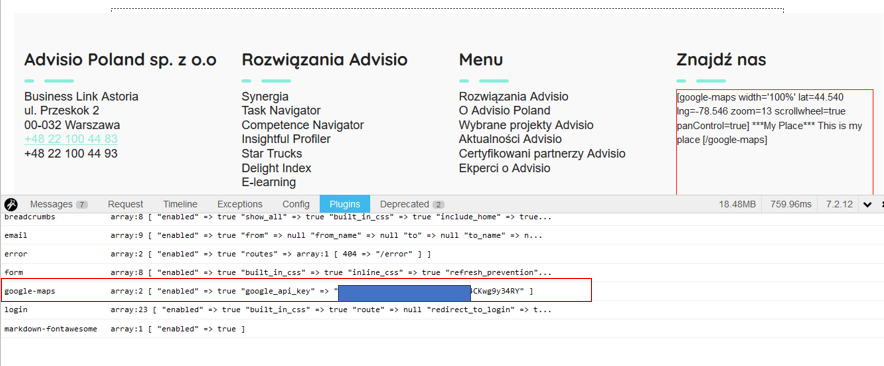
How to display a map in the footer for each page. Footer file is in ../partials/footer.html.twig, but embedding markdown in ..html.twig displays only markdown:(

Please see below screen:
debugger%20map|690x285

last edited 08/13/19 by Paweł
7 years ago

If I understand right, you did embed the markdown/shortcode for the google maps shortcode in your footer.html.twig ?
if so, that will not work, as twig does not process/interpret markdown shortcodes.
try to use the correct syntax to embed shortcodes in twig, see for example this hint
on stackoverflow

7 years ago

So, basically I should create a new page (.md file) where I put markdown (markdown embeded in .md shows a map). Then I should embed content of this page in /partials/footer/html.twig, right?

7 years ago

Perhaps not specifically what you're looking for I highly encourage you to abandon Google Maps in favor of OSM. The benefit is that people can own the data, not Goolag.

Here're the API docs: https://wiki.openstreetmap.org/wiki/API

Do the right thing.

7 years ago

No, just the other way round 😀 - your footer is a template which is shown on all pages that incorporate that template, so will have to insert the maps shortcode in a way that can be interpreted by twig.
and, as already mentioned by next poster, you could consider using OSM instead of google maps, for various reasons.
there is a nice grav plugin for OSM: Map Marker Leaflet

7 years ago

Hello guys!
Does anyone has implemented the Google Maps shortcode in html.twig?
Any example would be appreciated

7 years ago

@01K, The readme of the Google Maps plugin provides an example that works...

You already know how to embed a shortcode in Twig for Owl Carousel plugin and this shortcode is no different.

TWIG
{{ "[google-maps lat=44.540 lng=-78.546][/google-maps]" | shortcodes }}

The only difference is that you need a valid API to make it work without errors...

What have you tried and failed to work?

👍 1
last edited 12/03/19 by pamtbaau
7 years ago

@pamtbaau:
{{ "[google-maps lat=44.540 lng=-78.546][/google-maps]" | shortcodes }}

That's awesome! Thank you!

Suggested topics

Topic Participants Replies Views Activity
Plugins · by Rene, 1 week ago
2 43 1 week ago
Plugins · by Xavier, 4 weeks ago
2 53 4 weeks ago
Plugins · by Luka Prinčič, 7 years ago
3 1179 1 month ago
Plugins · by Sebastian van de Meer, 1 month ago
1 47 1 month ago
Plugins · by PIERROT Alain, 2 months ago
3 72 2 months ago