Skip to content
Grav 2.0 is officially stable. Read the announcement →

Community guidelines

Please keep discussions civil and on-topic. Repeated violations may lead to a temporary ban.

Plugins

Plugin-Design: how to best add custom data to a form?

form

Started by Julien 5 years ago · 5 replies · 1007 views
5 years ago

I'm trying to write a plugin for the following scenario:

  • Via Admin, I want the user to be able to curate a list of events
  • Each event has different fields, like title, data, location and many more
  • Visitors should be able to "subscribe" to events, via a simple form
  • Visitors need to be able to select the events they are interested in, then submit their name and e-mail address
  • The visitor's data, including the events and the event's details, need to be sent via email as well as saved so they can be evaluated later

The forms plugin seems generally to be a good fit; it has mail and save actions that will generally do what I'm looking for. Using the data-manager plugin allows to inspect and download the saved data, which works fine.

No matter what approach I try, I run into one or multiple of these problems:

  • Can't add the selected event's details to the submitted data
  • Adding the event's details to the submitted data does not work without JavaScript
  • The solution can not easily be wired up and maintained via Admin for non-power-users

My "best" solution so far looks like this:

  • Curate a list of events in the page headers (can be exposed via blueprint)
  • Add a form to the page and make sure there is a hidden field with a known id/name
  • In a custom template, create fake "subscribe" toggles for each event
  • In the template, with JavaScript, add or remove all of the selected event's details to the hidden form field as a JSON string
  • In the template that processes the form for email and data, have custom logic to process the JSON string accordingly

This seems like a dirty hack at best. Any suggestions as how to do this properly?
5 years ago

How does subscription to the event happen? Does every event have separate page with a form? In such case you could just use a hidden field with a current page URL I think. Or there are multiple events on a page and you need all the details of the event?

5 years ago

Hey Karmalakas, thanks for your reply. All events are displayed on the same page. You can subscribe to one, two, any number of them. They all have a toggle that you can flip, in which case they will be included when submitting the form.

5 years ago

From what I imagine, you'd need JS anyway to handle toggling. But I was thinking maybe some custom field could help here to fill event data 🤔 Not sure what to suggest actually

5 years ago

@domsson, The following is a rough example on how one can add fields dynamically to a form and process its submitted data.

  • Create new page with form: 'user/pages/03.events/form.md'
    YAML
    ---
    form:
    name: eventform
    fields:
      name:
        label: Name
        placeholder: Enter your name
        type: text
        validate:
          required: true
    buttons:
      submit:
        type: submit
        value: Submit
    process:
        # without action, 'onFormProcessed' will not be fired
        processEvents: true 
    ---
    
  • Create plugin $ bin/plugin devtools new-plugin
    Say we call it 'eventform'
  • Subscribe to form events in '/user/plugins/eventform/eventform.php':
    JS
    $this->enable([
      // Put your main events here
      'onFormInitialized' => ['onFormInitialized', 0],
      'onFormProcessed' => ['onFormProcessed', 0],
    ]);
    
  • Add new form fields in 'onFormInitialized()':

    PHP
    public function onFormInitialized($event)
    {
    $form = $event['form'];
    
    if ($form['name'] !== 'eventform') {
      return;
    }
    
    // Get 'id' and 'title' of all events from somewhere
    $events = [
      'idEvent1' => 'Title event 1',
      'idEvent2' => 'Title event 2',
    ];
    
    $eventsField = [
      'type' =>  'checkboxes',
      'label' => 'Select events',
      'options' => [],
    ];
    
    // Add options to checkboxes field
    foreach ($events as $id => $title) {
      $eventsField['options'][$id] = $title;
    }
    
    $fields = (array) $form['fields'];
    $fields['events'] = $eventsField;
    $form->setFields($fields);
    }
    
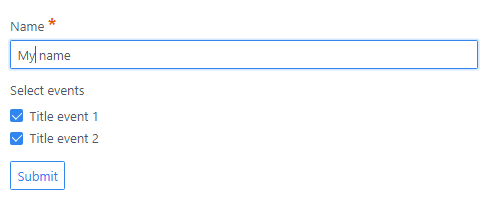
  • Form will now look like:
    image|486x204
  • Process submitted data in 'onFormProcessed()':

    PHP
    public function onFormProcessed($event)
    {
    $form = $event['form'];
    $action = $event['action'];
    
    if (! ($form['name'] === 'eventform' && $action === 'processEvents')) {
      return;
    }
    
    $values = $form->value();
    $events = $values['events'];
    
    // Save and mail data
    }
    
👍 2
last edited 04/01/21 by pamtbaau
5 years ago

That's super useful! I was experimenting with adding additional inputs via templates (using the HTML form attribute to associate them with the form), but that did not work at all. I was wondering what other ways there were to dynamically add fields - and now you laid one out for me.

I will give that I try today. Thank you very much for your detailed suggestions!

Suggested topics

Topic Participants Replies Views Activity
Plugins · by Rene, 1 week ago
2 43 1 week ago
Plugins · by Xavier, 4 weeks ago
2 54 4 weeks ago
Plugins · by Luka Prinčič, 7 years ago
3 1181 1 month ago
Plugins · by Sebastian van de Meer, 1 month ago
1 48 1 month ago
Plugins · by PIERROT Alain, 2 months ago
3 73 2 months ago