If i use the scholar theme from “skeleton_scholar_admin” and i install the directorylisting plugin, the only output is the “*.md” file. All mediafiles are omitted.
Any ideas whats going wrong ?
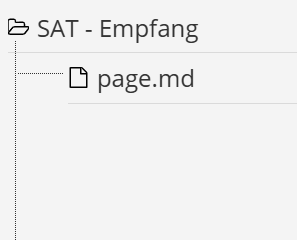
If i use the scholar theme from “skeleton_scholar_admin” and i install the directorylisting plugin, the only output is the “*.md” file. All mediafiles are omitted.
Any ideas whats going wrong ?
@habreli, I cannot reproduce the issue on a fresh install of the scholar-skeleton, scholar theme and directorylisting. Media files are shown as expected.
Also installing sole directorylisting in a fresh Grav install using Quark works as expected.
I did the same.
Took a skeleton_Scholar installation without any updates und installed the directiorylisting pluging.
Then i modified this page “\htdocs\gravskeleton\user\pages\02.docs\03.configuration\02.advanced\article.md”
I added:
process:
markdown: true
twig: true
And copied
{{ directorylisting|raw }}
to the end of the page.
And finally i added some mediafiles.
But nothing happens..
If i add eg. the “Learn2” theme and activate it, everything will be rendered correctly.
FYI: It´s a local installation with xampp and Win10.
@habreli, I can reproduce the behaviour when adding images to the folder using Windows Explorer, or VScode.
In my case $ bin/grav cache solves the issue.
Grav is not aware that the images have been added to the folder and will serve a cached version of the page.
@pamtbaau
Already cleared the cache before via the admin paneel.
Now i tried it from the CLI → same result.
FYI - i added the mediafiles via drag&drop inside the integrated editor (admin paneel).
@habreli, I'm sorry to say that I don't have much more to add...
Log in to reply.
| Topic | Participants | Replies | Views | Activity |
|---|---|---|---|---|
| 2 | 249 | 4 days ago | ||
| 3 | 594 | 1 month ago | ||
| 3 | 415 | 2 months ago | ||
| 1 | 529 | 2 months ago | ||
| 2 | 729 | 3 months ago |