Skip to content
Grav 2.0 is officially stable. Read the announcement →

Community guidelines

Please keep discussions civil and on-topic. Repeated violations may lead to a temporary ban.

Plugins

Unite Gallery in Grav non modular page: any short code?

Solved by pamtbaau View solution

Started by elisabetta 5 years ago · 13 replies · 1126 views
5 years ago

Hi all! I'm trying to put a gallery in a blog page using Unitegallery plugin, but I can't find a way to do this. My situation is even worsened by Gantry 5 plugin, which need this code:

TWIG
<div class="gallery-container {{ page.header.class }}">
    {{ unite_gallery(page.media.images)|raw }}
</div>

for the images to be dispalyed correctly.

I tried this solution from pambtaau for a similar post:

TWIG
        {% extends 'partials/base.html.twig' %}

{% block content %}
  <div class="gallery-container {{ page.header.class }}">
      {{ unite_gallery(page.media.images, '{"gallery_theme":"' ~ page.header.unitegallery.gallery_theme ~ '"}') }}
  </div>

  {{ page.content|raw }}
{% endblock %}

but it doesn't work, probably for the limitation of Gantry 5 template.
Moreover to put this in a page I need a sort of shortcode...
Can someone put me in the right direction?
Thanks in advance
5 years ago Solution

@maria, If you want to embed the UniteGallery inside the Markdown of a page, you could try the following:

  • I'm using a fresh install of Grav 1.7.0
  • Install UniteGallery: $ bin/gpm install unitegallery
  • Create page 'gallery'
  • Add images to folder '/user/pages/03.gallery'
    TXT
    user/pages
    ├── 01.home
    │   └── default.md
    ├── 02.typography
    │   └── default.md
    └── 03.gallery
      ├── default.md
      ├── autumn.jpg
      ├── butterflies.jpg
      ├── butterfly.jpg
      └── corn.jpg
    
  • Add the following to '/user/pages/03.gallery/default.md'
    YAML
    ---
    title: Gallery
    unitegallery:
    gallery_theme: tiles
    process:
      twig: true
    ---
    <div class="gallery-container {{ page.header.class }}">
      {{ unite_gallery(page.media.images, '{"gallery_theme":"' ~ page.header.unitegallery.gallery_theme ~ '"}') | raw }}
    </div>
    
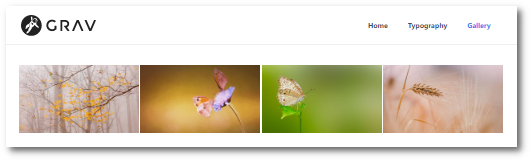
  • Browse to '/localhost/gallery' and you should see something like:
    Untitled|531x161
5 years ago

THANKS A MILLION! It works like a charm 😃
Now I need only a little improvement: captions for the photos.
If I use meta.yaml for every photo in the gallery folder can I have the captions?

5 years ago

@maria,

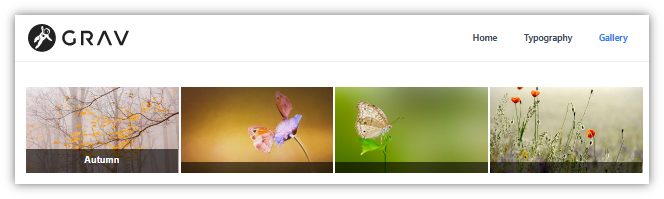
The README of the UniteGallery plugin gives you some examples. Here is one:

TWIG
<div class="gallery-container {{ page.header.class }}">
    {{ unite_gallery(page.media.images, '{
        "gallery_theme":"' ~ page.header.unitegallery.gallery_theme ~ '",
        "tile_enable_textpanel":true,
        "tile_textpanel_title_text_align": "center",
        "tile_textpanel_always_on":true
        }') | raw }}
</div>

Untitled|664x199

You might need to add some css to change the opacity of the background of the the captions.

The original UniteGallery will give you even more display alternatives...

5 years ago

Sorry..I'm a newbie with Grav... using your code I can see only the grey strip under the photo, but not the title..can you give me an example of how you add "Autumn"?
i read the documentation about meta.yaml files for the description, but I don't know where to put the myimage.meta.yaml file 🙄

5 years ago

@mari, I wouldn't call someone a newbie while being a member since Nov. '18 and having created 9 posts...

The docs on meta files are quite explanatory on this.

If you are using this method to add file-specific styling or meta tags for a single file, you will want to put the YAML file in the same folder as the referenced file.

5 years ago

My learning curve is a bit slow 🙄 ....
I'll try and let you know!
Thanks!

5 years ago

Ok. Now meta.yaml files are in the same folder of the related images... but I can't see any description in the gallery...

5 years ago

@maria,

Did you force a refresh of the browser's cache (Ctrl-F5, or open its devtools), and/or cleared cache of Grav?

What do you meta files look like?

5 years ago

cleared browser, gantry 5 and grav cache, but no results..

My meta.yaml

YAML
title: 'My Image'
alt: ''
caption: 'My Image'
last edited 01/21/21 by pamtbaau
5 years ago

@maria,

According the README (what's in a name?) of the UniteGallery plugin:

This generates an album where all pictures are displayed as thumbnails and the metadata alt_text [emphasis is mine] is displayed as text at the bottom of the thumbnail

5 years ago

Put "my Image" in alt, saved all, emptied cache of browser, grav and gantry.... no success...

5 years ago

That doesn't surprise me at all... ;-)

5 years ago

Ok I found the problem: I used "Admin Addon Media Metadata" plugin to generate the meta.yaml files, but the alt text is displayed only if in the meta.yaml is:

alt_text: 'My Image'

and the plugin doesn't generate this code.

As said, thanks a million for your help!

Suggested topics

Topic Participants Replies Views Activity
Plugins · by Rene, 1 week ago
2 43 1 week ago
Plugins · by Xavier, 4 weeks ago
2 53 4 weeks ago
Plugins · by Luka Prinčič, 7 years ago
3 1179 1 month ago
Plugins · by Sebastian van de Meer, 1 month ago
1 48 1 month ago
Plugins · by PIERROT Alain, 2 months ago
3 72 2 months ago