Skip to content
Grav 2.0 is officially stable. Read the announcement →
Releases

tailwind4 plugin

Solved by Andy Miller View solution

Started by astrorob 7 days ago · 5 replies · 135 views
7 days ago

The tailwind4 plugin is exactly what I've been hoping for. I just wanted to share something I experienced. I don't know if it's to be expected, but I was able to get past it...

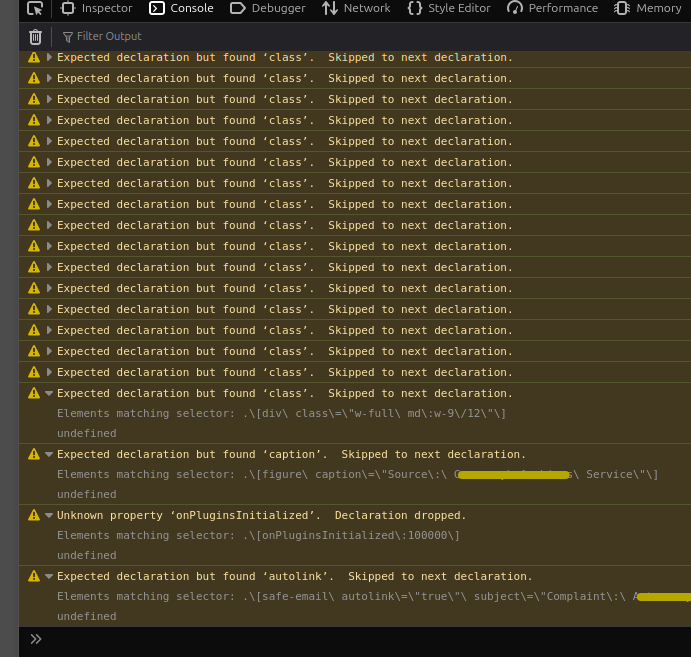
When I first recompiled CSS my Typhoon site lost a lot of styling. Dark mode broke and only mobile style even on large screens. I looked cluelessly at the browser console and then started replacing colons in my pages to use : for example in credits in image captions. As I did so, there were fewer comments in the console, but no change to the page rendering. It was when I replaced a colon used in a shortcode safe-email subject that the dark mode and desktop styling was restored.

I still see lots of comments in the console that seem to relate to colons. But at the moment I'm able to quickly try new utility classes and recompile in the plugin. Excellent work Andy.
👍 1
7 days ago

Glad you like it. Are you running a recent typhoon version? There are things the theme itself has to do to register paths with the plugin. Newer versions have this, but older ones wont.

6 days ago

Yes, it's the latest typhoon and I did see the contract additions as per the readme. I think I satisfy the requirements. I'm just not sure if I'm making mistakes in my use of characters like colons without using the html entity, e.g (after the word "source"):

TXT
[figure caption="Source: Archives Service"]  
![A crowd](image040.jpg?cropResize=1105,734&classes=rounded-md,mx-auto)  
[/figure]

But the one that seemed to cause the CSS issue (after the word "Complaint")

TXT
[safe-email autolink="true" subject="Complaint: Website"][email protected][/safe-email]

With these colons as written, the site looked wrong after tailwind4 recompiled. By changing these colons (the second one in particular) to : I was able to remove some (not all) of the things I saw in the browser's CSS console; the site looked correct again.

The things I'm seeing in Firefox console are along the lines of...

Expected declaration but found...

Then it says 'autolink' or 'caption' or 'class' etc., followed by "Skipped to next declaration".

It was the 'autolink' one that disappeared when I changed the colon in safe-email, the site then worked. I still have a lot "skipped" appearing in the console.

Is this all a result of mistakes I'm making, or is the compile process introducing errors for other reasons?

last edited 07/19/26 by astrorob
6 days ago

Is the common factor a colon appearing in shortcode that causes the css recompile to be problematic?

last edited 07/17/26 by astrorob
6 days ago Solution

tailwind4 plugin version 1.0.4 should fix this.. was a bug. cheers.

Shortcodes use square brackets, and so does Tailwind 4 for arbitrary properties
like [mask-type:alpha]. The scanner was grabbing your whole shortcode, e.g.
[figure caption="Source: Archives Service"], as a Tailwind candidate and
compiling it into an invalid CSS rule. The colon is what tipped that rule into
being malformed, which is why the browser started throwing "Expected
declaration" errors and why the styles after it (dark mode, the large-screen
layout) dropped out.

last edited 07/17/26 by Andy Miller

Suggested topics

Topic Participants Replies Views Activity
Releases · by Marcel, 4 weeks ago
1 332 4 weeks ago
Releases · by astrorob, 4 weeks ago
3 275 4 weeks ago
Releases · by astrorob, 4 weeks ago
0 174 4 weeks ago
Releases · by jeremycherfas, 4 weeks ago
1 216 4 weeks ago
Releases · by Hugh Barnes, 11 months ago
4 570 10 months ago