Skip to content
Grav 2.0 is officially stable. Read the announcement →

Community guidelines

Please keep discussions civil and on-topic. Repeated violations may lead to a temporary ban.

Support

Ordering blogposts by publishing date

Solved by pamtbaau View solution

Started by werdi 6 years ago · 27 replies · 1296 views
6 years ago

@werdi, Did you have a look at the ordering options of Collections?

<code><table><tr><td>header.x</td><td> The order is based on any page header field. i.e. header.taxonomy.year . Also a default can be added via a pipe. i.e. header.taxonomy.year|2015</td></tr></table></code>

To use the build-in publish_date, define the ordering of the collections as follows:

YAML
content:
  items: ...
  order:
    by: header.publish_date
    dir: asc

Variable publish_date is a standard field in the 'Options' tab for pages in Admin.
When creating a item.md, user can enter the 'Publishe Date' field. It will create the following frontmatter in item.md.

TXT
publish_date: 01-01-2020

Hope this helps...

👍 2
last edited 07/04/20 by pamtbaau
6 years ago

This looks good. So where would I enter this in order for it to affect all blogposts?

6 years ago

@werdi,

So where would I enter this in order for it to affect all blogposts?

What does this refer to? The definition of the ordering of the collection, or the 'publishing_date'?

6 years ago

@pamtbaau I meant, this bit you copied - I didn't find it in thesystem.yaml - where does it go?

@pamtbaau:

YAML
content:
  items: ...
  order:
    by: header.publish_date
    dir: asc
6 years ago

@werdi, You mention in your title 'blogposts' so I guess that will be in the page blog.md where the collection of blog-items is defined.

The value for publish_date will go in each item.md

6 years ago

Thank you @pamtbaau it looks like it will work and I'm in the middle of fixing it, since I had been using the Date field of the Options tab.

Now it seems that I have to change the date format to the US date, as grav now sorts the blog posts by day/month/year.

This is what I found on my system.yaml

YAML
dateformat:
    default: null
    short: 'jS M Y'
    long: 'F jS \a\t g:ia'

I cannot find any equivalent here to find my solution: https://learn.getgrav.org/16/content/headers#date

or here:
https://www.php.net/manual/en/datetime.formats.date.php

What am I missing?

6 years ago

@werdi, You didn't mention the dateformat you would like to use, so I guess it will be the German format: dd.mm.yyyy.

In 'sytem.yaml' set pages.dateformat.default: 'd.m.Y'

In your question you mention 'publish_date' while now you mention 'date'. You can use either of the two.

If you want to use the 'Date' field in the header of the page, change the collection to:

YAML
---
date: 02.04.2020
content:
  items: ...
  order:
    by: date  # This is a build-in ordering field for collections
    dir: asc
---
6 years ago

I found a way in the configuration > system tab to set the date format - now I found out I do have to re-load each blog article for this to be actively working.

I like the European date format, but the ordering happens apparently like so: day-month-year, so a blog post published on 01-05-2016 would sort higher than a blogpost published on 02-01-2020. At least that's what it looked like to me.

6 years ago Solution

@werdi,

I don't think there is a European standard date format. Some use dd-mm-yyyy and others like Germany use dd.mm.yyyy'

The ISO standard is yyyy-mm-dd

I haven't finalised debugging it, but it seems that if the ordering is using x.publish_date as I suggested, Grav doesn't know it is a date field. Hence it will order it like a string as you noticed.

When ordering on 'date' the ordering follows the internal value of the date.

last edited 07/05/20 by pamtbaau
6 years ago

@pamtbaau So if I understood you correctly, I would

  • move the value to the field "date" instead of the field "publish date"
  • change the ordering back to date on the blog.md

This would revert things back to where they were - the ordering was following the "last changed" timestamp. Which is not what I intended with my question.

With my question, I intend that a blogpost stays in the right order even if I modify it afterwards.

6 years ago

@werdi, According the docs:

The date variable allows you to specifically set a date associated with this page. This is often used to indicate when a post was created and can be used for display or sort-order purposes. If not set, this defaults to the last modified time of the page.

If the user explicitly sets the date I expect it to remain the same also after updating the page.

👍 1
6 years ago

@pamtbaau Me too, but it wasn't happening on my blog. The person who initiated the discussion I was referring to in my OP had the same issue.

6 years ago

@werdi, I believe the OP of the other post, does not set the date value in Admin manually. In that case, Grav will use the default 'modify date' as the date for that page. Therefor the ordering changes when editing a page.

Once set manually, it should remain the same despite any changes to the page.

6 years ago

@pamtbaau It makes total sense what you say, but this is not true for my blog. I tried setting up everything you suggested for the three last published blogposts. They don't appear on top.

6 years ago

Apparently, re-saving a blog post without even modifying it brings it back up.

Blog posts which should appear up because of the date don't.

I can't find the system here.

6 years ago

@werdi, That is not my experience...

When I set the date in each page, via an editor or through the Admin plugin, their values do not change after saving the page later on.

The date is only cleared (and hence will have value 'date-modified') when the checkbox before the field in Admin is unchecked.

What are the values of date in the header of the page before and after saving the page?

6 years ago

@pamtbaau This is how it looks like
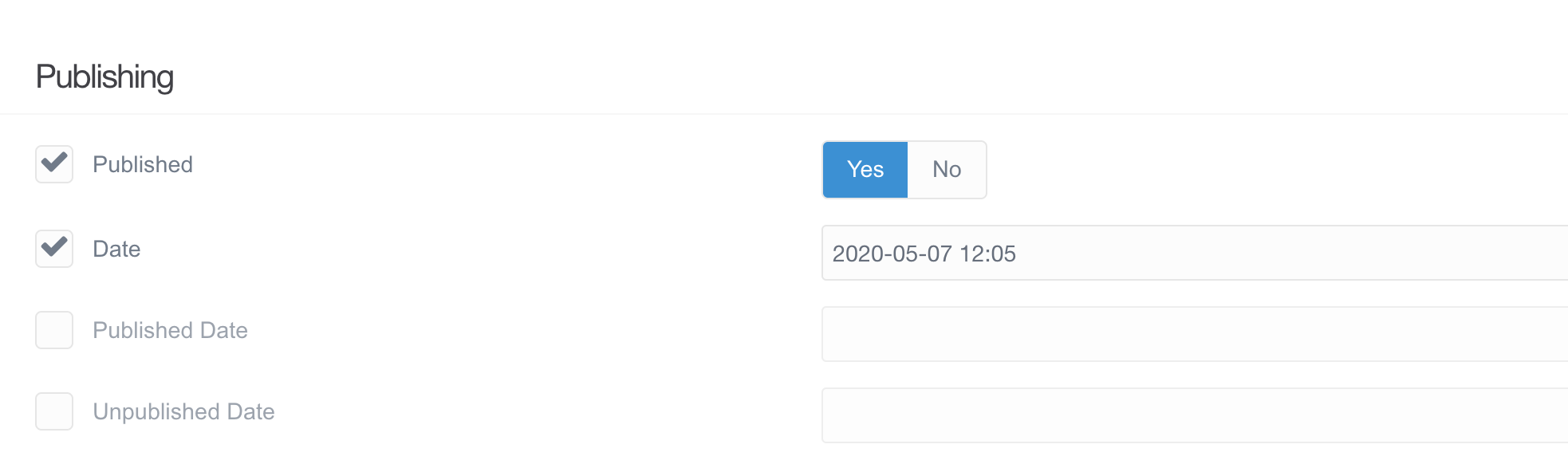
Bildschirmfoto 2020-07-05 um 13.28.46|690x204

Either way, the checkbox is always checked.

Before and after saving the page it is the same date. Also, in either field. The date remains the same but the page jumps on top of the other blogposts.

These are the current settings in blog.md

YAML
content:
    order:
        by: date
        dir: desc

The three blogposts with the latest date (see the one in the screenshot, for example) don't appear on top.

(And I've kept the date format year-month-day for now)

It's possible that at this point the publish_date field is overriding the date field. Meaning, some blog posts I already set to publish date, some blog posts are still on date.

last edited 07/05/20 by werdi
6 years ago

What I have found out is that

publish_date (when modified or re-saved without modifying)

trumps

date.

Even when the sorting is by date.

That's why it makes no sense.

Likewise, if a blogpost where the value is set at date, re-saving makes no difference to the ordering.

6 years ago

@werdi, I cannot reproduce what you are seeing. And because I cannot see what is happening in you system, it is bit useless for me to continue digging...

At the moment I do not see any role of 'publish_date' when sorting a collection on 'date'. Only whether 'date' is being set or not.

Hope you find a working solution!

Suggested topics

Topic Participants Replies Views Activity
Support · by Thomas, 1 week ago
3 92 3 hours ago
Support · by Anna, 3 days ago
2 94 24 hours ago
Support · by Justin Young, 1 day ago
1 62 1 day ago
Support · by Duc , 1 week ago
2 98 6 days ago
Support · by Colin Hume, 1 week ago
2 91 6 days ago