Skip to content
Grav 2.0 is officially stable. Read the announcement →
Themes & Styling

Accessing punchline header image Saturn theme

theme

Started by fred van mourik 2 years ago · 8 replies · 337 views
2 years ago

I am a complete newby. Just installed my first ever grav site - I chose the Saturn theme and am fiddling around how to adjust.
I changed (=replaced) the header image in the folder but am unable to change or delete the punchline.
How to access this?

https://www.homeopathie-amsterdam-noord.nl/

thanks in advance for good advice

2 years ago

@fred, Steps to find out how to set the "punch line":

  • Open you website
  • Richt click on the punch line and inspect the element. It will show:
    HTML
    <p class="p-intro"></p>
    

    Note the class="p-intro"

  • Using your code editor, open folder user/themes/saturn/templates
  • Your first template the explore should be partials/base.html.twig
    (When you know grep, you can search for the right template using the the class.)
    • On line 55 you will find <p class="p-intro">{{ site.intro }}</p>
    • {{ site.intro }} means: Print the value intro which is defined in file user/config/site.yaml.
      That will be your punch line...
2 years ago

Ok thanks for the prompt reply. The I found the files you pointed out. I havent changed anything - still the punchline in user/config/site.yaml does not appear.

2 years ago

@fred, Sorry, but I cannot reproduce the issue using the following steps:

  • Fresh install of Grav
  • Installing theme Saturn using $ bin/gpm install saturn
  • Set the theme in user/config/system.yaml
    YAML
    pages:
    theme: saturn
    
  • Set the intro value in user/config/site.yaml
    TXT
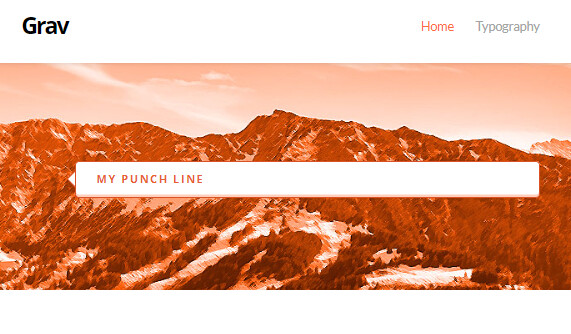
    intro: This is my punch line
    

Result:
image|571x334

Please share the content of your user/config/site.yaml

By the way, your site throws an error on the incorrect src value of the avatar image being set in front of the punch line.

Failed to load resource: net::ERR_TOO_MANY_REDIRECTS img:1

last edited 04/02/24 by pamtbaau
2 years ago

title: 'Homeopathie Amsterdam Noord'
default_lang: nl
author:
name: 'Trudy van den Berg'
email: [email protected]
taxonomies:

  • category
  • tag
    metadata:
    description: 'Grav is an easy to use, yet powerful, open source flat-file CMS'
    summary:
    enabled: true
    format: short
    size: 300
    delimiter: '==='
    redirects: null
    routes: null
    blog:
    route: /blog
1 reply
2 years ago fred van mourik A second question. I dont want the punchline on every page. Can it be accessed per page? O…

A second question. I dont want the punchline on every page. Can it be accessed per page?

Only by creating a child theme, overriding the templates of the parent and adding a variable in the frontmatter of the page.

Or else removed all together?

Yes, by removing the element from base.html.twig inside your child theme.

Note: When overriding base.html.twig, see Cookbook.

Note: Please don't add multiple questions to a single topic. A topic can only have a single 'solution', which means the answers to other questions will be buried and hard to find.
last edited 04/02/24 by pamtbaau

Suggested topics

Topic Participants Replies Views Activity
Themes & Styling · by Sebadamus, 7 days ago
5 148 15 hours ago
Themes & Styling · by martynfoster735, 1 week ago
1 193 1 week ago
Themes & Styling · by Justin Young, 3 weeks ago
1 241 3 weeks ago
Themes & Styling · by Slebeig, 1 month ago
4 376 1 month ago
Themes & Styling · by Pedro M, 3 months ago
4 745 3 months ago