Skip to content
Grav 2.0 is officially stable. Read the announcement →

Community guidelines

Please keep discussions civil and on-topic. Repeated violations may lead to a temporary ban.

Themes & Styling

Adding image to twig template from variable

Solved by Chris Jung View solution

Started by Usk70 9 years ago · 9 replies · 13768 views
9 years ago

I am trying to define three filenames to be included in a slider.

Filenames are defined in the page as:

YAML
---
slide1: myimage1.png
slide2: myimage2.png
slide3: myimage3.png
---

And in the Twig template I would like to get something as:

TWIG
<img src="{{ page.media[slide1].url }}" alt="MyPassion" />
<img src="{{ page.media[slide2].url }}" alt="MyPassion" />
<img src="{{ page.media[slide3].url }}" alt="MyPassion" />

But I am not being able to get the src properly filled.
Could someone help me to understand how to use a variable in a <img> inside a Twig template.


9 years ago

YAML
slide1: myimage1.png
slide2: myimage2.png
slide3: myimage3.png
---

slide1 is header.slide1

<img src="{{ page.media[page.header.slide1].url }}" alt="MyPassion" />

9 years ago

thanks, but I get unknown!
Note: myimage1.png, myimage2.png and myimage3.png are in the same folder as the markdown page definition (not in the template folder).

image|690x28

9 years ago

it works, what is your folder structure ? Just tested with Antimatter

9 years ago

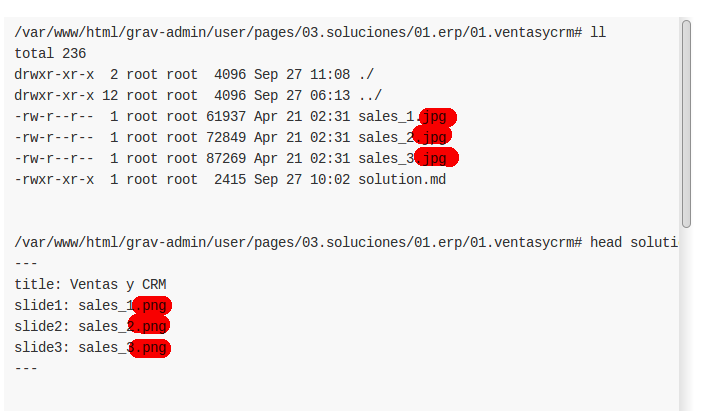
/var/www/html/grav-admin/user/pages/03.soluciones/01.erp/01.ventasycrm# ll
total 236
drwxr-xr-x 2 root root 4096 Sep 27 11:08 ./
drwxr-xr-x 12 root root 4096 Sep 27 06:13 ../
-rw-r--r-- 1 root root 61937 Apr 21 02:31 sales_1.jpg
-rw-r--r-- 1 root root 72849 Apr 21 02:31 sales_2.jpg
-rw-r--r-- 1 root root 87269 Apr 21 02:31 sales_3.jpg
-rwxr-xr-x 1 root root 2415 Sep 27 10:02 solution.md

TWIG
/var/www/html/grav-admin/user/pages/03.soluciones/01.erp/01.ventasycrm# head solution.md
---
title: Ventas y CRM
slide1: sales_1.png
slide2: sales_2.png
slide3: sales_3.png
---

/var/www/html/grav-admin/user/themes/new-theme/templates# head -50 solution.html.twig
{% extends 'partials/base.html.twig' %}

{% block content %}

        <!-- Content -->
        <section id="content">
            <div class="container">

                {{ include('partials/breadcrumbs.html.twig') }}

                <!-- Main Content -->
                <div class="main-content">
                    <p>{{ page.media[slide1].url }}</p>
                    <p>{{ page.media[slide2].url }}</p>
                    <p>{{ page.media[slide3].url }}</p>
                    <!-- Single -->
                    <div class="column-two-third single">
                        <div class="flexslider">
                            <ul class="slides">
                                <li>
                                    <img src="{{ page.media[page.header.slide1].url }}" alt="{{ page.header.slide1_alt }}" />
                                </li>
                                <li>
                                    <img src="{{ page.media[page.header.slide2].url }}" alt="{{ page.header.slide2_alt }}" />
                                </li>
                                <li>
                                    <img src="{{ page.media[page.header.slide3].url }}" alt="{{ page.header.slide3_alt }}" />
                                </li>
                            </ul>
                        </div>

                        {{ page.content }}

...

9 years ago

06|333x145

is that right ?

51|413x231

It works for me

9 years ago

@dimitrilongo:
<img src="{{ page.media[page.header.slide1].url }}" alt="MyPassion" /

I tried this in the template (solution.html.twig):
<p>{{ page.header.slide1 }}</p>

And I can't get the content of slide1, I get an empty html paragraph tag.

In the page solution.md I have:

YAML
# more solution.md
---
title: Ventas y CRM
slide1: sales_1.png
slide2: sales_2.png
slide3: sales_3.png
slide1_alt: Sales 1
slide2_alt: Sales 2
slide3_alt: Sales 3
---

This works perfectly fine:

< img src="{{ page.media['sales_1.jpg'].url }}" / >

So the issue seems to be in page.header.slide1.

BTW I am creating a new theme from scratch (I created the basic structuring following official documentation)

last edited 09/28/17 by Usk70
9 years ago Solution

Guys, anyone checked the filenames?

TXT
slide1: sales_1.png

Won't work together with the .jpg files.

Please check the filenames 🙂 and use

TXT
slide1: sales_1.jpg

in your header ;-)

grafik|690x397

👍 1
last edited 09/30/17 by Chris Jung
9 years ago

good catch, that's why it works in my test i have same filename ;-) and not in @Usk70 example

9 years ago

Wow, no comments.
I tried so many things I missed the most obvious one.

Thanks.

Suggested topics

Topic Participants Replies Views Activity
Themes & Styling · by Pedro M, 2 months ago
4 193 2 months ago
Themes & Styling · by Ian, 2 months ago
3 91 2 months ago
Themes & Styling · by Norbert, 2 years ago
11 451 3 months ago
Themes & Styling · by Lukáš Findeis, 3 months ago
0 45 3 months ago
Themes & Styling · by Sebadamus, 4 months ago
5 125 3 months ago