Skip to content
Grav 2.0 is officially stable. Read the announcement →

Community guidelines

Please keep discussions civil and on-topic. Repeated violations may lead to a temporary ban.

Themes & Styling

Background not displayed under menu in helium template

Solved by Chris View solution

Started by Chris 11 months ago · 1 replies · 56 views
11 months ago

I’m not sure why, but the menu has a bar and isn’t allowing me to see the image as a background when using the helium template. In the attached screenshot you can see mine with the black menu vs the demo site with the image under the menu.

I’ve tried removing the color from the menu in the gantry settings, but then I just end up with a white bar. Any suggestions?
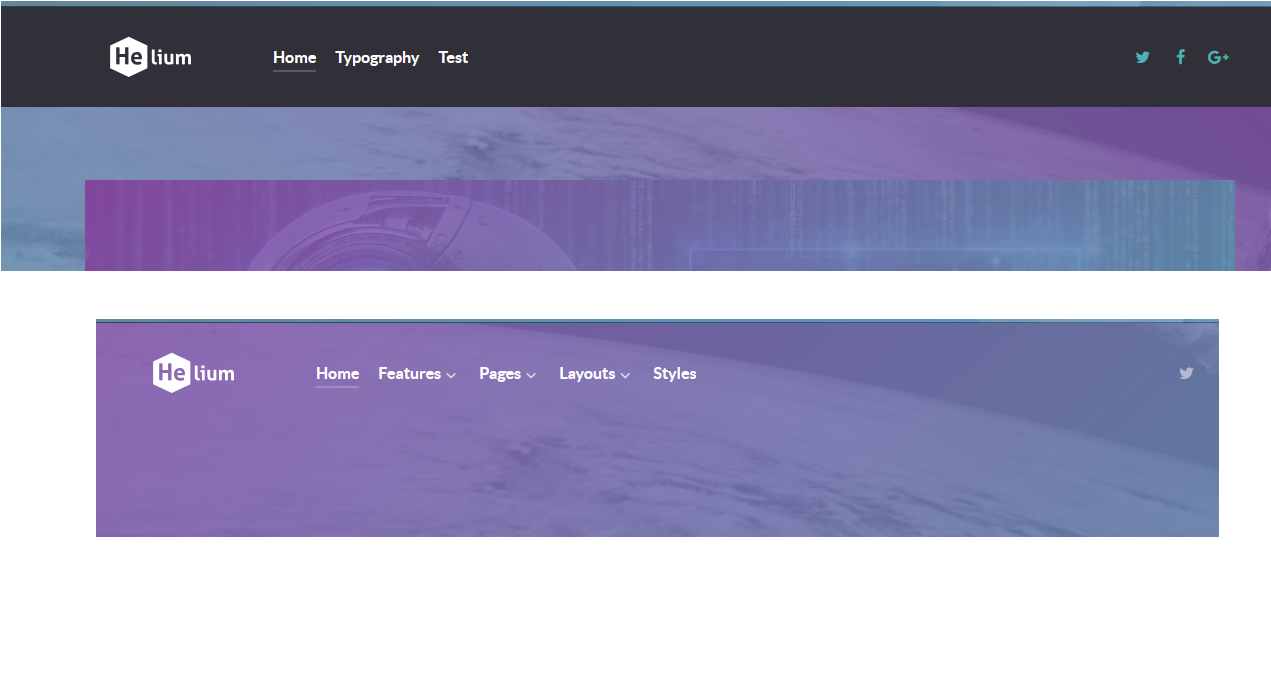
Helium|690x371

11 months ago Solution

Per my post regarding obtaining the skeleton package: /forum/gantry/skeleton-for-helium-hydrogen-t5075 this is no longer needed as that package had my answer.

Suggested topics

Topic Participants Replies Views Activity
Themes & Styling · by Pedro M, 2 months ago
4 193 2 months ago
Themes & Styling · by Ian, 2 months ago
3 90 2 months ago
Themes & Styling · by Norbert, 2 years ago
11 449 3 months ago
Themes & Styling · by Lukáš Findeis, 3 months ago
0 43 3 months ago
Themes & Styling · by Sebadamus, 4 months ago
5 123 3 months ago