Skip to content
Grav 2.0 is officially stable. Read the announcement →

Community guidelines

Please keep discussions civil and on-topic. Repeated violations may lead to a temporary ban.

Themes & Styling

Create submenu does not work with admin panel theme twenty

Started by anke brodersen 5 years ago · 1 replies · 452 views
5 years ago

i want to create a submenu in the theme twenty like shown in the picture. Bildschirmfoto 2021-09-01 um 21.17.06|690x478
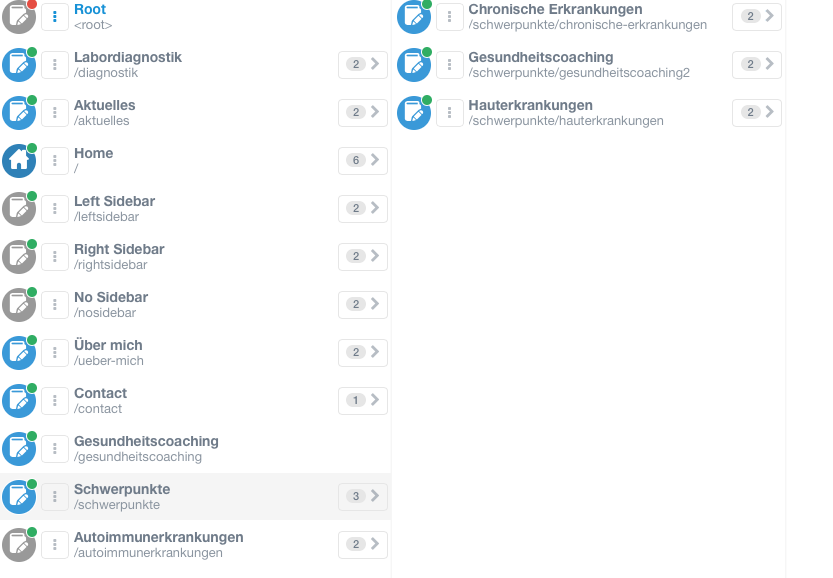
the structure looks like parent is "Schwerpunkte", which should not be routable (advanced settings routable disabled). child pages "chronische Erkrankungen", "Gesundheitscoaching" and "Hauterkrankungen" are Child pages. they are routable and visible. the submenu is not visible. Only "Schwerpunkte" without the subpages in the menu bar. I want it to like like shown in the picture Bildschirmfoto 2021-09-01 um 21.21.39|690x170
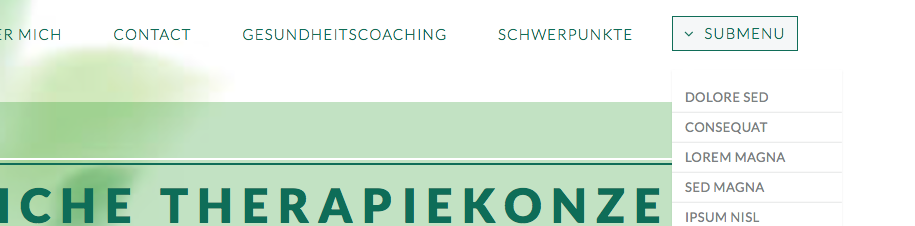
"Submenu".
What can i do?
thanks.

5 years ago

@seeankemone, Theme Twenty is not designed to fascilitate a menu structure as shown above.

It only provides a hardcoded menu-item 'Welcome' and a single dropdown menu 'Layout'. See the skeleton or the original theme.

You will have to change template /user/themes/twenty/templates/partials/header.html.twig to create a menu to you liking.

Note, this theme is 7 years old which is from the very early days of Grav. You might consider choosing a more recent theme.

👍 1

Suggested topics

Topic Participants Replies Views Activity
Themes & Styling · by Pedro M, 2 months ago
4 195 2 months ago
Themes & Styling · by Ian, 2 months ago
3 91 2 months ago
Themes & Styling · by Norbert, 2 years ago
11 451 3 months ago
Themes & Styling · by Lukáš Findeis, 3 months ago
0 45 3 months ago
Themes & Styling · by Sebadamus, 4 months ago
5 125 3 months ago