Skip to content
Grav 2.0 is officially stable. Read the announcement →

Community guidelines

Please keep discussions civil and on-topic. Repeated violations may lead to a temporary ban.

Themes & Styling

Expand Learn2 menu structure

Started by Raf van de Vreugde 9 years ago · 3 replies · 902 views
9 years ago

Hello everybody,

I use the Learn2 theme for my website.
I have my articles organized in folders and subfolders.
But, When I click on the main folder, it expands all the subfolders and articles in it.

Is there a possibility to disable this "expand all" feature.

I mean, when I click on the main folder, it has to expand to the subfolders ony. When I click on one of the subfolders, it has to show the articles in it.

Can anybody help, please?

Regards,

TXT
 Raf
9 years ago

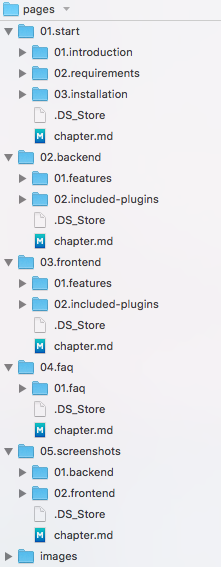
I'm using the theme too on https://so-wp.com/lean-wp-docs/ and my structure is that under the pages folder I have
the 5 folders for the different chapters. Then each of these sub-folders have more folders hanging under them for the different topics, like so:

page-structure-learn2|194x500

If this doesn't help, then please give URL or show screenshot.

9 years ago

Hi Bohan,

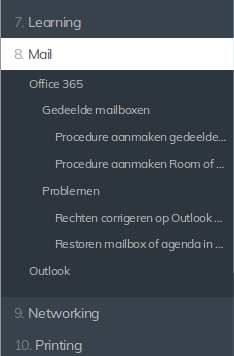
Wel actually, when I click on the Mail menu item, it automatically expands the whole structure and substructures...

Selection_027|234x356

I just want, when I click on "Mail", the "Office 365" and "Outlook" expanded, nothing more. Then, afterwards, when I click on "Office 365", only "Gedeelde mailboxen" and "Problemen"...

9 years ago

Ah okay, I understand. You have sub-sub-sub chapters, correct? I think you should be able to show/hide this with CSS?
Cheers,
Pieter

Suggested topics

Topic Participants Replies Views Activity
Themes & Styling · by Pedro M, 2 months ago
4 193 2 months ago
Themes & Styling · by Ian, 2 months ago
3 91 2 months ago
Themes & Styling · by Norbert, 2 years ago
11 451 3 months ago
Themes & Styling · by Lukáš Findeis, 3 months ago
0 45 3 months ago
Themes & Styling · by Sebadamus, 4 months ago
5 125 3 months ago