Skip to content
Grav 2.0 is officially stable. Read the announcement →

Community guidelines

Please keep discussions civil and on-topic. Repeated violations may lead to a temporary ban.

Themes & Styling

General Asset Configuration

theme

Solved by Karmalakas View solution

Started by desta 3 years ago · 9 replies · 507 views
3 years ago

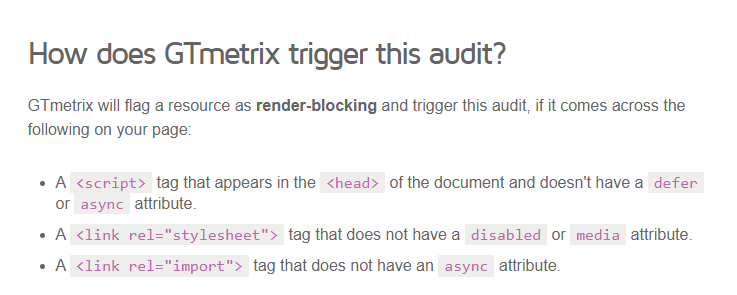
Hi, I have tested my website, it's fast cz i'm using redis as cache. but when i'm testing with GTMetrix it's give me grade E .. some improvement like this

17-11-2023 09-57-19|690x276

by default, we can put css or js in asset configuration, but we can't add more tags prop like disable, media, async how we do in Grav?

thanks

last edited 11/17/23 by pamtbaau
3 years ago

Give the link to your web site. I guess it has more in common with how is your web site build like, than with the Grav itself.

3 years ago

@topidesta, More interesting than the generated output of Asset Manager, would be, IMHO, its input...

  • How do you add assets?
  • How do you render assets?
  • What are your asset settings in system.yaml?
  • What are the results?
  • Anything else you have in place that might influence the output of Asset Manager?

Please provide code snippets (not screenshots).

last edited 11/27/23 by pamtbaau
3 years ago

It's loading quite fast, and current GTmetrix grade is B, so I guess you've been fixing it already.

IMHO you're losing some points because of the overuse of animations that affect rendering of the page (I'm talking about the HP).

Are you sure you need all that assets that slow down rendering? HP is relatively easy, could be done with a few lines of Grid CSS, no need to load the whole Bootstrap just for it. BTW: you can safely switch off some of the Grav plugins CSS as well (notices, login etc.).

3 years ago

the result GTMetrix is not same, some times B, some times C or E. the animations is default of theme i purchased before.

how i do safetyl switch off some style with Grav? any plugin can do this? or manual one-by-one with inspect element.

btw thanks for your suggestion, but the site still development, not ready to change existing site.

3 years ago

ah, i missed thats point, js-async: thanks!

3 years ago

Well, I still think the problem isn't with Grav itself, but the way the template is build. You use a lot of resources that are split into many singular files.
I code every template myself and try to minimalize unnesessary code, HTTP requests etc. I achieve PageSpeed Insights results above 90 quite easily.
3 years ago

ah i see, the template it self. may i try remove some style not needed manualy? or may i just select css with spesifict page?

Suggested topics

Topic Participants Replies Views Activity
Themes & Styling · by Pedro M, 2 months ago
4 193 2 months ago
Themes & Styling · by Ian, 2 months ago
3 90 2 months ago
Themes & Styling · by Norbert, 2 years ago
11 449 3 months ago
Themes & Styling · by Lukáš Findeis, 3 months ago
0 44 3 months ago
Themes & Styling · by Sebadamus, 4 months ago
5 123 3 months ago