I am using the grav-skeleton-open-blog-space. In the theme, it allows to Enable a "Show sidebar" on a new page, or Disable, of course. But I want to add a second option for a second sidebar so I can have one sidebar on specific pages and another on other pages. I think I need to adjust or duplicate some twg files, but I'm not sure where to start to customize this.
Themes & Styling
Hi @g.gravitas, I am the author of Open Blog Space (a customized version of the Quark theme). As you can see, there is no built-in support for a second sidebar but of course it is possible re: custom Twig.
Is one sidebar for all blog pages and another sidebar for other types?
Hi,
yes, that right.
My customizations and Quark itself is not really setup for doing that easily - for sure it would involve custom Twig (new page templates) and also additional pages (to store/display new sidebar).
I'd offer to provide something to help you out but it's beyond the scope of something I could quickly create myself. However, you might find some of my other work in my Bootstrap Open Matter theme (https://github.com/hibbitts-design/grav-theme-bootstrap4-open-matter) of interest, as there I've got multiple page types and some include a sidebar and some do not - might be some useful starting points there.
Good luck!
Thank you. I really like your theme. I'll learn by doing. Appreciate it
Hi, me again.
I keep getting this message and can't get the site on my local machine:
- Allowed memory size of 134217728 bytes exhausted (tried to allocate 9301601 bytes) in /Users/jerrybrahm/repos/outrage/vendor/gregwar/image/Gregwar/Image/Adapter/GD.php on line 85
I've checked to make sure my php.ini file is at 256, but in th Admin console it still says 128 ... ? I've deleted and reinstalled several times. Each time I can launch the site at first, then when I refresh ... I get this message .... any help?
I do not know, is this still happening? How are you running the site on your local site?
Hi,
I am using your grav-skeleton-open-blog-space theme; it's not published yet, but when working on it locally, a GitHub link is always in the navbar; I actually disable the GitSync plugin, but "View Content Repository" is now in the nav ... will that be visible to users? How do I remove it? Thanks

Hi @g.gravitas, you can choose where/if to display the GitHub link in the theme settings:
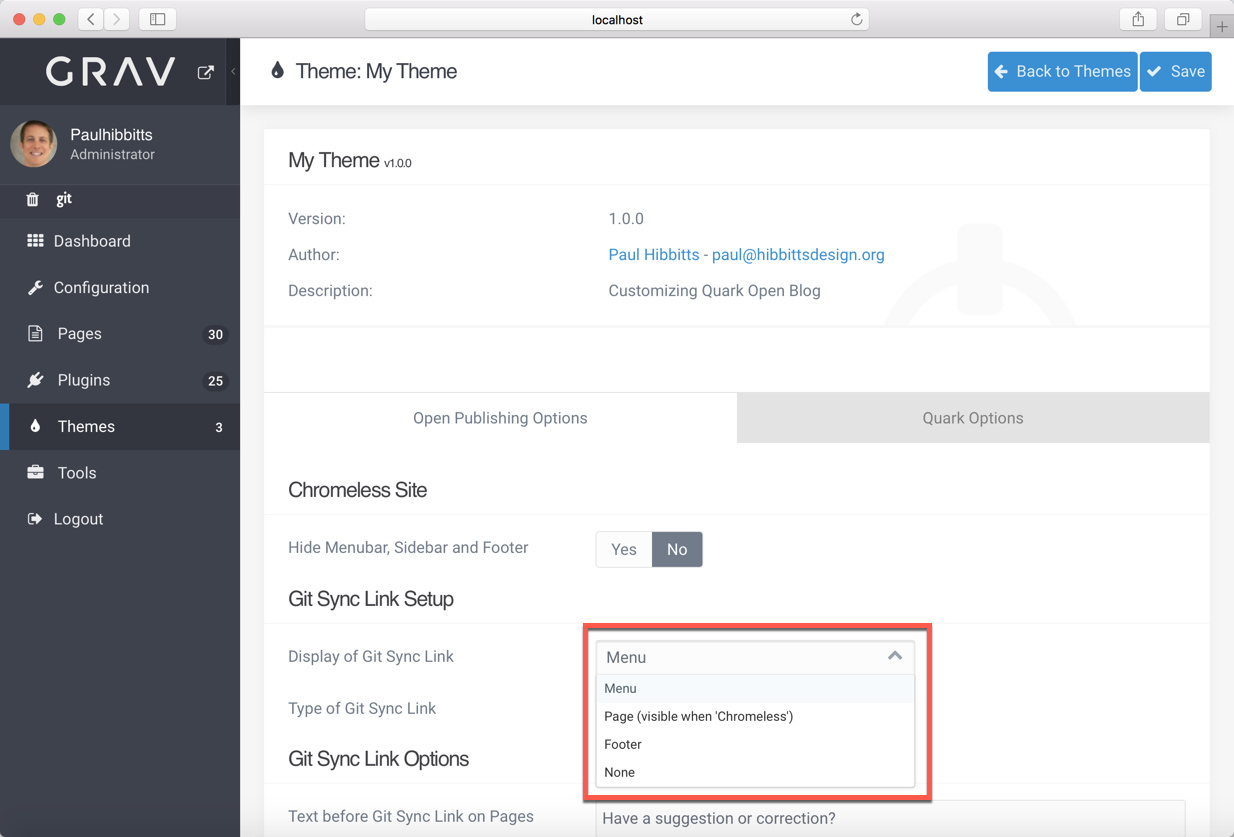
To hide the link, choose "None" in the above menu.
Please let me know how you make out.
Doh! Didn't see that Thanks
Log in to reply.
Suggested topics
| Topic | Participants | Replies | Views | Activity |
|---|---|---|---|---|
| 3 | 262 | 2 weeks ago | ||
| 5 | 327 | 3 weeks ago | ||
| 1 | 316 | 4 weeks ago | ||
| 1 | 355 | 1 month ago | ||
| 4 | 481 | 2 months ago |