Skip to content
Grav 2.0 is officially stable. Read the announcement →

Community guidelines

Please keep discussions civil and on-topic. Repeated violations may lead to a temporary ban.

Themes & Styling

How to create a link from the site icon to the base URL (in Masonry theme)

Started by Sumpuran 6 years ago · 6 replies · 1052 views
6 years ago

Masonry theme requires a Mediator skeleton, with which I had the same issue, but had solved. But now that I switched to Masonry (which was the intention all along), the issue is back. I applied the same fix as with Mediator on the Masonry theme (replacing base_url_relative with home_url), but to no avail.

When you click on the site icon (top-left corner of the page), or on the breadcrumb to Home, you’d expect to go to the home page. But instead, it just reloads the current page.
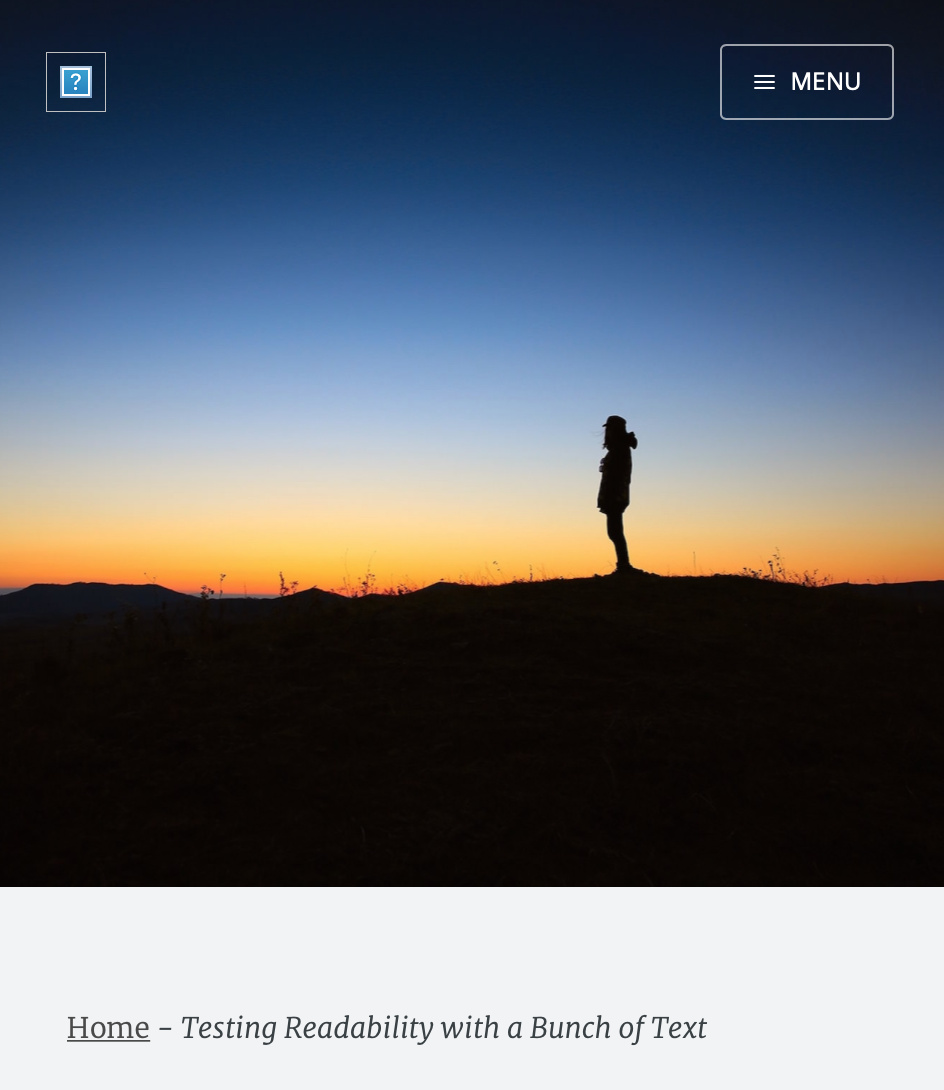
Screen Shot 2020-01-27 at 9.54.41 PM|433x500

Looking at it from my browser, when I inspect the element, the ‘blog-logo’ link doesn’t point anywhere. Same for the breadcrumb that supposedly leads to ‘Home’.

There are two files that reference ‘blog-logo’: default.html.twig and header.html.twig.

Default.html.twig:

TWIG
{% extends 'partials/base.html.twig' %}
{% set collection = page.collection() %}

{% block content %}

<header class="main-header {% if page.header.cover %}" style="background-image: url({{ page.media[page.header.cover].url }}) {% else %} no-cover {% endif %}">
<nav class="main-nav overlay clearfix">
    {% if site.logo %}
    <a href="{{ home.url }}" class="blog-logo"><img src="{{ theme_url }}/images/{{site.logo}}" alt="{{ site.title }}" width="100%" height="100%" /></a>
    {% endif %}

    <a class="menu-button icon-menu" href="{{ home.url }}">
        <label for="show-menu" class="word">{{ 'THEME_MASONRY.MENU_TITLE'|t }}</label>
    </a>
</nav>
<div class="vertical">
    <div class="main-header-content inner">
        <h1 class="page-title">{{ site.title }}</h1>
        <h2 class="page-description">{{ site.description}}</h2>
    </div>
</div>
<a class="scroll-down icon-arrow-left" href="#content" data-offset="-45">    <span class="hidden">Scroll Down</span></a>
</header>

<main id="content" class="content" role="main">
<div class="wrapper">
    <section class="masonry">
        {% for post in collection %} {% include 'partials/article.html.twig' %} {% endfor %}
    </section>
</div>
{% if config.plugins.pagination.enabled and collection.params.pagination %}
    {% include 'partials/pagination.html.twig' with {'base_url': page.url, 'pagination':collection.params.pagination} %}
{% endif %}
</main>

{% endblock %}

Header.html.twig:

TWIG
<header class="main-header post-head {% if page.header.image %}" style="background-image: url({{ page.media[page.header.image].url }}){% else %}no-cover{% endif %}">
<nav class="main-nav {% if page.header.image %}overlay{% endif %} clearfix">
    {% if site.logo %}            
        <a href="{{ home.url }}" class="blog-logo"><img src="{{ theme_url }}/images/{{site.logo}}" alt="{{ site.author.title}}" /></a>
    {% endif %}
    <a class="menu-button icon-menu" href="{{ home.url }}"><span class="word">{{ 'THEME_MASONRY.MENU_TITLE'|t }}</span></a>
</nav>
</header>

In the case of Mediator, I needed to replace base_url_relative with home_url, which I did in this case too. But while that worked for the Mediator theme, it did not for the Masonry theme.

Here’s the file breadcrumbs.html.twig:

HTML
<ul class="post-header__breadcrumb">
<li><a href="{{ home.url }}" title="blog homepage">{{ 'THEME_MASONRY.HOME'|t }}</a></li>
<li>-</li>
<li>{{page.title}}</li>
</ul>

I think it may have to do with ‘THEME_MASONRY.HOME’, which looks like a variable, but I can’t find where that is defined. Or is that just the title, not the base URL? There’s also a ‘THEME_MASONRY.MENU_TITLE’ called in header.html.twig and default.html.twig, so how would that one be different?

last edited 01/27/20 by Sumpuran
6 years ago

@veggit, Installed skeleton Mediator and installed theme Masonry.

The icon and the 'Home' in breadcrumbs work as expected when using the href="{{base_url}}" as designed.

In your adapted code, you use href="{{ home.url }}" where home.url isn't defined anywhere in Grav and hence the href becomes an empty attribute. In that case, the page will do nothing but refresh.

There are some issues with the logo when using the default skeleton: They refer to the wrong src.

  • In header.html.twig, replace inside line 4:
    TWIG
    src="{{ theme_url }}/images/{{site.logo}}"
    

    with:

    TWIG
    src="{{ base_url }}{{site.logo}}"
    
  • In default.html.twig, replace inside line 49:
    TWIG
    src="{{ theme_url }}/images/{{site.logo}}"
    

    with:

    TWIG
    src="{{ base_url }}{{site.logo}}"
    
last edited 01/27/20 by pamtbaau
6 years ago

Thanks for taking the effort to install that skeleton and theme, it helps a lot.

Your code solved the issue of the missing src for the icon image, thanks. (it’s starting to dawn on me that this theme may not have been very well coded... but you know, don’t look a gift horse in the mouth)

However, it did not change the behavior of the link, which still self-references.

Here’s what I got now:

Header.html.twig:

TWIG
<header class="main-header post-head {% if page.header.image %}" style="background-image: url({{ page.media[page.header.image].url }}){% else %}no-cover{% endif %}">
<nav class="main-nav {% if page.header.image %}overlay{% endif %} clearfix">
    {% if site.logo %}            
        <a href="{{ base.url }}" class="blog-logo"><img src="{{ base_url }}{{site.logo}}" alt="{{ site.author.title}}" /></a>            
    {% endif %}
    <a class="menu-button icon-menu" href="{{ home.url }}"><span class="word">{{ 'THEME_MASONRY.MENU_TITLE'|t }}</span></a>
</nav>
   </header>

Default.html.twig:

TWIG
{% extends 'partials/base.html.twig' %}
{% set collection = page.collection() %}

{% block content %}

<header class="main-header {% if page.header.cover %}" style="background-image: url({{ page.media[page.header.cover].url }}) {% else %} no-cover {% endif %}">
<nav class="main-nav overlay clearfix">
    {% if site.logo %}
    <a href="{{ base.url }}" class="blog-logo"><img src="{{ base_url }}    {{site.logo}}" alt="{{ site.title }}" width="100%" height="100%" /></a>
    {% endif %}

    <a class="menu-button icon-menu" href="{{ home.url }}">
        <label for="show-menu" class="word">{{ 'THEME_MASONRY.MENU_TITLE'|t }}</label>
    </a>
</nav>
<div class="vertical">
    <div class="main-header-content inner">
        <h1 class="page-title">{{ site.title }}</h1>
        <h2 class="page-description">{{ site.description}}</h2>
    </div>
</div>
<a class="scroll-down icon-arrow-left" href="#content" data-offset="-45">    <span class="hidden">Scroll Down</span></a>
</header>

<main id="content" class="content" role="main">
<div class="wrapper">
    <section class="masonry">
        {% for post in collection %} {% include 'partials/article.html.twig' %} {% endfor %}
    </section>
</div>
{% if config.plugins.pagination.enabled and collection.params.pagination %}
    {% include 'partials/pagination.html.twig' with {'base_url': page.url, 'pagination':collection.params.pagination} %}
{% endif %}
</main>

{% endblock %}
last edited 01/27/20 by Sumpuran
6 years ago

@veggit, base.url ??? Never heard of... neither does Grav....

base_url might be a better variable...

Using base.url and base_url in one code line... Maybe it's time for coffee or a nap... ;-)

6 years ago

My bad, thanks. I’ve changed those. Still doesn’t work though... neither for the icon link nor the breadcrumb link.

In my browser, the breadcrumb link shows as:

HTML
<a href="" title="blog homepage">Home</a>

The icon link shows as:

HTML
<a href="" class="blog-logo"><img src="/user/images/logo.jpg" alt=""></a>

Just to be sure, when you wrote:

TWIG
Installed skeleton Mediator and installed theme Masonry.

The icon and the ‘Home’ in breadcrumbs work as expected when using the href="{{base_url}}" as designed.

That hasn't been my experience so far, and I’ve installed Grav+Mediator+Masonry several times. Could it be due to the fact that I’m using Grav 15.10, not the latest version? (I’m running PHP 7.0.33, which won’t run Grav 16.)

last edited 01/27/20 by Sumpuran
6 years ago

@veggit, I'm using php 7.2 with Grav 1.7.0-rc.3 and base_url is working well...

Please forgive me for not trying to keep a 4 year old theme, with an old version of Grav up and running...

last edited 01/28/20 by pamtbaau
6 years ago

@pamtbaau:
@veggit, I’m using php 7.2 with Grav 1.7.0-rc.3 and base_url is working well…

OK, good to know. Then it must be my install. Time to update my version of PHP.

Please forgive me for not trying to keep a 5 year old theme, with an old version of Grav up and running…

Haha, I hear you. That’s not at all what I expected. I just wanted to make sure there weren’t any errors in the code that were causing the problem.

last edited 01/28/20 by Sumpuran

Suggested topics

Topic Participants Replies Views Activity
Themes & Styling · by Pedro M, 2 months ago
4 198 2 months ago
Themes & Styling · by Ian, 2 months ago
3 94 2 months ago
Themes & Styling · by Norbert, 2 years ago
11 455 3 months ago
Themes & Styling · by Lukáš Findeis, 3 months ago
0 48 3 months ago
Themes & Styling · by Sebadamus, 4 months ago
5 128 3 months ago