Skip to content
Grav 2.0 is officially stable. Read the announcement →

Community guidelines

Please keep discussions civil and on-topic. Repeated violations may lead to a temporary ban.

Themes & Styling

How to remove text transparency on the Hero text

theme

Solved by pamtbaau View solution

Started by Delo 1 year ago · 8 replies · 110 views
1 year ago

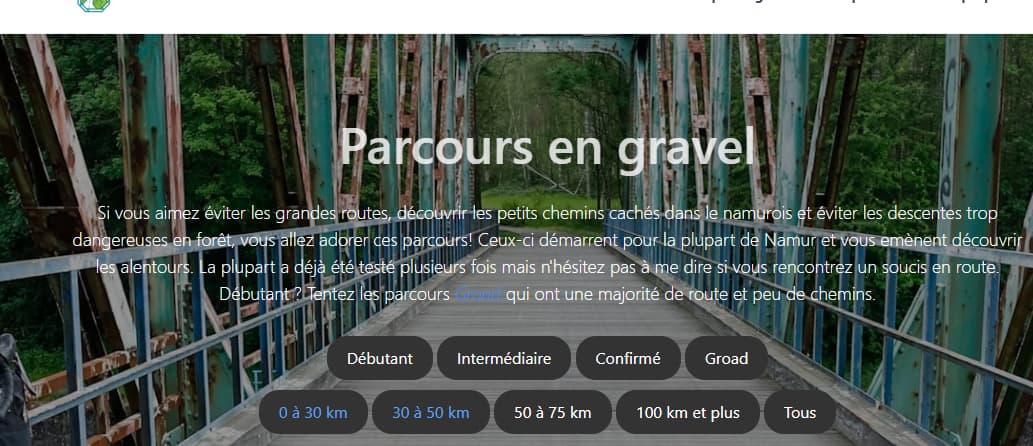
Hello, I'm using the Quark theme and I can't find anywhere where I could remove the transparency on the text of the header.
For now, the text is white but not fully white : https://parcoursvelo.be/
image|690x297

The text become transparent as soon as i add a hero image. It is not due to a class.

1 year ago Solution

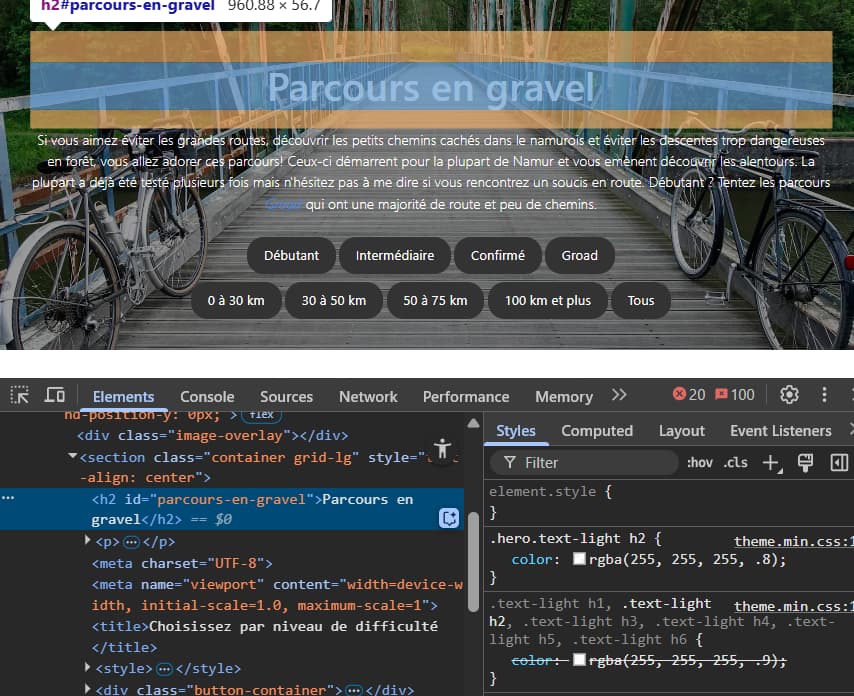
@Delo, Open the Developer Console of your browser and click on the element in question. Then look at the right side to find the rule(s) that impact the style of the element.

{92BFDE4A-A551-4045-8C8C-447E4668284A}|613x499

Once you find the rule, you can adapt the css.

1 year ago

It worked thank you very much!

1 year ago

@Delo, That is nice to know, but the community would like to know what you've changed and how and where you made the change.

It is a two-way street: You ask for a favour and you return a favour...

last edited 04/05/25 by pamtbaau
1 year ago

In theme.min.css I changed the hero.text-light h2 rgba(255, 255, 255, .8) to (255, 255, 255, 1) to make it opaque.

1 year ago

@Delo,

In theme.min.css I changed

Yes, I've noticed that looking at your site...

  1. It is not a good idea to edit a generated *.min.css file.
    • Edit the original *.scss files instead and recompile.
    • Or, use custom.css instead.
  2. You are in for a surprise when a new release of Quark arrives: All you changes will be gone...
    Use an inherited/child theme and use the /user/mytheme/css/custom.css in your own theme to make changes.
👍 1
last edited 04/06/25 by pamtbaau
1 year ago

Thank you for letting me know i had no idea these could interfere with the updates.
Here's what i added to custom.css :

CSS
.hero.text-light h2 {
    color: rgba(255,255,255,1) !important;
}

1 year ago

@Delo, Still 2 issues:

  • /user/themes/quark/css/custom.css is being included twice.
    Not sure what you have done in Twig templates.
  • You are not using a child/inheriting theme. All changes will be lost in due time...
    Also all changes in custom.css.
1 year ago

@pamtbaau:
You are not using a child/inheriting theme. All changes will be lost in due time…
Also all changes in custom.css.

Sorry I don't know what's a child theme
I'll be reading about it

Suggested topics

Topic Participants Replies Views Activity
Themes & Styling · by Pedro M, 2 months ago
4 193 2 months ago
Themes & Styling · by Ian, 2 months ago
3 90 2 months ago
Themes & Styling · by Norbert, 2 years ago
11 449 3 months ago
Themes & Styling · by Lukáš Findeis, 3 months ago
0 44 3 months ago
Themes & Styling · by Sebadamus, 4 months ago
5 123 3 months ago