Skip to content
Grav 2.0 is officially stable. Read the announcement →
Themes & Styling

Parallax effect on Quark theme

first-time theme

Started by Bob 5 years ago · 3 replies · 820 views
5 years ago

Hi,

I'm trying to have multiple parallax effects on my all-in-one page using Quark. However, every time I create a new page with the Hero Classes "parallax", the module always ends up at the top of the page even if I specify a different order
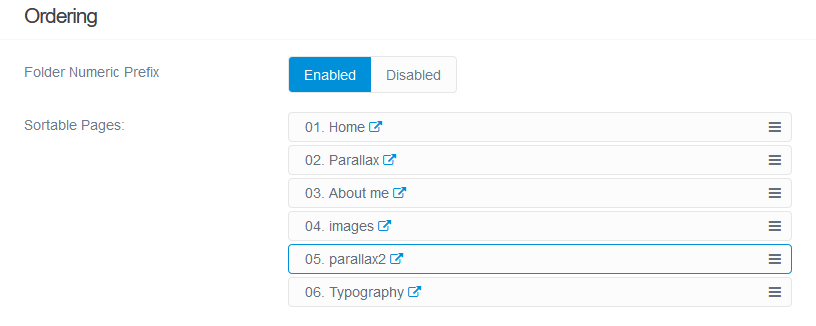
Screenshot_2020-12-31 Edit parallax2 Grav|690x275

With this configuration, the result shows in fact 01. Home, 02. Parallax, 05. parallax2, 03. About me, 04. images order.
Is there anyway to force and place the parallax effect wherever I want? I can do it with other modules, but that one.

Thanks

5 years ago

@thebob, Not sure I understand your question, but when you take a look at /themes/quark/templates/modular.html.twig you'll see at line 48, that any module with template modular/hero will be placed at the top of the page.

5 years ago

Thank you @pamtbaau, so there is no way to place a parallax effect anywhere else I want in the page 😦

5 years ago

@thebob, I don't think it can be done with the default templates, but there is nothing in the way to create it manually....

Suggested topics

Topic Participants Replies Views Activity
Themes & Styling · by Pedro M, 2 months ago
4 226 2 months ago
Themes & Styling · by Ian, 2 months ago
3 119 2 months ago
Themes & Styling · by Norbert, 2 years ago
11 483 3 months ago
Themes & Styling · by Lukáš Findeis, 3 months ago
0 73 3 months ago
Themes & Styling · by Sebadamus, 4 months ago
5 152 3 months ago