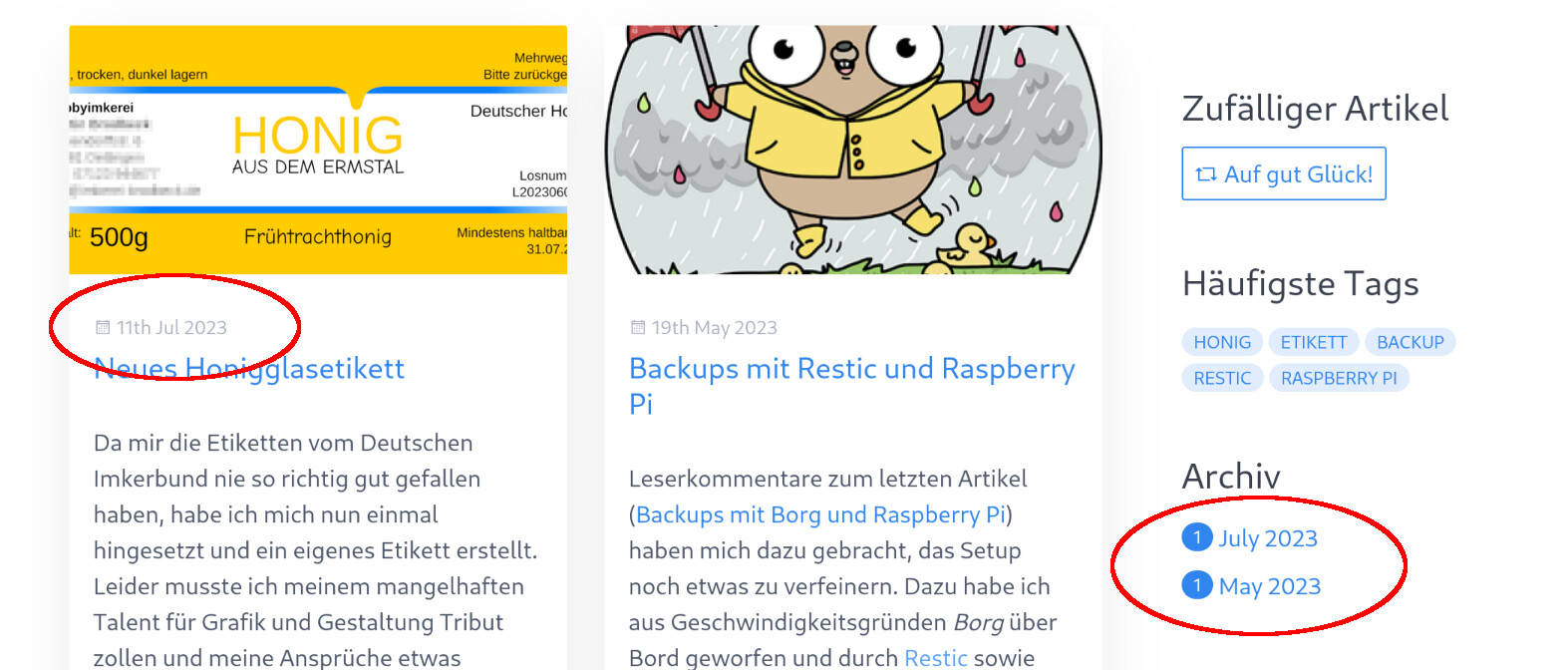
I am currently trying Grav and have a problem with untranslated dates. I have set "de" as the (only) supported language. Dates, for example in the articles or in the archives plugin are still displayed to me as English date (see screenshot). Is this a known problem or have I perhaps overlooked a setting?
Solved by Pedro M View solution
@beedaddy, Have you had a chance to search the forum? Try searching for: translate date
Yes, I did, but as a beginner I could not find a solution. Sometimes the modification of template files is recommended. I could not imagine that this is actually necessary, since it is a standard case. I assumed an error or a wrong configuration. Apparently I was wrong and a more extensive intervention is necessary to get a date translated...
@beedaddy,
I assumed an error or a wrong configuration. Apparently I was wrong and a more extensive intervention is necessary to get a date translated…
Unfortunately, it does indeed require a bit more work...
Hi @beedaddy
You can try something like this in partials/blog/date.html.twig:
TWIG
{# Support for translate and twig extensions plugins #}
{% set lang = grav.language.getActive ?: grav.config.site.default_lang %}
{% if config.plugins["translate-date"].enabled %}
    {% set datestamp = (page.header.publish_date) ? (page.header.publish_date|td(null, "m-d-Y")) : (page.date|td(null, "m-d-Y")) %}
{% elseif config.plugins["twig-extensions"].enabled %}
    {% set datestamp = (page.header.publish_date) ? (page.header.publish_date|localizeddate('medium', 'none', lang)) : (page.date|localizeddate('medium', 'none', lang)) %}
{% else %}
    {% set datestamp = (page.header.publish_date) ? (page.header.publish_date|date(system.pages.dateformat.short)) : (page.date|date(system.pages.dateformat.short)) %}
{% endif %}

{% if datestamp %}
<span class="blog-date">
    <time class="dt-published" datetime="{{ datestamp }}">
        <i class="fa fa-calendar"></i> {{ datestamp }}
    </time>
</span>
{% endif %}
For this to work properly you must set a language in the site settings (settings/languages) and have one of the two plugins referenced in the code installed: translate-date or twig-extensions.
last edited 07/12/23 by Pedro M
Hi @pmoreno
Sorry for the stupid question, but: do I have to edit the file directly or can/should it be copied to somewhere and then modified? Question is regarding future updates…
You'll need to create a Quark child theme, and in that theme make all necessary modifications, to prevent future updates from overwriting your modifications.
You can take a look at this article, Easy Theme Development with Inheritance or this other Theme Inheritance
Thanks a lot!
The problem with the publish dates is resolved. And I guess I have to do something similar with plugins/archives/templates/partials/archives.html.twig?
You just have to copy archives.html.twig from the plugin to your partials folder of your child theme and make the necessary modifications there
Log in to reply.
Suggested topics
| Topic | Participants | Replies | Views | Activity |
|---|---|---|---|---|
| 1 | 25 | 35 minutes ago | ||
| 3 | 480 | 1 month ago | ||
| 5 | 481 | 2 months ago | ||
| 1 | 460 | 2 months ago | ||
| 1 | 490 | 2 months ago |