Skip to content
Grav 2.0 is officially stable. Read the announcement →

Community guidelines

Please keep discussions civil and on-topic. Repeated violations may lead to a temporary ban.

Themes & Styling

Resize hero height

Solved by pamtbaau View solution

Started by Matteo Duranti 5 years ago · 6 replies · 1005 views
5 years ago

Hi guys,

I tried to search here, googling and essentially is 2 days that I'm playing with it and beating the head against the wall...

I created I theme inheriting from Quark, following the guide. It works and I was able to customize some of the templates. Just an example:

TWIG
bozzo@MacBook-Pro:herd-grav> diff user/themes/quark/templates/partials/hero.html.twig user/themes/my-quark/templates/partials/hero.html.twig 
5a6,7
>     {% if page.header.hero_noarrow %}
>     {% else %}
6a9
>     {% endif %}

to remove the fa-angle-down arrow in the hero if hero_noarrow: true is set in the yaml part of a page.

I was also able to change some defaults using user/themes/my-quark/css/custom.css but not all of them.

In particular I wanted to change the height of the hero image "hacking" the "hero-tiny" option. I added, to custom.css:

.hero.hero-tiny { min-height: 1rem; }

but I'm not able to change the default size.

Where I'm wrong?

Thanks,
Matteo
5 years ago Solution

@bozzochet, As far as I can see, the different hero-* classes only set a different 'min-height'.

If you want a maximum height for either of the classes, you could add a 'max-height' and see how that works out for your site.

5 years ago

I really feel myself idiot... I was thinking "min" was the size if the title was not requiring it to be bigger.

Thanks!
Matteo

5 years ago

@bozzochet, Be aware that the .hero class sets quite large vertical paddings (6rem/7rem) which may force the display to be bigger then the max-height.

5 years ago

Yes,

now that I understood:

CSS
.hero.hero-tiny {
    max-height: 0px;
    padding-top: 5em;
    padding-bottom: 0px;
}
5 years ago

@bozzochet, I have no idea how your page needs to look like, but 'max-height: 0' seems quite useless.

The height of the hero is now entirely defined by its padding and its inner elements and will expand the hero element beyond 'max-height'

5 years ago

Ciao,

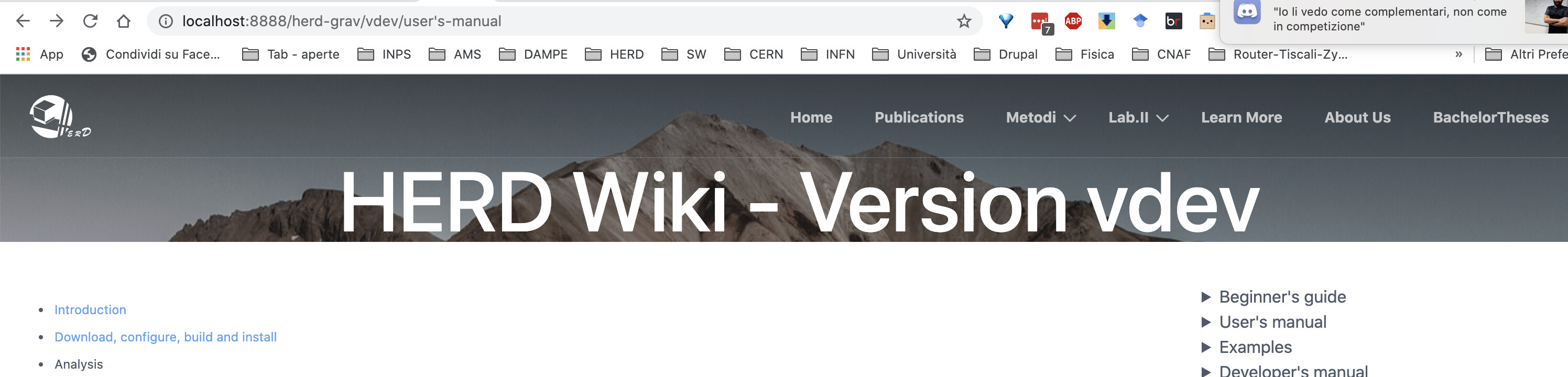
maybe I have to put the size of "h1" (3rem?). What I wanted is this:

image|690x166

Ciao,
Matteo

Suggested topics

Topic Participants Replies Views Activity
Themes & Styling · by Pedro M, 2 months ago
4 226 2 months ago
Themes & Styling · by Ian, 2 months ago
3 118 2 months ago
Themes & Styling · by Norbert, 2 years ago
11 483 3 months ago
Themes & Styling · by Lukáš Findeis, 3 months ago
0 73 3 months ago
Themes & Styling · by Sebadamus, 4 months ago
5 152 3 months ago