
Adding discussion to a Grav site has always meant reaching for somebody else's platform. You either stand up Discourse and take on a Ruby app, a Postgres database, Redis, a job runner and a mail pipeline, or you pay a hosted service every month and watch the bill grow with your community, or you drop in a JavaScript embed that owns your data, ignores your theme and gives your members a second account to remember.
I got tired of all three options. So we built Forum Pro, and today it's available as a Grav Premium plugin for $100.

It's Part of Your Site, Not Bolted Onto It
This is the thing that makes Forum Pro different from everything else you could put on a Grav site. The forum isn't an iframe, an embed, or a separate app sitting on a subdomain. Topics and posts are first-class Grav pages, served by your Grav install, wearing your theme, sharing one login with the rest of your site.
That has some pleasant knock-on effects:
- One account. Members sign in once and that covers the forum, comments, and anything else on your site.
- Your backups already cover it. The forum lives in a database you own, on your server, in your deployment pipeline.
- Your theme just works. More on that below, but the short version is that a well-behaved Grav theme gets a native-looking forum with no CSS work at all.
- Search engines index it like the rest of your site. Everything is server-rendered first, so the forum works with JavaScript off. The live stuff is a progressive enhancement on top.
- No recurring bill. One license, one site, unlimited updates. That's it.
It Scales From a Hobby Board to a Real Community
Forum Pro runs the identical schema and migrations on SQLite, MySQL/MariaDB and PostgreSQL, selected by a config setting. CI runs the full test suite against all three.
Start on SQLite because it needs nothing, and if your community outgrows it, moving to Postgres is a config change rather than a rewrite. There's no separate "enterprise" build and no seat count.
We're not asking you to take the scaling claim on faith either. The Grav Community Forum is Forum Pro, running 41,742 posts across 9,332 topics from 3,841 members, with full-text search, live updates, private messages and the whole spam pipeline switched on. If you want to know what you're buying, go poke at it. Anyone can sign up.
What Your Members Get

Everything people expect from a modern forum, without the parts that make new members bounce.
Posts go through a hardened Markdown pipeline with @mentions and autocomplete, formatted quotes with reply-below-post, and fenced code blocks with server-side syntax highlighting that detects the language when a block doesn't name one. A WYSIWYG editor enhances the posting forms, and plain HTML forms keep working with JavaScript disabled.
Attachments work the way people actually try to use them: drag and drop, or just paste a screenshot and watch it preview inline as it uploads. Content-addressed dedupe means the same file uploaded twice is stored once, and abandoned uploads clean themselves up.
On top of that there are reactions in a hover tray, polls on new topics, tags with a browser and per-tag pages, accepted answers with a checkmark on listings, bookmarks, and full revision history on every edit with a configurable edit window.
Unread tracking is the feature I'd miss most. There's a real per-member read baseline, so unread topics get a new-post counter and a link that jumps straight to the first reply you haven't seen. Suggested topics appear under each thread (your unread first, then related), and long threads get a scrollspy timeline rail for scrubbing.

Members and recognition
Forum Pro runs its own account system, so your members never need a Grav account to take part. Your existing Grav admin and staff accounts link in automatically and keep working.
Members get public profiles with recent activity, avatars (with a colored letter avatar derived from the username when none is set), automatic ranks they climb as they post, badges awarded on milestones, and member groups like Core Team or Moderators with their own color and icon shown as badge bars under their names. Staff can grant a custom rank like Founder with its own icon, or a member title.

Search and live updates

Full-text search over published posts, always constrained by the visitor's category permissions, with filters for keywords, author, forum, and topics-only. Two engines: builtin uses SQLite FTS5, MySQL FULLTEXT or PostgreSQL tsvector with zero setup, or you can hand indexing to YetiSearch Pro for fuzzy matching and tuned relevance. The index maintains itself.
New replies appear in place, reaction counts tick up, and you can see who's viewing a topic and who's typing. That runs over Mercure push (a hub binary is bundled), falls back to polling automatically, and stands down entirely to a perfectly good server-rendered forum when neither is available.
Private messages

One-to-one or group conversations, with a live unread count in the toolbar and new replies appearing without a refresh. Archiving, blocking, and bulk cleanup that includes select-all-N, so you can clear an entire tab and keep just the few you want.
What You Get as the Person Running It
This is the half that decides whether a forum is a pleasure or a second job.
Moderation that doesn't require admin access
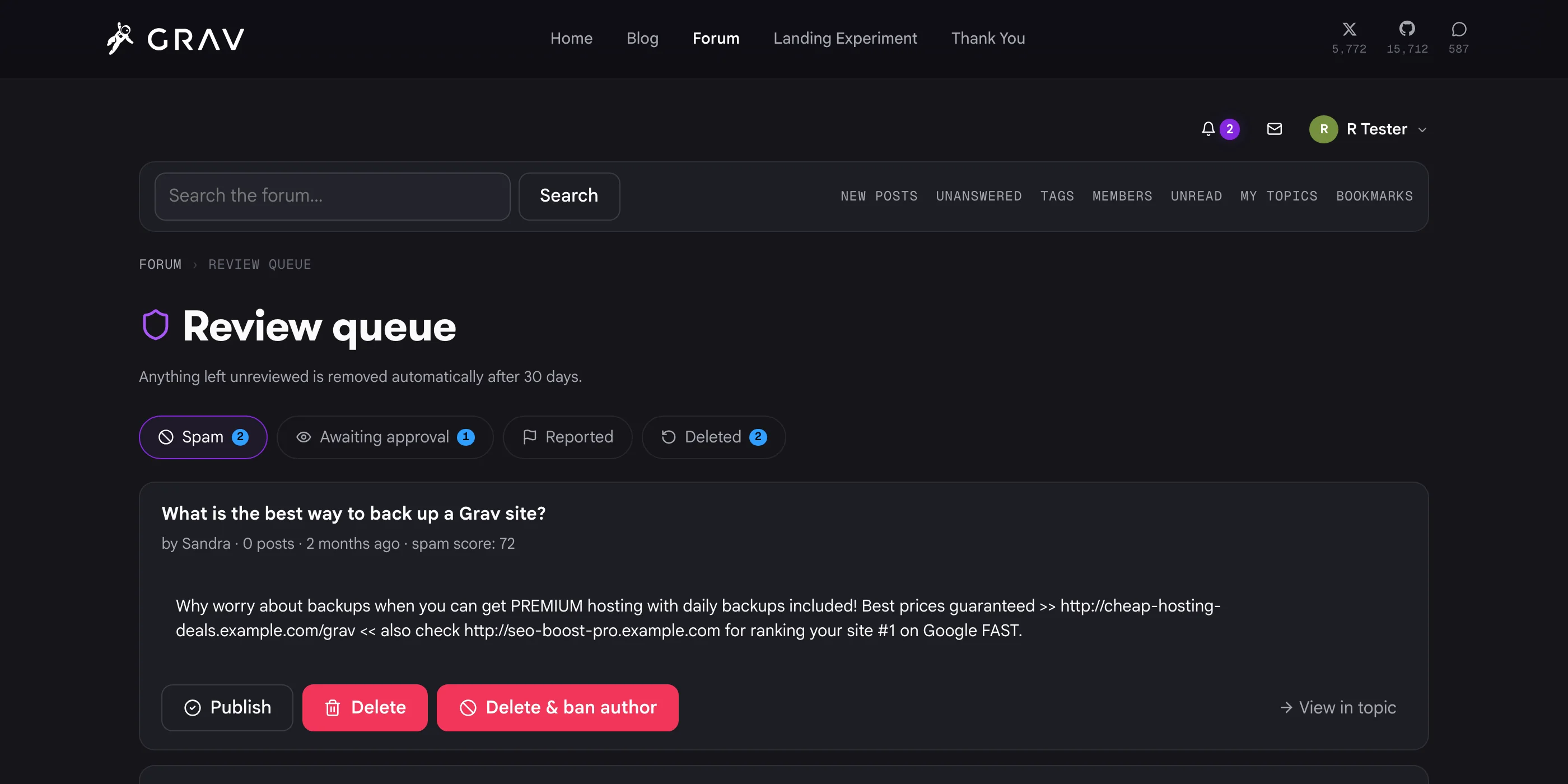
Scoped moderators can be global or limited to specific sections and categories, so you can hand someone the keys to one corner of your forum. Most moderation happens on the forum itself at /forum/queue, with one-click publish, delete, or delete-and-ban, and a step-through review mode that clears the whole queue in place. Your moderators never need to see the Grav admin.
The feature I'd point at first, though, is undo. A Deleted tab lists everything recently removed, who removed it, when and why, with a one-click Restore. A Bans area lists every active ban with a Lift that also brings back the content that ban had hidden. Bans can be global or scoped, temporary or permanent, and you choose what happens to the member's content: keep it, reversibly hide it, anonymize it, or delete it all.
There's also per-category premoderation, member reports with auto-hide on heavily reported posts, a complete audit log of every staff action, legal holds that exempt something from all automated cleanup, and a daily moderator digest email that stays silent on quiet days.

Spam defense in three stages
Unproven newcomers can't turn your board into a link farm. Nothing is deleted automatically, so anything the stages catch lands in the review queue rather than vanishing:
- Heuristics, instant and always on. Honeypot, submit speed, link counts, blocklists, flood limits and new-member weighting score every post.
- An ML classifier, instant and optional. Posts by low-trust members are checked against a quantized DistilRoBERTa model served by a tiny Python and ONNX sidecar. Roughly 200ms, no GPU, and an install script sets it up on any Linux host. The client fails open, so a slow or dead sidecar can never block posting.
- AI review, hourly and optional, via AI Pro. An LLM reviews new members' recent posts with full topic context and queues confident spam, logging its reasoning on every decision.
Provisional-member restrictions keep brand-new accounts on a lighter footing until they've both posted a configurable number of times and been registered a while. Strip their links to plain text, hide website and social fields, mark the profile noindex, block uploads and private messages. Every restriction is its own switch.
There's also an optional invisible captcha, a transparent proof-of-work check on register and login that needs no user interaction at all.
Notifications your members won't mute
An in-app bell with live unread counts, plus live toasts that slide in the moment a reply, mention or private message arrives. Burst coalescing turns twelve replies in a watched topic into one bell entry rather than twelve, which is the difference between a useful notification system and one everybody switches off.
Email mirrors the bell per member preference: immediate (throttled to one email per topic per window), daily or weekly digests, or never, with per-type toggles and one-click unsubscribe signed into every message. Delivery is queued and individually addressed, never BCC blasts, drained by the background worker with retry and backoff.
Everything else under the covers

Content-addressed blob storage for attachments and avatars, local by default or on any S3-compatible store (Cloudflare R2 recommended) with a local read-through cache and render-time CDN switching. Signing is built in, so there's no AWS SDK to install.
If you're the one holding the data, you also get the compliance controls that come with that: member self-deletion (GDPR erasure) confirmed by email double opt-in with a cooling-off window that logging back in cancels, and retention windows that hard-delete soft-deleted and spam content, scrub stored IP addresses, drop closed-report snapshots, read notifications and sent-email payloads. Each is configurable, and each is enforced by the scheduled worker.
And a full CLI for the rest: status, migrate, work, recount, reindex, rerender, integrity, files-sync, avatars-sync, ai-scan and import-discourse.
It's Also a Comments System

Plenty of people reading this don't want a forum. They want comments on their blog without handing their readers to Disqus.
Forum Pro does that too. Any page can carry a comments section whose discussion lives in the forum as a real topic. The first comment opens the thread automatically, seeded with the article excerpt and a link back to the page. Because comments are forum posts, the spam scoring, premoderation, review queue, search, notifications and reputation all apply to them, and the conversation can be continued in the forum by anyone who'd rather read it there.
Turn it on per template or per page, and use the forum_comments(page) Twig call to place it, with forum_comments_count(page) for 12 comments links on your listings.
Your Theme, Not Ours
Forum Pro is theme-agnostic by design. Every color, radius, font and shadow resolves through a token chain: --forum-* site overrides fall back to --grav-* theme tokens, then to --theme-accent, then to accessible neutral defaults.
What that means in practice:
- A theme that publishes
--grav-*tokens gets matching typography, cards, buttons, chips and labels automatically, with no work at all. - A theme that just wants the forum to match its brand publishes a single
--theme-accentand is done. Labels sitting on a filled accent pick black or white text automatically based on how light that accent resolves. - A theme that publishes nothing still gets contrast-checked neutral styles in both light and dark schemes.
Dark mode works without a token set, recognizing data-theme, data-bs-theme and a dark class on html or body. Icons are inline Lucide SVGs that recolor with the surrounding text.
Coming From Discourse
If you're currently paying for hosted Discourse, or maintaining a self-hosted install, there's a real path off it rather than a fresh start.
Point the importer at a standard Discourse admin backup (the .sql.gz kind) and it stream-parses the dump in PHP. No PostgreSQL install required:
bin/plugin forum-pro import-discourse backup.sql.gz --source-url=https://discourse.example.com
Members arrive with working passwords. Discourse's pbkdf2 hashes verify natively and upgrade to bcrypt on each member's first login, so nobody has to reset anything. Categories, topics, posts with uploads, quotes, emoji, revision history, likes as reactions, tags, accepted answers, bookmarks, polls with votes, watched and muted topics, and private messages all come across.
The importer is idempotent, which matters more than anything else on cutover day. Every imported row keeps a reference back to its original Discourse ID, so running it again skips what's already there and only pulls in what's new. Do a full import early, keep testing against real data, then run a final pass right before go-live to sweep up whatever landed in between. An interrupted run just gets started again.
Old Discourse URLs (/t/, /p/, /c/, /u/) 301 redirect to the right place, so years of links in Google and in people's bookmarks keep working. We did exactly this with our own forum, and I've written up how that went if you want the detail.
Requirements
Forum Pro is built for Grav 2.0 and Admin Next, and requires the free API plugin. It is not compatible with Grav 1.7. If you're still on 1.7, start with the migration guide.
Get It
- Forum Pro is $100, one license per site, with unlimited updates.
- The documentation covers installation, configuration, theming tokens, the spam stages and the Discourse import.
- The live demo is our own community, and you're welcome to sign up and take part.
Remember that buying a Grav Premium product directly funds continued development and support of Grav itself. Grav 2.0 exists because people bought these plugins, and the next round of work depends on the same thing.
If you have questions before you buy, the fastest place to ask is Discord at chat.getgrav.org. Once you own it, the Premium Issue Tracker is where bugs and feature requests go.
Enjoy!
Andy