Skip to content
Grav 2.0 is officially stable. Read the announcement →

Community guidelines

Please keep discussions civil and on-topic. Repeated violations may lead to a temporary ban.

Forms & Blueprints

Custom field data not being submitted in Admin

admin blueprints form plugin plugins

Solved by pamtbaau View solution

Started by Karmalakas 1 year ago · 8 replies · 77 views
1 year ago

In my plugin blueprint I have 3 fields - 2 of them are list type (plans and features) and the 3rd one is completely custom (table). When the form is rendered on the admin page, I can clearly see the input name attributes are correct on my custom field and matches the list fields

TXT
data[header][plancompare][plans][0][text]
data[header][plancompare][plans][1][text]
data[header][plancompare][features][0][text]
data[header][plancompare][features][1][text]
data[header][plancompare][table][slug1|slug2][text]
data[header][plancompare][table][slug1|slug3][text]

But when saving, data[header][plancompare][table] branch is never submitted. Or at least in onAdminSave() I get only plans and features, but table doesn't even exist.

Custom field blueprint:
https://github.com/Karmalakas/grav-plugin-plan-compare/blob/init/blueprints/plan-compare.yaml

Custom field HTML:
https://github.com/Karmalakas/grav-plugin-plan-compare/blob/init/templates/forms/fields/plancompare/plancompare.html.twig

Again can't find what's missing 😦
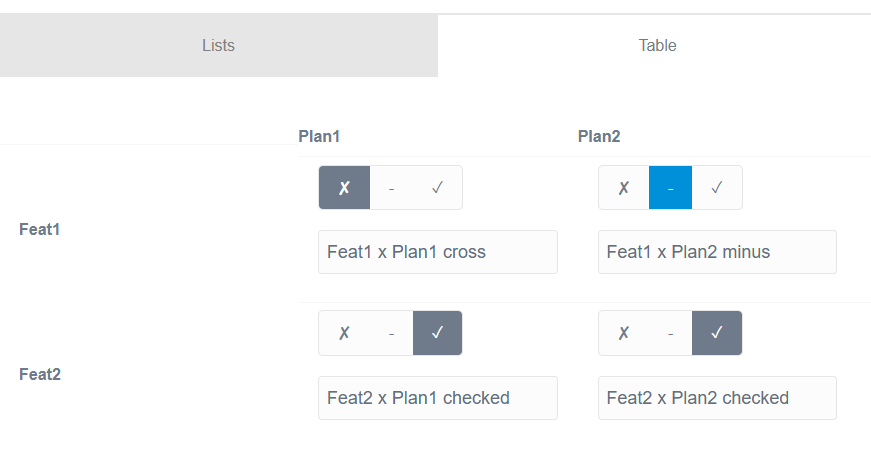
1 year ago

Add the following to your plan-compare.php and see if that works for you. No need to register the callback. See https://learn.getgrav.org/17/forms/blueprints/advanced-features#creating-new-form-field-type

JS
  public function getFormFieldTypes(): array
  {
      return [
          'plancompare' => [
              'input@' => false
          ],
      ];
  }

Input:
{64E22234-4F75-4849-96C4-7DAC46B32AF1}|690x377

Markdown page:

YAML
---
title: 'Plan Compare'
plancompare:
    features:
        -
            label: Feat1
            active: true
            divider: false
            description: 'This is feat1'
        -
            label: Feat2
            active: true
            divider: false
            description: 'This is feat2'
    plans:
        -
            label: Plan1
            active: true
            description: 'This is Plan1'
        -
            label: Plan2
            active: true
            description: 'This is Plan2'
    table:
        feat1|plan1:
            checkmark: '0'
            text: 'Feat1 x Plan1 cross'
        feat1|plan2:
            checkmark: '-1'
            text: 'Feat1 x Plan2 minus'
        feat2|plan1:
            checkmark: '1'
            text: 'Feat2 x Plan1 checked'
        feat2|plan2:
            checkmark: '1'
            text: 'Feat2 x Plan2 checked'
---
last edited 02/26/25 by pamtbaau
1 year ago

That's so misleading IMO

above code makes display and spacer types to be virtual, meaning that they won't exist in real data

My understanding is, if you add this 'input@' => false, data will not be submitted. That's why I didn't even try this. But it actually works the opposite way 😕

Or am I misunderstanging this completely?

1 year ago

In the form plugin, in function getFormFieldTypes(), fields like columns, section, tabs etc. are also marked as 'input@' => false and yet, their children are seen as proper fields...

I interpreted it as "hm, container fields seem to be ignored, but not its containing fields".
The container field becomes "virtual", but not its containing fields.

So why not try if that holds also for plancompare?

1 year ago

I guess that makes sense. I didn't consider my field as a container, but now I see it is. I still think this part of docs could be more clear, but I'm not sure how to properly phrase it

1 year ago

I removed the solution here, because this saves new entries first time only. It doesn't save the edits. When form is submitted, page.header contains old data 😕

1 year ago Solution

Ok, try this...

JS
public function getFormFieldTypes(): array
{
    return [
        'plancompare' => [
            'array' => true,
        ],
    ];
}

Uhh... please don't ask...

1 year ago

This worked. I'm pretty sure I saw somewhere in the docs, that in order to save lists, you need to have

YAML
validate:
  type: array

Or something similar (can't find it any more)... And I tried that, but didn't work

P.S. TBH, I barely can find anything in the docs since they switched to Algolia 😦 I just go page by page and just search in page - much more reliable and faster

1 year ago

I tried type: array, because when I replaced type: plancompare in the blueprint with array or list all worked fine, although the layout was off.

Suggested topics

Topic Participants Replies Views Activity
Forms & Blueprints · by Ton Haarmans, 5 years ago
13 1133 4 months ago
Forms & Blueprints · by Hugo Oliveira, 5 months ago
0 60 5 months ago
Forms & Blueprints · by Flachy Joe, 6 months ago
9 131 6 months ago
Forms & Blueprints · by Augustus, 7 months ago
7 107 7 months ago
Forms & Blueprints · by Julien, 7 months ago
10 125 7 months ago