Skip to content
Grav 2.0 is officially stable. Read the announcement →

Community guidelines

Please keep discussions civil and on-topic. Repeated violations may lead to a temporary ban.

Forms & Blueprints

How to reorder modular page children in Admin using page titles instead of manual array input?

admin blueprints first-time form

Solved by pamtbaau View solution

Started by Tournay 10 months ago · 6 replies · 105 views
10 months ago

Hello,

I am working on a modular page in Grav, and I want the Admin panel to allow reordering of its child modules easily.

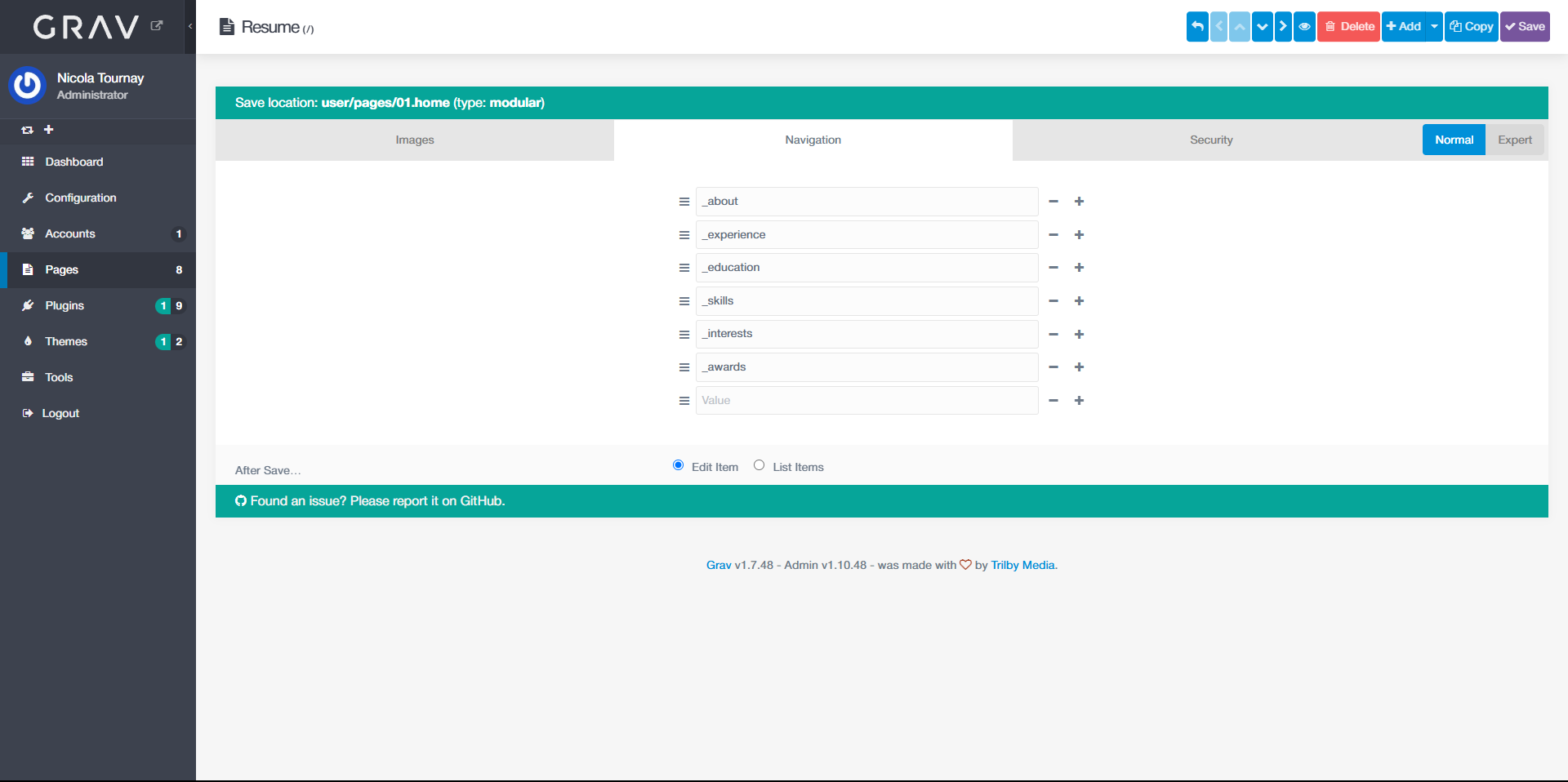
Right now, my workaround is to define an array field in my theme’s blueprint so the editor can manually set header.content.order.custom as a list.

Blueprint (user/themes/mytheme/blueprints/pages/modular.yaml):

YAML
title: Modular

form:
  fields:
    tabs:
      type: tabs
      active: 1

      fields:
        images:
          type: tab
          title: Images

          (...)

        navigation:
          type: tab
          title: Navigation

          fields:
            header.content.order.custom:
                type: array
                value_only: true

Frontmatter (user/pages/01.home/modular.md):

MARKDOWN
---
title: Resume
(..)
content:
    items: '@self.modular'
    order:
        by: default
        dir: asc
        custom:
            - _about
            - _experience
            - _education
            - _skills
            - _interests
            - _awards
---

This works, but it’s not ideal because:

  • If a user adds a new module, they must manually update the array in Admin.

  • They have to type the folder name with the underscore prefix (e.g. _about), which is not user-friendly.
image|690x344

I have tried other approaches:

  • Using type: order with data-options@: '\Grav\Common\Page\Page::children' and route: '@self' → always shows the parent’s children, not the current page’s children.

  • Using type: pages with default: '@self.children' → just shows an empty text field, not a sortable list.

Question:
Is there a way to create a sortable select field that:

  • Lists the titles of the current page’s children (modules)

  • Stores their folder names in header.content.order.custom

  • Allows drag-and-drop reordering in Admin?

Any advice or example would be greatly appreciated.

Thanks in advance!
10 months ago

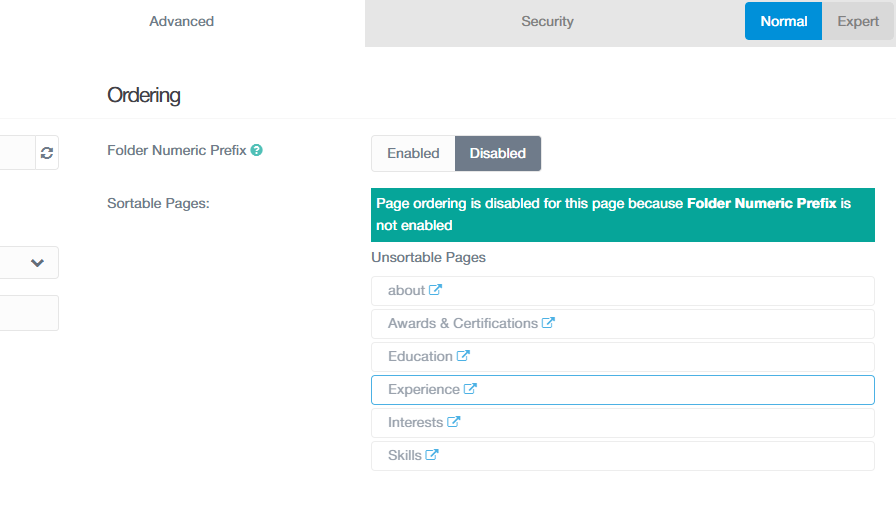
@Nicola, Have you tried opening any child module of the modular page and sort the modules by drag & drop in the "Ordering" section?

10 months ago

Are you referring to this section of the “Advanced” tab?

image|690x404

image896×525 25.7 KB

Even when I “enable” the numeric folder prefix in the admin panel, I still can’t sort the page order.

However, I think you’ve pointed me in the right direction, and I appreciate that. I’m probably trying to reinvent a feature that already exists natively, out of ignorance. I should probably adjust my modular.md frontmatter to enable sorting of the child pages.

10 months ago Solution

@Nicola, Add number prefixes to the page folders, like 01._about/about.md. Admin will then show the field 'Folder Numeric Prefix' as 'Enabled'. When you drag/drop modules in the page list, Grav will adjust the folder prefix.

10 months ago

@Nicola, Have you had a chance to work on it?

10 months ago

Yes. Your solution works if and only if I remove the custom order in the frontmatter of my modular page (for obvious reasons).

YAML
---
title: Resume
favicon: user/pages/images/favicon.ico
profile_picture: user/pages/images/profile.jpg
content:
    items: '@self.modular'
    # This has been removed 👇
    # order:
    #     by: default
    #     dir: asc
    #     custom:
    #         - _about
    #         - _experience
    #         - _education
    #         - _skills
    #         - _interests
    #         - _awards
---

Thank you very much for your help.

10 months ago

@Nicola, Yes, you are right. Sorry, I forgot to mention that.

Suggested topics

Topic Participants Replies Views Activity
Forms & Blueprints · by Ton Haarmans, 5 years ago
13 1133 4 months ago
Forms & Blueprints · by Hugo Oliveira, 5 months ago
0 60 5 months ago
Forms & Blueprints · by Flachy Joe, 6 months ago
9 131 6 months ago
Forms & Blueprints · by Augustus, 7 months ago
7 107 7 months ago
Forms & Blueprints · by Julien, 7 months ago
10 125 7 months ago