Hi,
I'm using the grav form plugin with name, email and message field and I want the submitted email to be saved as a variable. As I'm new to grav I'm not really sure in which file and how to change this. Does anyone have an idea? Many thanks
Hi,
I'm using the grav form plugin with name, email and message field and I want the submitted email to be saved as a variable. As I'm new to grav I'm not really sure in which file and how to change this. Does anyone have an idea? Many thanks
Where would this variable be used? What are you trying to achieve?
I will need this for google ads enhanced conversions setup. When the user input email is saved into a variable it can then dynamically be pushed into the data layer. But for that I first need the variable
Do I understand correctly? You will need email to be pushed to Google and that's it? I think you'll have to create a custom form action
I'm not sure if this is it. Let me give some more info. This is my datalayer.push code:
 dataLayer.push({
    'event':'form_enhanced_conversion',
    'enhanced_conversion_data': {
      "email": 'emailVariableName'
    }
  });
So I need some code in place that saves the email that was submitted in the form and then put that in as a variable in the dataLayer.push.
And then what would actually be pushed would be:
dataLayer.push({
'event':'form_enhanced_conversion',
'enhanced_conversion_data': {
"email": '[email protected]'
}
});
I believe you'd still need a custom action, where you would set email to some variable and then output it to a template (I understand this is JS)
Maybe @pamtbaau could help here with setting a variable and accessing it in template (sorry, I'm very busy at my work to figure this further 🙂)
@sib, Based on the given information, I can only say "It depends" and give some generic suggestions.
"It depends" on information like:
Your help is highly appreciated.
@sib, What template are you using for the thankyou page?
To recap:
<input name="data[email]" value="" type="email"
 class="form-input "
 required="required"
>
More question:
NB.
Yes, the recap is correct. For the thank-you page I'm using the default template from the quark theme. The errors in the console are now not there anymore.
@sib, Ok that means the values of the form are not being shown in the thankyou page.
In that case you'll have to read the form data yourself:
Steps:
Alter the new template into:
{% extends 'partials/base.html.twig' %}

{% block content %}
<script>alert('{{ form.value('email') }}')</script>

{{ page.content|raw }}
{% endblock %}
alert with your Google dataLayer script and use {{ form.value('email') }} to inject the email value into your script.@pamtbaau Thank you very much for your help. I'll try it out 💪
Looks like either I didn't know or I simply forgot we have form available in Twig after the submission 🤔 👍
@Karmalakas, Well I didn't know either, but I figured that if template formdata.html.twig can show the input data in the thankyou page, then any template can...
Following the template, led me to line 11 in plugins/form/templates/forms/default/data.html.twig, which contains:
{%- set value = form.value(scope ~ (field.name ?? index)) -%}
where scope is an empty string when the macro is being called.
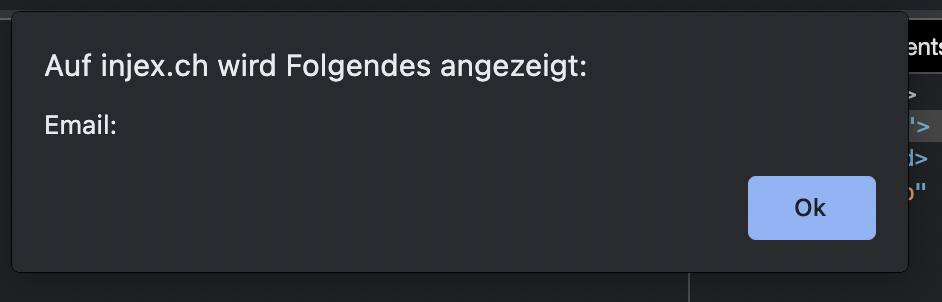
I've implemented everything as you wrote. But unfortunately, the email does not show with the alert --> form.value('email') seems not available on the thankyou page.
Thats the code and attached you can see the alert:
{% extends 'partials/base.html.twig' %}

{% block content %}
  <script>alert('Email:'+'{{ form.value('email') }}')</script>

  {{ page.content|raw }}
{% endblock %}
Any ideas? Thank you for your support
@sib, When I use your latest Twig snippet, it works fine... If you provide a step-by-step description to reproduce your situation, we might find something.
Log in to reply.
| Topic | Participants | Replies | Views | Activity |
|---|---|---|---|---|
| 13 | 1892 | 6 months ago | ||
| 0 | 469 | 7 months ago | ||
| 9 | 565 | 9 months ago | ||
| 7 | 586 | 9 months ago | ||
| 10 | 606 | 9 months ago |