Skip to content
Grav 2.0 is officially stable. Read the announcement →

Community guidelines

Please keep discussions civil and on-topic. Repeated violations may lead to a temporary ban.

General

GRAV + Flex Directory

Started by Giuseppe Lucido 9 years ago · 8 replies · 2271 views
9 years ago

Hello Everyone,

I've just discovered Grav and totally fell in love with it, to be clear I AM NOT A WEB DEVELOPER, i am more of a creative designer, hacker, maker, CG Artist, i like programming/Scripting and making my own stuff just for the sake of knowledge.

My last obsession is to build a simple (modular, scalable) Real estate agency website with GRAV, I know it can be done and should be pretty simple. What I ask for is to follow me with the building of the site and give me an hand understanding, so lets start with the basics and see if I already made some mistake.

What I've done so far was to set up Grav+admin with flex-directory, the idea is to customize FlexDirectory to allow admin to insert properties and display them in a sortable, searchable filterable manner.

does that makes sense?
Any suggestion?

Thanks for you time
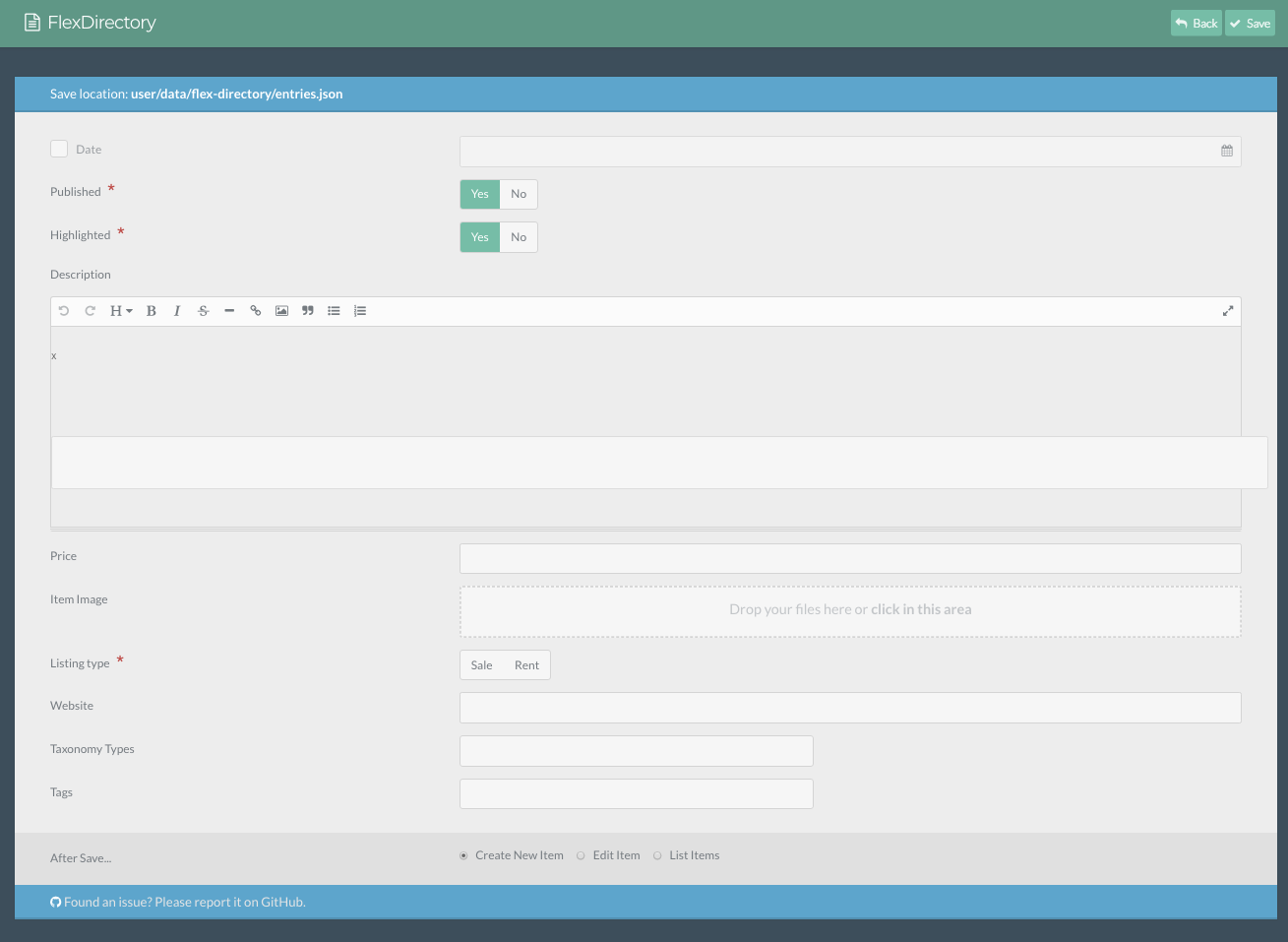
9 years ago

I am editing the blueprint to match the aspect of a property listing27|683x500
I know FlexDirectory gives you already a search field, but how would i go about creating a proper search form with more options like: Search all HOUSE for SALE under 100,000 EUROS etc...

9 years ago

I am stuck:

I have a json database with all the entries from flex, each entry at the moment looks like this:

TXT
"onuuookjnnkwkwcn": {
    "date_published": "17-11-2017 15:32",
    "published": true,
    "highlighted": true,
    "description": "Lorem ipsum dolor sit ametLorem ipsum dolor sit ametLorem ipsum dolor sit ametLorem",
    "price": 1789,
    "listing_type": false,
    "website": "www.miosito.it",
    "comforts": [
        "sss",
        "ffff"
    ],
    "tags": [
        "fff",
        "wqqqq"
    ],
    "item_image": {
        "user\/data\/flex-directory\/files\/r7wqyBXEUnub2xp.png": {
            "name": "r7wqyBXEUnub2xp.png",
            "type": "image\/png",
            "size": 27731,
            "path": "user\/data\/flex-directory\/files\/r7wqyBXEUnub2xp.png"
        }

and a twig with this code:

{% set data = flex_entries.getData().toArray()|sort_by_key('date_entered') %}
<div id="flex-directory">
<div class="text-center">
<input class="form-input search" type="text" placeholder="Search by name, email, etc" />
<button class="button button-primary sort asc" data-sort="description">
Sort by Description
</button>
</div>

TWIG
<ul class="list">
    {% for entry in data if entry.published %}
        <li>
          {{ entry.item_image.0.path }}
        </li>
    {% endfor %}
</ul>

</div>

i am not able to read the path value in json what am I missing?

thanks

9 years ago

I'm not sure about your specific issue, but I wanted to mention that there's a big update to Flex-Directory coming that supports multiple data sets as well as more configurable options. Hopefully this will be available in a couple of weeks.

9 years ago

Thank you, I was loosing hope for any answer at all. Thanks I'll look for the update

9 years ago

Solved with

TWIG
  {% for key in entry.item_image|keys %}
  <img class="card-img-top" src=" {{ url(key) }} " alt="Card image cap">
  {% endfor %}
👍 2
8 years ago

Sorry for getting back to this issue. Flex-Directory is evolving and get's more and more awesome and useful. BUT when it comes to grouped or nested fields in a list field I totally get stucked in how to set up the right loop to output the right data. Like @zaldor I understand how to access data or values from an specific field inside a direct path. In my case I use Grav v1.4.5 with Flex-Directory v2.0.1 (Branch: feature/grav_objects). My setup follows a simple structure. I grouped four fields together. A date-field (days), a select-field (station), checkboxes (zeiten) and a text-field (notizen). The output from json looks like this:

TXT
 "gi3egqlhpjnfmwcz": {
        "published": true,
        "last_name": "Lastname",
        "first_name": "Firstname",
        "header": {
            "einsaetze": [
              0 {
                  {
                    "days": "2018-06-12",
                    "station": "fabelwesenschule",
                    "zeiten": {
                        "zeit1": true,
                        "zeit2": true,
                        "zeit3": true,
                        "zeit4": true,
                        "zeit5": true,
                        "zeit6": false,
                        "zeit7": false,
                        "zeit8": false,
                        "zeit9": false,
                        "zeit10": false,
                        "zeit11": false
                    }
                  }
                },
             1 {
                  {
                    "days": "2018-06-12",
                    "station": "trickbox",
                    "zeiten": {
                        "zeit6": true,
                        "zeit7": true,
                        "zeit8": true,
                        "zeit9": true,
                        "zeit10": true,
                        "zeit11": true,
                        "zeit1": false,
                        "zeit2": false,
                        "zeit3": false,
                        "zeit4": false,
                        "zeit5": false
                    }
                  }
                },
             2 {
                {
                    "days": "2018-06-28",
                    "station": "bauhuette",
                    "zeiten": {
                        "zeit4": true,
                        "zeit5": true,
                        "zeit6": true,
                        "zeit7": true,
                        "zeit8": true,
                        "zeit1": false,
                        "zeit2": false,
                        "zeit3": false,
                        "zeit9": false,
                        "zeit10": false,
                        "zeit11": false
                    }
                  }
                }
            ]

From here I can get access by this if-condition:

TWIG
{% if entry.header.einsaetze.0.zeiten.zeit1 is sameas(true) %}
   <html_element class="checked"></html_element>
{% else %}
   <html_element class="unchecked"></html_element>  
{% endif %}

But I would like to iterate through the numbers which are the reference of how many groups are added. To avoid writing a bunch of twig for an (infinite) custom number of groups like 'einsaetze.0.zeiten' (only one group) or 'einsaetze.4.zeiten' (four groups). Any idea what I do wrong?

I'm sorry for bothering you guys. I'm working hard to understand the logics behind Grav and its assets (even with intensly reading of the lovely documentation). But I'm not that much familiar with programming languages at the moment (except of a basic level in js). So, give me a guess where to hit the Piñata. ;)

last edited 06/15/18 by Christian
8 years ago

Got it! After a night of thinking and reading the documentation again, it was quite simple. In my case all I needed to do was:

TWIG
    {% for entry in entry.header.einsaetze %}
            {%  if entry.zeiten.zeit1 ?? '1' %}
                <i class="checked">09</i>
                    {% else %}
                <i class="unchecked">09</i>
                {% endif %}
             {% endfor %}

Yay! :)

8 years ago

You just saved my bacon with this! No idea what the 'keys' filter does yet but it lets me spit out my flex images!!!

thanks!

Suggested topics

Topic Participants Replies Views Activity
General · by Jerry Hunt, 4 days ago
2 74 6 hours ago
General · by pamtbaau, 11 hours ago
1 47 11 hours ago
General · by Andy Miller, 23 hours ago
0 43 23 hours ago
General · by Marcel, 12 months ago
6 346 5 days ago
General · by Duc , 5 days ago
3 39 5 days ago